
Effective Techniques for Managing Small Screen Elements in Revit Families
BIM Software Tip: How to Handle Small Elements in Revit Families When creating a family in Revit, especially during the ...
BIM Software Tip: How to Handle Small Elements in Revit Families When creating a family in Revit, especially during the ...
BIM Software Tip: Ideas for Revit Stair Corner Detailing Typically, when we draw stairs directly, the automatically gene...
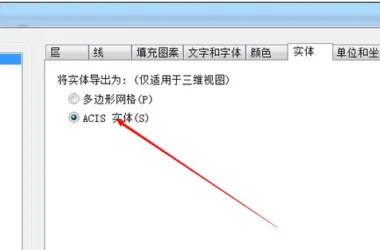
BIM Software Tip: How to Export STL Format Files in Revit Revit does not support direct export to STL files. To achieve ...
BIM Software Tip: How to Manage Shortcuts in Revit Not all shortcut keys in Revit can be customized. The shortcuts liste...
BIM Software Tip: When Should You Restart REVIT? While using REVIT, you might notice that the software slows down, displ...
BIM Software Tip: How Revit Addresses the Issue of Not Being Able to Preview Column Sizes As illustrated above, the inab...
BIM Software Tip: Enhance your scene with stunning environmental reflections using 3D MAX. The two images above demonstr...
BIM Software Tip: Understanding the Priority Order of Revit Filters Today, I want to share a handy trick I recently disc...
BIM softwareTip: How to set rebar material in Revit The completed effect is as follows:; The material settings are shown...
BIM Software Quick Tip: How to Quickly Find Elements in Revit Plan Views Click on the graphic elements in the plan view,...
BIM Software Tip: How to Use DWG Files Efficiently in REVIT When working with REVIT, DWG files are often used to varying...
BIM Software Tip: Understanding Why Revit Room Fill Profiles May Not Display In the floor plan view, room fills appear a...
BIM Software Tip: Understanding Volume Calculation at the Intersection of Revit Walls and Beams It is well known that Re...
BIM Software Tip: How to Boost Efficiency in Revit’s Worksharing Mode Most of us use worksharing mode for collabor...
BIM Software Tip: Structural Engineering Enhancements in Revit 2016 Steel Profile: The structural column and frame eleme...
BIM Software Tip: How Multi-Core Processors Enhance Revit Performance While it’s widely known that multi-core proc...
BIM Software Tip: Understanding Area Coverage in CAD In CAD, area coverage refers to masking or blocking objects behind ...
BIM Software Tip: Expanding the Use of Revit Filters Expanded Applications of Filters 1. Rule-Based Filters These filter...
BIM Software Tip: Revit classifies beams based on their height and width. To categorize beams by their height and width,...
BIM Software Tip: Using Revit Line Processing Tools In this guide, we’ll explain how to use the line processing command,...
 Designing a Secluded Home with a 2.5-Meter Narrow Space and a Captivating Staircase Linking Diverse Lifestyles2025-04-29
 The Wabi Sabi Experience: Designing a Natural Villa Beneath an Inverted Roof in a Poetic Forest2025-04-29
 Layered Light and Shadow: A Slope-Side Vacation Home Inspiring Endless Imagination2025-04-28
 Embracing Tranquil Poetry and Natural Textures in a Dreamy Home Design2025-04-27
 A Villa Nestled in Urban Alleyways: A Timeless Home Filled with Family Love2025-04-26
 A Tranquil Vacation Home Nestled Amidst Lush Surroundings with Hidden Red Gemstones2025-04-25
 A Unique Blend of Concrete and Wood for a Serene Residential Retreat2025-04-24
 Vacation Home Designs Inspired by Natural Wells and Caves, Capturing Time Through Light and Shadow2025-04-24