
Case Study: Implementing BIM for Construction Safety Management at Auburn University, USA
BIM for Construction Safety: A Case Study Case Study: BIM-Based Construction Safety Management at Auburn University, USA...
BIM for Construction Safety: A Case Study Case Study: BIM-Based Construction Safety Management at Auburn University, USA...
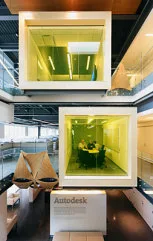
I. Overview The Autodesk AEC Headquarters was recognized as a flagship BIM application by the American Institute of Arch...
BIM Software Tip: Key Points to Consider in Navisworks Construction Simulation When creating a construction simulation a...
BIM Software Tip: Revit View Optimization Navigation Settings Revit 2014 introduces many practical new features, which I...
BIM Software Tip: Sharing Custom Shortcut Keys for REVIT Interior Design Here are the customized shortcut keys I use for...
BIM Software Tip: Using the Material Used for Model Behavior in Revit Here’s a simple example illustrating how materials...
BIM Software Tip: How to Draw Ducts Along Walls Using REVIT Today, I accidentally discovered a useful REVIT tip for draw...
BIM Software Tip: Fixed-Angle Axonometric Sectioning in REVIT In REVIT, you can open the cutting box and adjust an axono...
BIM Software Tip: How to Display Hidden Lines in Revit Structural Concrete Components Revit allows you to control the ap...
BIM Software Tip: Using Key Prompts in Revit to Boost Efficiency In Revit, besides the customizable shortcut keys for qu...
BIM Software Tip: Automatically Generate Structural Columns in Revit After creating a building model and placing multipl...
BIM Software Tip: How to Achieve the Perfect Fusion Effect in a REVIT Family Most users start by using the fusion comman...
BIM Software Tip: In Revit, use the Wall Connection Display command to manage how wall connections are cleaned up. The d...
BIM Software Tip: The Advantages of Adding a Transparent Insulation Layer in Revit Did you notice the air duct in the im...
BIM Software Tip: Non-Cutting Families in Revit The following families are non-cutting and always display as projections...
BIM Software Tip: How to Cut Openings in Structural Beams, Supports, or Columns Using REVIT Navigate to the Commonly Use...
BIM Software Tip: How to Synchronize Navisworks with Revit 1. To synchronize Revit and Navisworks models, start by openi...
BIM Software Tip: REVIT Wall Tile Method Let’s start by introducing the method for creating wall tiles. Within the...
BIM Software Tip: Navisworks Collision Report Shows the Axis Number of the Issue The exported collision report can inclu...
BIM Software Tip: Important Considerations When Copying and Pasting Revit Rooms When copying and pasting rooms from one ...
 Designing a Secluded Home with a 2.5-Meter Narrow Space and a Captivating Staircase Linking Diverse Lifestyles2025-04-29
 The Wabi Sabi Experience: Designing a Natural Villa Beneath an Inverted Roof in a Poetic Forest2025-04-29
 Layered Light and Shadow: A Slope-Side Vacation Home Inspiring Endless Imagination2025-04-28
 Embracing Tranquil Poetry and Natural Textures in a Dreamy Home Design2025-04-27
 A Villa Nestled in Urban Alleyways: A Timeless Home Filled with Family Love2025-04-26
 A Tranquil Vacation Home Nestled Amidst Lush Surroundings with Hidden Red Gemstones2025-04-25
 A Unique Blend of Concrete and Wood for a Serene Residential Retreat2025-04-24
 Vacation Home Designs Inspired by Natural Wells and Caves, Capturing Time Through Light and Shadow2025-04-24