








Latest Posts Page 767
Mastering the Advanced Quick Access Toolbar in Revit
Revit Advanced Quick Access Toolbar The Quick Access Toolbar comes with a set of default tools, but you can customize it...

Managing Revit Central Files: Creation, Access, Transfer, and Repair
Creating, Accessing, Transferring, and Repairing Revit Central Files When working with Revit to develop project models, ...
How to Measure Duct and Pipe Bottom Heights in Revit Section Views
How to Measure the Bottom Height of Ducts and Pipes in Revit Section Views When adjusting pipe harnesses in Revit, worki...
How to Insert Placeholder Text in Revit
How to Place Model Text in Revit If you need to add the project name during your work, the Model Text tool is the way to...

How to Exclude Unwanted Models in Revit Projects
How to Filter Out Unwanted Models in Revit Projects When working on a Revit project, it’s common to have multiple ...
Creating Frames in Revit 2D Drawings
Revit 2D Drawing – Frame Creation When working with BIM, the model primarily represents basic data displayed in a 3D spa...
Converting CAD Frames to Revit Frames: A Step-by-Step Guide
How to Convert CAD Frames to Revit Frames in Revit When working in Revit, it’s often necessary to use project-spec...
How to Insert Special Symbols in Revit
How to Input Special Symbols in Revit There are three methods to enter special symbols in Revit: ① Use the Alt key combi...
How to Configure Multiple View Ranges Within a Single View in Revit
How to Set Multiple View Ranges in a Single View in Revit In Revit, a single view typically uses one view range. However...
A Step-by-Step Guide to Using Viewports in CAD Layouts
How to Use CAD Layout Viewports When creating layout diagrams, floating viewports act as graphic objects within paper sp...
How to Create Column Reinforcement Models in Revit: A Step-by-Step Guide
Techniques for Creating Column Reinforcement Models in Revit Start by creating a detailed drawing in Section 1. Next, pr...
Creating Custom Line Styles in Revit: A Step-by-Step Guide
How to Create Line Styles in Revit When working in Revit, it’s often necessary to adjust the thickness and color o...
2018 Tianjin International Prefabricated Building and Modular Housing Expo
2018 Tianjin International Prefabricated Building and Integrated Housing Exhibition Time: November 16-18, 2018 Location:...
How to Quickly Rotate Plan Views in Revit
Quickly Rotate Plan Views in Revit Revit Modeling When viewing a model in plan view, the entire model may appear rotated...
Adaptive Sunshade Design Using Revit Software
Adaptive Creation of Sunshade Using Revit Start by creating an adaptive generic model family. Then, establish a referenc...
How to Arrange and Manage Bolt Quantities in Revit Families
How to Array Bolts and Control Their Quantity in a Revit Family 1. Select the bolt and click on the Array tool. 2. Click...
Understanding the Role of Dimension Locking in Revit Family Type Parameters
The Role of Revit Family Type Properties in Locking Dimensions (Parameters) This topic covers a broad range of concepts,...
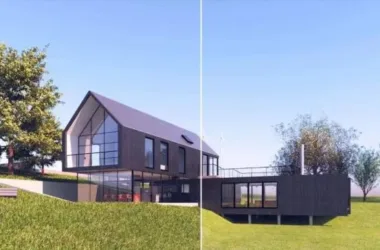
VRay for Revit 3.6 Official Release: 32/64 Bit Chinese Version with Installation Guide for Revit 2017-2019 High-Quality Rendering Plugin
VRay for Revit is a powerful rendering plugin designed specifically for Revit. The latest version introduces a simplifie...
How to Adjust Rectangular Railing Parameters in Revit
How to Modify Railings and Handrails in Revit: Rectangular Railing Parameters In the Revit software template, the rectan...
How to Design Exterior Column Finishes in Revit
How to Create Exterior Finishes for Columns in Revit Step 1: Navigate to Metric Structural Columns and create a new stru...