
Two Ways to Control MEP Hidden Lines in Revit and How They Differ
BIM Software Tip: Two Methods and Their Differences for Controlling MEP Hidden Lines in Revit There are two distinct met...
BIM Software Tip: Two Methods and Their Differences for Controlling MEP Hidden Lines in Revit There are two distinct met...
BIM Software Tip: Revit Slope Analysis There are three common methods to create ramps in Revit: 1. Using the floor slab ...
BIM Software Tip: Minimum Values for Revit Parameters While learning Dynamo, you may encounter issues when debugging par...
BIM Software Tip: Using Arc Parameter-Driven Details in Revit Family Customization During the process of customizing fam...
BIM Software Tip: What Information Should Revit Mechanical and Electrical Templates Include? When working on mechanical ...
BIM Software Tip: Is your Revit view appearing abnormal or unusually dark? When you open the sunlight path, a dialog box...
BIM Software Tip: How to Add Pipe Sizes in Revit MEP In the Revit MEP template, some pipe dimensions are predefined. But...
BIM Software Tip: How to Link Gaps Between Revit Beams and Columns Let’s begin by comparing two groups of beams an...
BIM Software Tip: Add All Rooms with One Click in Revit 2016 Tired of adding rooms one by one? Revit 2016 makes this pro...
BIM Software Tip: Guidelines for Defining Revit Shortcut Keys When customizing shortcut keys in Revit, it’s important to...
BIM Software Tip: How to Handle Small Elements in Revit Families When creating a family in Revit, especially during the ...
BIM Software Tip: Ideas for Revit Stair Corner Detailing Typically, when we draw stairs directly, the automatically gene...
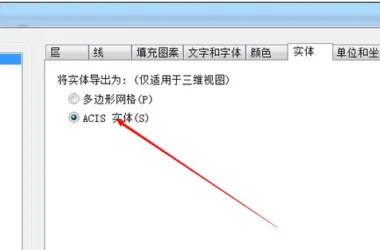
BIM Software Tip: How to Export STL Format Files in Revit Revit does not support direct export to STL files. To achieve ...
BIM Software Tip: How to Manage Shortcuts in Revit Not all shortcut keys in Revit can be customized. The shortcuts liste...
BIM Software Tip: When Should You Restart REVIT? While using REVIT, you might notice that the software slows down, displ...
BIM Software Tip: How Revit Addresses the Issue of Not Being Able to Preview Column Sizes As illustrated above, the inab...
BIM Software Tip: Enhance your scene with stunning environmental reflections using 3D MAX. The two images above demonstr...
BIM Software Tip: Understanding the Priority Order of Revit Filters Today, I want to share a handy trick I recently disc...
BIM softwareTip: How to set rebar material in Revit The completed effect is as follows:; The material settings are shown...
BIM Software Quick Tip: How to Quickly Find Elements in Revit Plan Views Click on the graphic elements in the plan view,...
 Designing a Secluded Home with a 2.5-Meter Narrow Space and a Captivating Staircase Linking Diverse Lifestyles2025-04-29
 The Wabi Sabi Experience: Designing a Natural Villa Beneath an Inverted Roof in a Poetic Forest2025-04-29
 Layered Light and Shadow: A Slope-Side Vacation Home Inspiring Endless Imagination2025-04-28
 Embracing Tranquil Poetry and Natural Textures in a Dreamy Home Design2025-04-27
 A Villa Nestled in Urban Alleyways: A Timeless Home Filled with Family Love2025-04-26
 A Tranquil Vacation Home Nestled Amidst Lush Surroundings with Hidden Red Gemstones2025-04-25
 A Unique Blend of Concrete and Wood for a Serene Residential Retreat2025-04-24
 Vacation Home Designs Inspired by Natural Wells and Caves, Capturing Time Through Light and Shadow2025-04-24