








Latest Posts Page 740
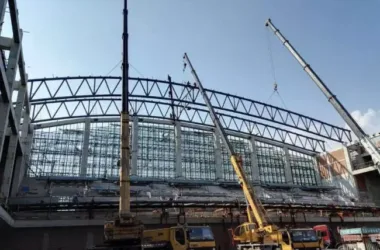
Ensuring Precision and Safety in Prefabricated Steel Truss Construction Analysis
Constructing steel trusses demands high precision, especially since the work often takes place at significant heights, i...

Troubleshooting and Fixing Steel Bar Symbol Printing Issues in Revit
How to Fix Revit’s Inability to Print Steel Bar Symbols When working on drawings in Revit, annotating steel bars i...
Effective Methods for Creating Holes in Columns, Beams, and Structural Components in Revit
Techniques for Creating Holes in Columns, Beams, and Other Components in Revit During the Revit modeling process, it is ...
How to Showcase a Floor Model in 3D Using Revit
How to Display a Floor Model in 3D View with Revit When working in a 3D view, Revit typically displays the entire model ...

Why Doesn't Revit Automatically Align System Families When Loading Them into a Project?
Why Can’t Revit Align the Family Properly When Loading System Families into a Project? When placing furniture in a...
How to Resolve Circle and Polygon Overlaps in Revit
How to Resolve the Fusion of Circles and Polygons in Revit When polygons and circles are combined in Revit, the result o...
How to Fix Reinstallation Errors When Launching AutoCAD
Error Prompt for Reinstallation When Starting AutoCAD If AutoCAD closes immediately after launching, you might see an er...
Effective Solutions for Importing CAD Files into Revit
How to Resolve Issues When Importing CAD Files into Revit During a project, you might encounter prompts when importing C...
Overview of Methods for Querying CAD Areas
Summary of CAD Area Query Methods Recently, there have been inquiries regarding methods to query area in CAD, so I’d lik...
How to Customize the Front View in Revit
Customizing the Revit Front View Step 1: Navigate to the default front view, labeled as B in the image below. Step 2: a....
How to Use the Element Hiding Feature in Revit
Using the Revit Element Hiding Function Step 1: Begin by drawing four walls, labeled A, B, C, and D. Step 2: To hide the...
How to Assign Different Colors to Various Pipe Types in Revit
How to Display Different Colors for Various Pipe Types in Revit During project modeling, assigning different colors to v...
How to Batch Adjust View Scale in Revit
How to Batch Modify View Scale in Revit When working on a project, you may need to adjust the scale of multiple views. S...
Creating Composite Floor Slabs in Revit: A Step-by-Step Guide
How to Create Composite Floor Slabs in Revit In most cases, creating profiled floors with detailed 3D features in Revit ...
How to Change the Background Color in Navisworks
How to Set Background Color in Navisworks Navisworks is widely recognized as a powerful 3D model integration software in...
Warehouse Manager for Prefabricated Components
The Prefabricated Building Collaborative Management Platform offers a comprehensive solution for managing the entire lif...
How to Use Custom Fonts for Detail Tables in Revit
Implementing Custom Detail Table Fonts in Revit In the Details Table Properties dialog box, under the Appearance section...
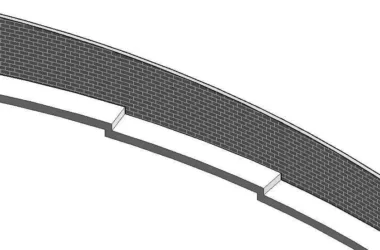
A Step-by-Step Guide to Editing Surface Wall Profiles in Revit
How to Edit Revit Surface Wall Profiles The image above shows the final result, featuring a smooth upper edge. Below it,...
Essential Tips and Precautions for Successful Prefabricated Waterproofing Installation
Leakage is a common quality issue in construction engineering. It often impacts the overall construction quality and the...

Prefabricated Construction: Essential Technical Insights You Can’t Miss
Introduction Construction technology disclosure plays a crucial role and is ultimately incorporated into the projectR...