
The complexity of a surface often directly impacts the design difficulty, construction challenges, and overall cost. In the early planning stages, it can be tedious and challenging to accurately determine whether the surface shape meets economic and functional requirements. Using software to simulate the form offers valuable insight into design risks and helps optimize the plan effectively.
In practical applications, many additional details and minor issues may arise. Below is a rough exploration of designing a curved curtain wall within a project:
1. First, start by creating the volume.
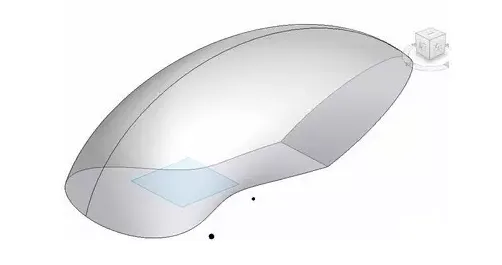
Surface volume model
2. Within the surface volume, divide the mesh according to your specific needs. Then use adaptive families to report parameters that express panel deformation through color coding: green indicates minimal deformation, while red signals greater deformation. A deformation degree of 0 represents a perfect panel. This approach allows for quick, intuitive evaluation of surface design schemes. Refer to Figures 2 and 3 below.
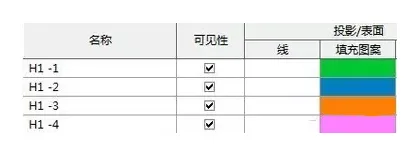
Figure 2
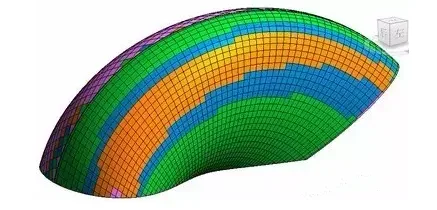
Figure 3
3. Extract detailed data tables to analyze specific panel metrics. This includes edge length, angles, deformation degree, and panel area, which can be compiled into detailed reports for precise design evaluation. See Figure 4 for an example.
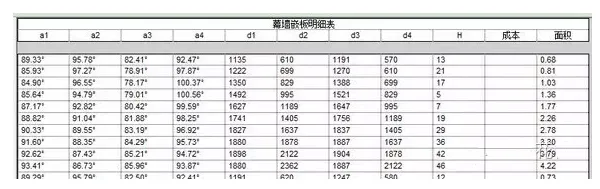
Figure 4
4. Once the plan adjustments are nearly complete, assign a unique tag to each panel. This facilitates easy searching, communication, and precise positioning. See Figure 5 below.
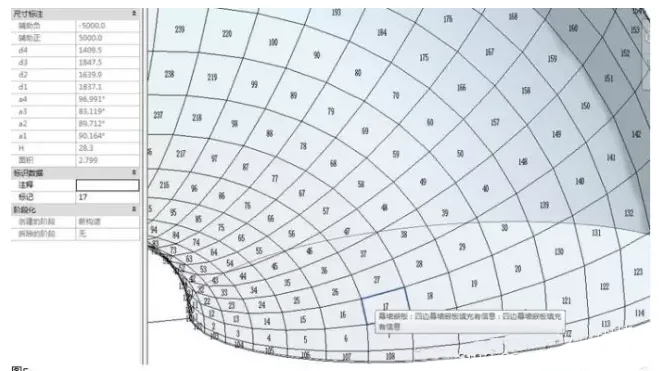
Figure 5
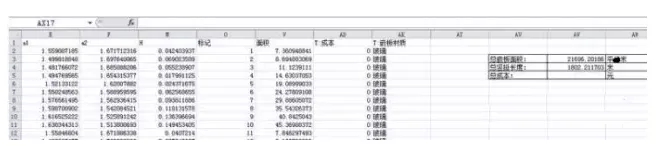
5. Finally, export the panel data to Excel for convenient statistics such as area, length, cost, and more. This aids in comprehensive project management and decision-making. See Figure 6 for reference.













Must log in before commenting!
Sign Up