
To create a sloping ceiling, you can use one of the following methods:
1. Draw slope arrows while drawing or editing ceiling boundaries.
2. For parallel ceilings, draw lines and specify the Deviation from the reference point as an attribute value.
3. For a single ceiling, specify a line, define the Slope, and set the corresponding Slope attribute value.
Cathedral Ceiling
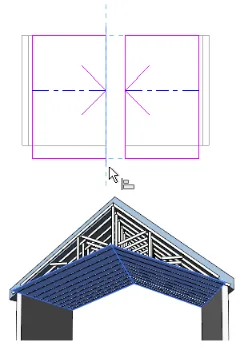
In Revit, ceiling elements can only tilt in one direction. To create a cathedral ceiling, you need to create multiple ceilings, each with its own slope. Then, align and lock these ceilings together to form the cathedral ceiling effect.
Note: To provide a clear illustration, two separate ceiling elements are shown simultaneously in the image below.

xuebim
Follow the latest BIM developments in the architecture industry, explore innovative building technologies, and discover cutting-edge industry insights.
← Scan with WeChat












Must log in before commenting!
Sign Up