
Abstract: This article presents Jianyi Group’s innovative exploration and practical application of BIM 5D using the iTWO system during the construction phase of real projects. It also summarizes the comprehensive experience gained throughout the process and various functionalities.
丨 Authors: Liu Liming, Li Hongfen, Zhang Hongnan, Xing Yu
Jianyi Group has consistently pushed the boundaries in applying BIM technology. In the first half of this year, the group made three focused advancements in BIM, marking the first time its project lifecycle management concept was supported and implemented on practical system platforms. This involved leveraging Bentley’s PW platform during design management, adopting the German-based RIB iTWO system for construction, and utilizing the ARCHIBUS platform for post-construction operations and maintenance.
The PW platform has been in use for over a year, accompanied by comprehensive application documents, guidelines, and operating procedures developed from practical experience. The iTWO system was officially launched in June this year, following extensive evaluations of similar platforms both domestically and internationally. Our interaction with RIB convinced us that iTWO fits our needs perfectly.
From my perspective, the key strengths of the iTWO system include:
- Genuine multi-use of a single model and information set, completely transforming the previous challenge where design models were not applicable during construction.
- An integrated BIM tuning feature that is both practical and cost-effective. Standard model-based operations such as browsing, slicing, roaming, and perspective viewing, typically found in standalone software, are embedded within this platform.
- Seamless and non-destructive import of design model data into the platform for calculations, pricing, and progress linkage. The inclusion of calculation rules based on domestic inventory quotas is a significant localization effort, though still a work in progress.
- A robust built-in database encompassing cost quotas, material prices, and group price data. This covers commonly used cost-related libraries within enterprises. Enterprises with mature cost control systems can import their proprietary quotas and pricing data directly, providing strong backend support for project cost management.
- Having originated in Germany with a focus on cost estimation, the system’s core functions revolve around cost control. It offers dynamic cost management, powerful internal data reconciliation, and comprehensive reporting capabilities.
- An excellent overall system architecture, characteristic of international software. Unlike many BIM solutions requiring multiple third-party tools, iTWO integrates diverse functions essential for construction project management, such as subcontracting, bidding response, and evaluation modules.
To validate the system’s modules, we selected a building from our development and construction projects and conducted a full-scale, end-to-end application within iTWO. This included importing the design model, performing quantity calculations, pricing, progress correlation, and generating overall control reports. The data and results were retained in the system, reflecting the project’s actual status. Our phased application of iTWO yielded positive outcomes.
Below is an overview of our application process, which also serves as an introduction to the iTWO system:
1. Model Creation and Import Validation
The key task here is the conversion from 3D modeling software to the iTWO platform, enabling calculations from early design stages through to later phases. This requires building the model according to domestic quantity surveying and pricing standards, exporting a CPI file via the iTWO plugin, and importing it into iTWO for model checking and corrections. Once the model meets requirements, quantity calculations, pricing, and progress linkage can proceed.
Currently, beyond Revit, Bentley, Tekla, and ArchiCAD also support CPI file export for subsequent iTWO processing. The main workflow is illustrated below:
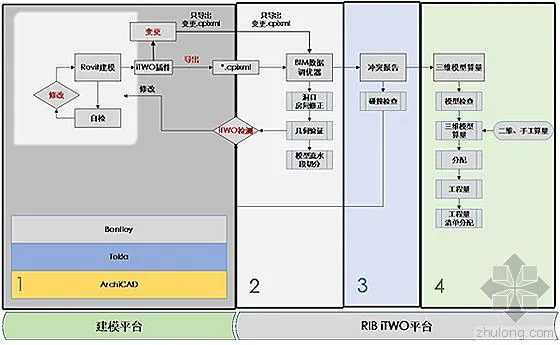
Figure 1-1
2. Quantity-Based Pricing Using Design Models
(1) Basic Functions:
- The design model must strictly follow modeling standards and undergo preliminary testing in iTWO.
- Quantity lists can originate from the owner’s bill of quantities used for bidding or be compiled within iTWO using project templates or traditional enterprise methods.
- 3D model quantities are calculated by associating the model with the owner’s bill of quantities.
- Pricing can be conducted during bidding based on local or enterprise quotas; during construction, project cost lists can be generated based on enterprise consumption quotas, with change orders prepared according to contract terms.
- Bidding management involves decomposing cost lists into subcontracting tasks for bidding, evaluation, and award processes.
(2) Business Workflow and Module Interfaces:
1. Business workflow diagram:
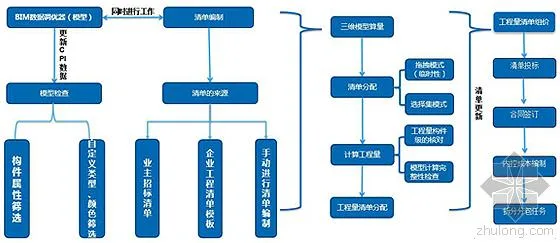
2. Calculation module interfaces:
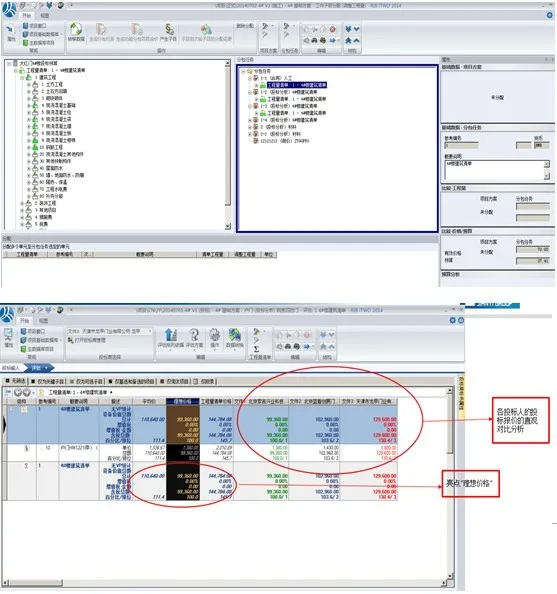
(1) Model check:
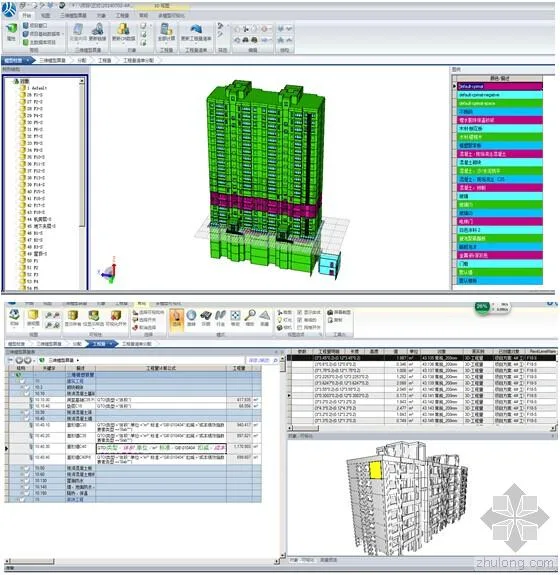
(2) Engineering quantity correlation and calculation
(3) List group price:
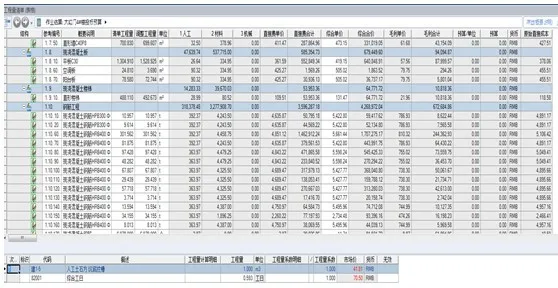
(4) Tendering, bidding response, evaluation, and awarding:
3. Model-Based Project Management
(1) Basic Functions:
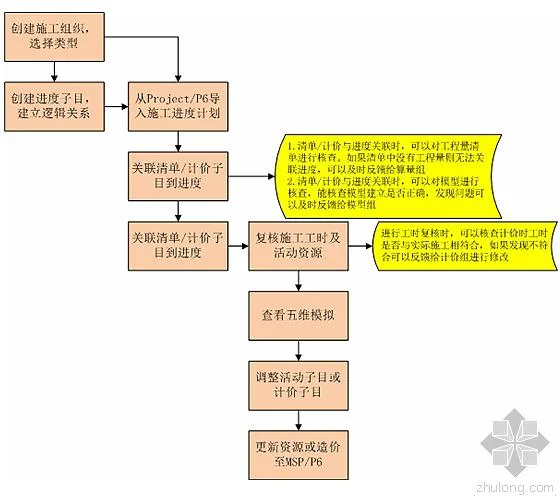
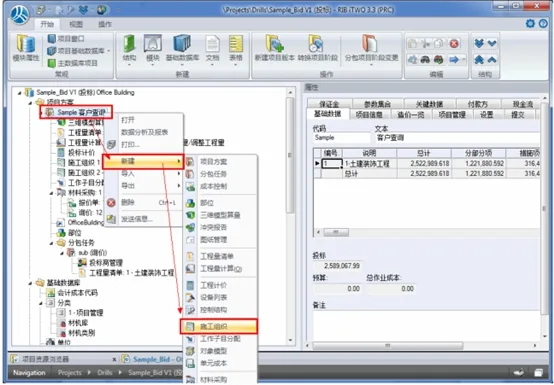
1. Construction Organization
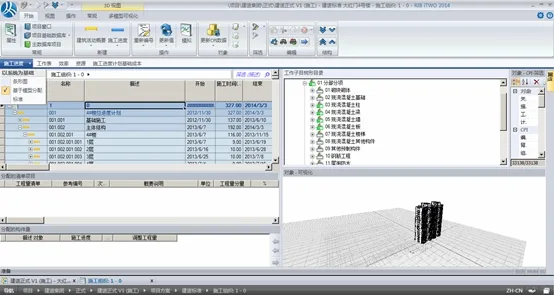
Within this module, users can create flexible mappings—one-to-many, many-to-one, or many-to-many—between pricing sub-items or bill of quantities sub-items and construction activity sub-items. Schedule mappings can also be customized according to pricing needs.
Costs and revenues connect through these mappings to the construction organization module. Pricing cost codes and materials can be designated as resources for management, enabling control over key materials and costs.
Users can input construction schedules in two ways:
- Design custom schedules and Gantt charts directly within the module.
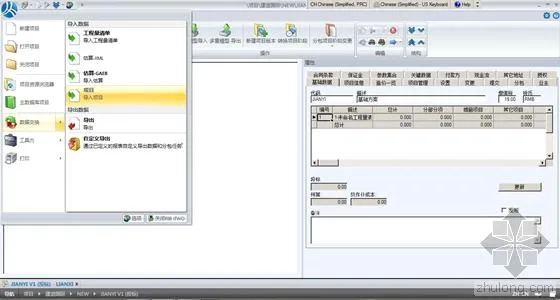
- Import progress plans from Primavera P6, Microsoft Project, or similar tools, with synchronized resource and price data.
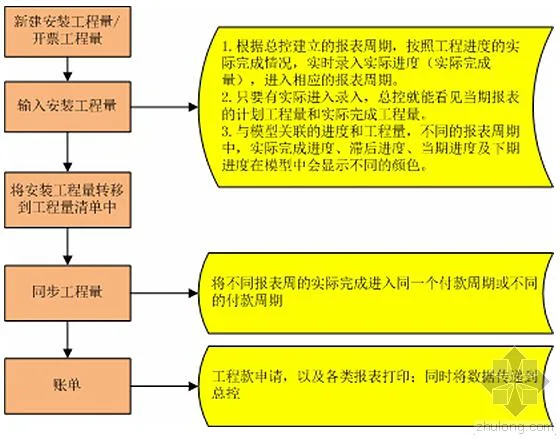
2. Installation Quantity / Invoicing Quantity
This refers to the construction output value completed according to the actual progress plan. The construction site inputs the actual completed output and installation quantities based on real progress, which are used primarily for project fund applications and payments.
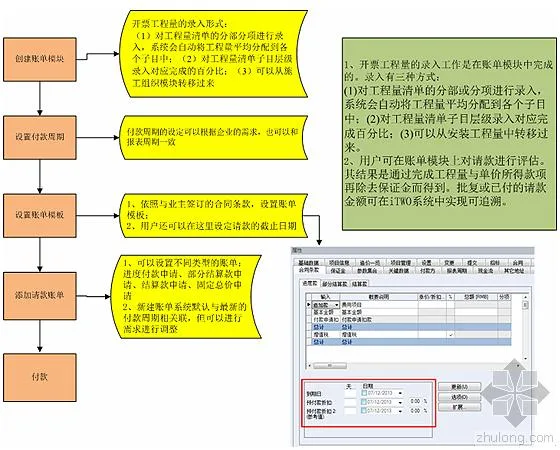
3. Billing
During construction, users can evaluate project status using two quantities: installation quantity for internal assessment, and invoicing quantity for requesting payments from owners. To save time, installation quantity can also be imported directly as invoicing quantity.
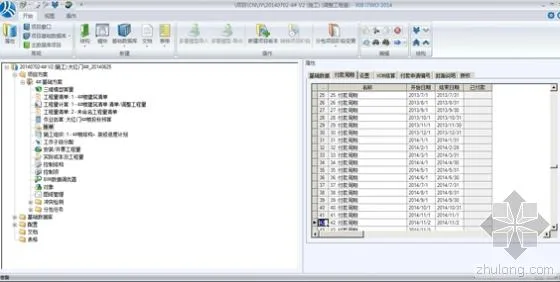
Payment requests in iTWO can follow schedules or cover total amounts, allowing packaging of progress payments and milestone payments together—for example, general contractors may request milestone payments alongside progress payments.
(2) Business Workflow and Module Interfaces:
1. Construction organization:
2. Installation quantity, invoicing quantity, and billing:
3. Bill:
4. Software Operation Screenshots
(1) Construction organization creation:
(2) Importing construction schedule plans:
(3) Progress and checklist association:
(4) Installation quantity / invoicing quantity:
Setting payment cycles and progress payment schedules:
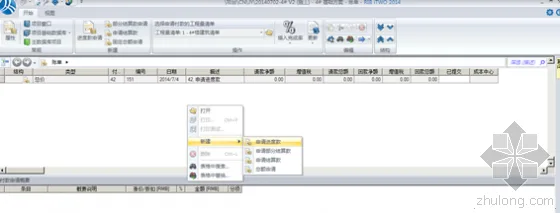
(5) Bill creation:
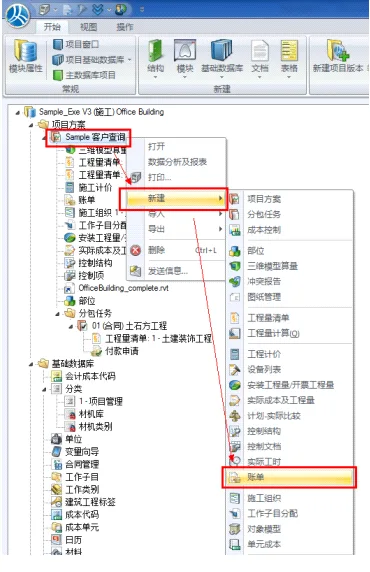
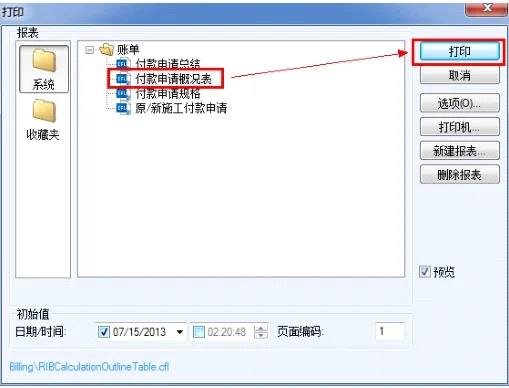
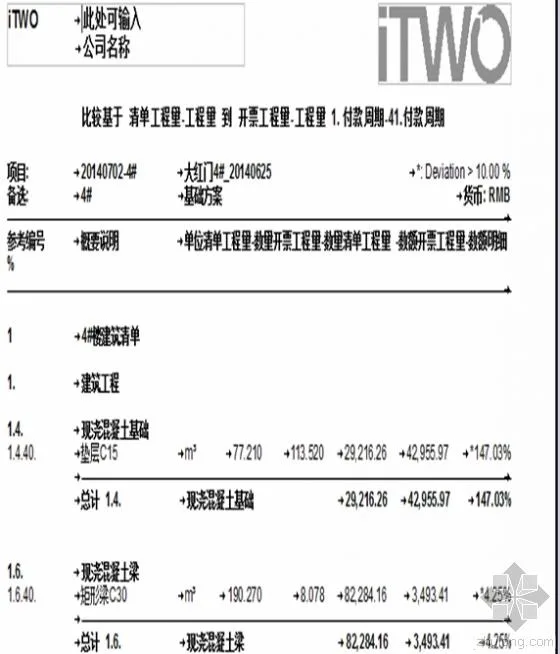
Billing settings:
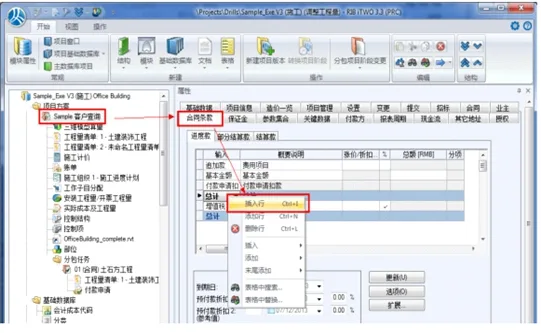
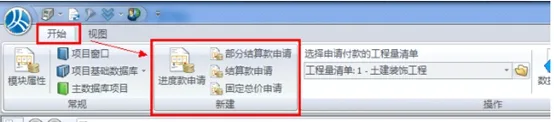
Generating invoicing quantities and bills:
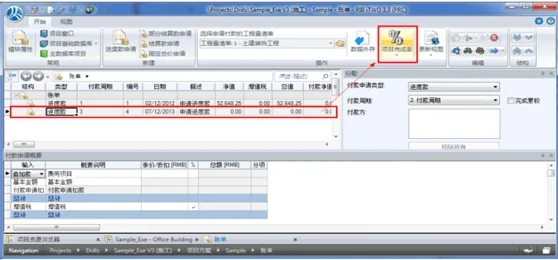
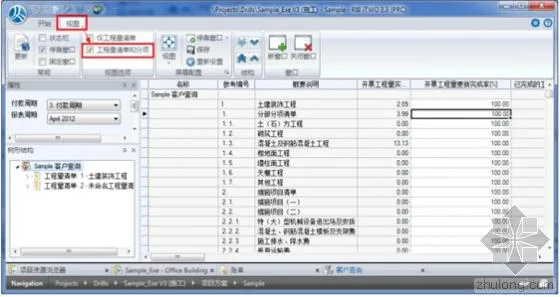
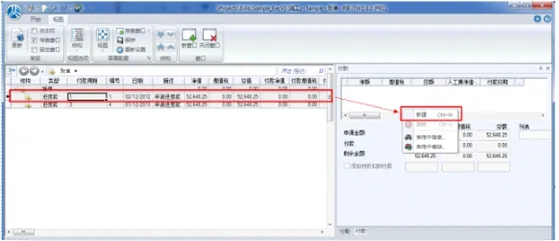
Payment processing:
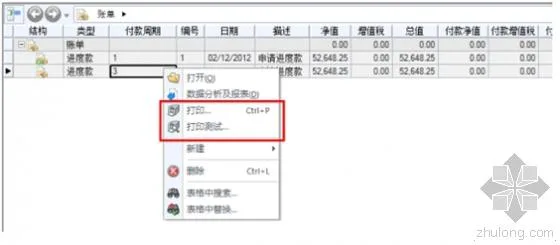
Information copying:

4. Comprehensive Control Management Based on 5D Project Information Model
(1) Basic Functions:
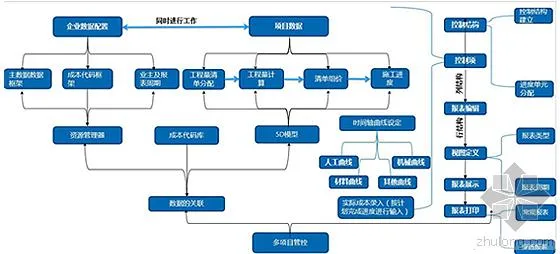
- Control Structure: Upon completion of each group, prepare the framework structure, combining it with the group’s management model and objectives to establish control structure information.
- Progress Matching: After control structure setup, select the schedule plan (linking completed quantities) and combine it with the control structure for management purposes.
- System Configuration, Database Creation, and Report Preparation: Configure the system to integrate data and set up backend report templates for company-wide review.
- Actual Cost Input: Match actual labor, material, and machinery costs to corresponding construction tasks over time. The precision depends on each company’s management needs.
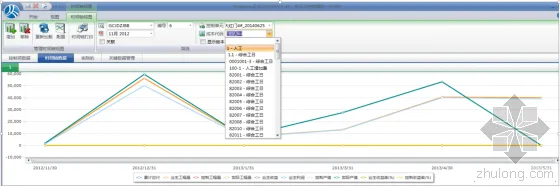
- Timeline Analysis: Select desired control cycles and types to display progress in linear charts.
- Multi-Project Management and Printing: Conduct economic analysis and comparative management across multiple projects, with graded penetration printing and various report output options.
(2) Business Workflow and Module Interfaces:
1. Business workflow diagram:
2. Timeline display:
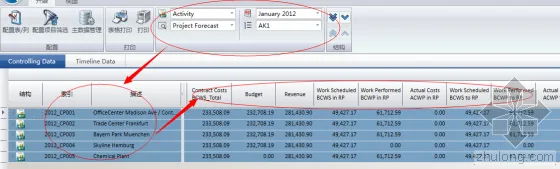
3. Multi-project control:
The iTWO system is undeniably powerful. However, due to space constraints, this overview is limited. Despite years of localization efforts, as a German software, it still requires enhancements to better fit China’s project management realities. For instance, it currently cannot calculate steel bar quantities, and its internal workflow functions are relatively weak. Both modeling software and system platforms face similar challenges. On the BIM journey, there is no perfect solution—only continuous improvement. We sincerely hope that iTWO will integrate with domestic computing platforms to address its volume calculation limitations, leverage its data integration strengths, and truly elevate BIM 5D to new heights!
















Must log in before commenting!
Sign Up