
Abstract The Green Building Research Complex of China Aviation Planning and Construction Development Co., Ltd. is a BIM-driven project utilizing full-process collaborative design. It explores the BIM workflow while fulfilling construction drawing requirements and seeks to broaden BIM’s depth and scope of application.
1. Project Background
Project Name: AVIC Planning and Construction Research Complex Building
Design Unit: China Aviation Planning, Construction and Development Co., Ltd.
China Aviation Industry Planning and Construction Development Co., Ltd. (referred to as “AVIC Planning and Construction”) is a leading national comprehensive survey and design firm. Its services span aviation, aerospace, air force, navy, civil aviation, and civil construction industries. The company offers full-value chain services including planning, design, surveying, construction, and operation, along with engineering cost consulting, environmental impact assessments, bidding agency services, and engineering supervision.
Related Software Applications:
- Autodesk Revit Architecture
- Autodesk Revit Structure
- Autodesk Revit MEP
- Autodesk Navisworks
- Autodesk Ecotect
- Autodesk 3dsMax
- Autodesk Project Vasari
- Autodesk SimulationCFD
BIM Application Evaluation and Feedback:
“BIM’s parameterization technology streamlines design modifications and updates, while its visual design capabilities enhance spatial control.”
— Fu Shaohui, Chief Architect, China Aviation Planning and Construction Development Co., Ltd.
“From a designer’s viewpoint, BIM offers high efficiency, intuitiveness, and accuracy. It allows us to focus more on design rationality and optimization, delivering superior designs. Autodesk Revit software provides excellent project support.”
— Li Rui, BIM Project Manager, China Aviation Planning and Construction Development Co., Ltd.
“BIM’s 3D parametric digital design has opened new horizons in our thinking. Autodesk Revit serves as an effective platform for information integration.”
— Zhao Qiang, BIM Project Manager, China Aviation Planning and Construction Development Co., Ltd.
2. Main Text
Research and Application of BIM Technology in AVIC’s Scientific Research Complex Building Planning and Construction
Project Overview
The R&D building of China Aviation Planning and Construction Development Co., Ltd. is located at the southeast corner of Dewai Street and Huangsi Street intersection in Beijing. The site area is 2,898 square meters with a total building area of 47,912 square meters—30,912 square meters above ground and 17,000 square meters underground. The structure comprises 15 floors above ground and 4 basement levels. The project aims to achieve the three-star green building design certification (public buildings), according to the “Green Building Evaluation Standard” GB/T50378-2006, laying the groundwork for obtaining this certification in the future.
The building’s exterior uses modern materials to reflect the aesthetic spirit of aviation enterprise architecture through sophisticated, high-tech construction. Window openings are designed based on interior functionality. The modular geometric design balances modernity with corporate culture, achieving variation while maintaining a calm and dignified appearance. The façade features vertical white stone and red clay panels emphasizing linearity. The overall architectural form is simple, smooth, and unified with a modern style. Building materials and construction fully comply with insulation, energy conservation, and environmental protection requirements.
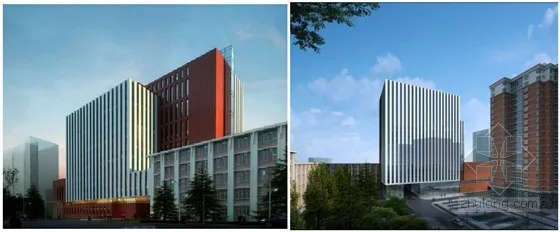
Figure 1: Entrance and bird’s-eye view of AVIC’s scientific research office building
Solution
This project features a tight schedule and heavy workload. It represents a BIM-driven full-process collaborative design approach by China Aviation Planning and Construction Development Co., Ltd. The workflow mainly utilizes Autodesk’s software platform, exploring BIM processes while meeting construction drawing standards and expanding the depth and breadth of BIM application.
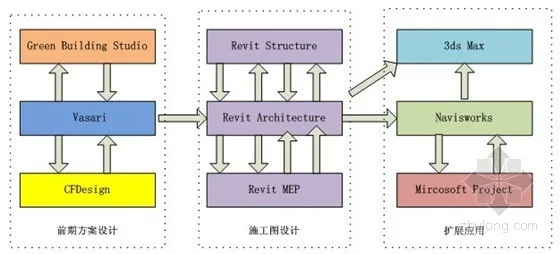
Figure 2: Schematic diagram of BIM workflow application
BIM Application in Early Planning Stage
1. Scheme Design
Autodesk Project Vasari is a user-friendly conceptual design tool that enables free-form creation and editing of shapes. It quickly generates analysis data to identify the most effective design solutions. Vasari shares the same BIM engine and interface as Autodesk Revit, allowing seamless import of volume models into Revit for detailed design. It integrates cloud-based analysis tools for green design without disrupting workflows, providing rich, visual energy consumption analytics. Early in the design process, Vasari allows rapid creation of multiple concept models for comprehensive comparison.
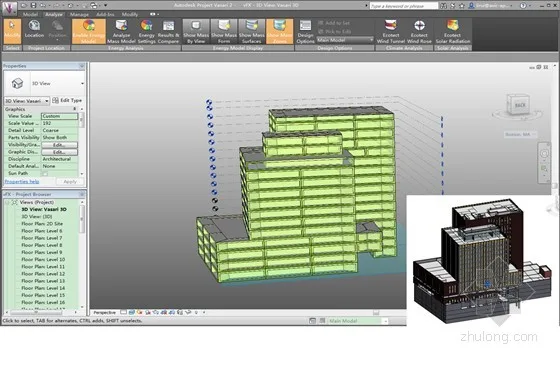
Figure 3: Autodesk Project Vasari Analysis
2. Green Computing
Using BIM models in Project Vasari, meteorological data, solar radiation, dry and wet bulb temperatures, building comfort, passive technology applications, lighting, energy consumption, sound environment, and thermal environment are analyzed. These results strongly support green and energy-efficient design. Based on analysis, the BIM model is refined, enabling real-time design adjustments that create a more rational and scientific design process compared to traditional methods.
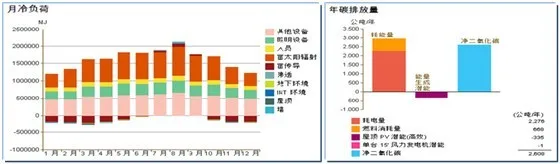
Figure 4: Cooling Load Analysis | Figure 5: Five-Year Carbon Emissions Analysis
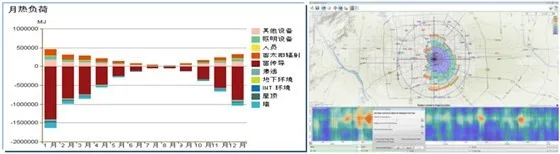
Figure 6: Heat Load Analysis | Figure 7: Wind Rose Analysis
3. Energy Saving Analysis
Autodesk SimulationCFD technology was used to analyze temperature distribution and wind environment in shielded computer rooms within the office building, along with thermal comfort simulations. Adjusting window placement, size, and indoor spatial separation optimizes natural ventilation to meet indoor comfort standards during outdoor weather conditions, thus saving energy and enhancing occupant comfort. Three alternative solutions were developed.
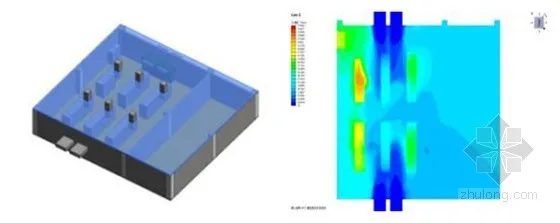
Figure 8: Shielded Computer Room | Figure 9: Scheme 1
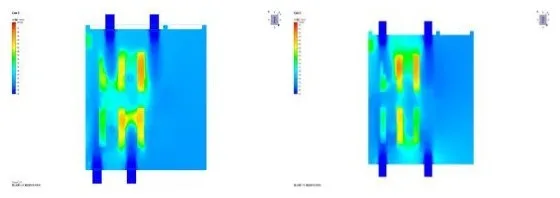
Figure 10: Scheme 2 | Figure 11: Scheme 3
The revised plan ensures that the ambient temperature remains within 24 degrees Celsius, meeting computer room requirements.
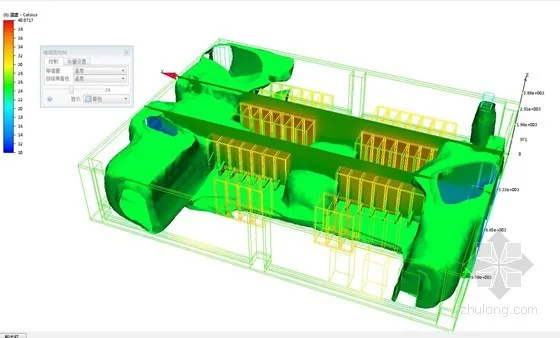
Figure 12: Computer Room Temperature Environment
Plan 1 showed a maximum local temperature of 40 degrees Celsius, which satisfies the computer room’s thermal criteria.
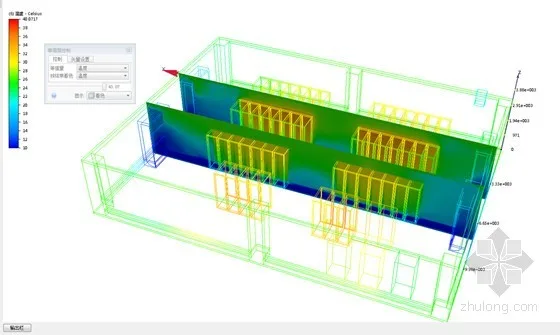
Figure 13: Maximum Local Temperature in Computer Room
BIM Application in Construction Drawing Stage
During construction drawing development, disciplines such as architecture, structure, plumbing, electrical, and HVAC used Autodesk Revit for BIM modeling and design. Construction drawings were generated directly from Revit models. Throughout the process, both advantages and challenges of Autodesk’s BIM platform became evident.
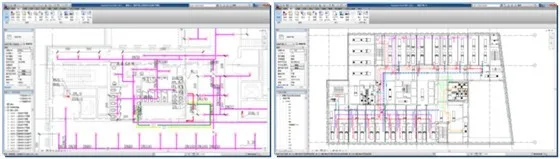
Figure 14: Plumbing Specialty | Figure 15: HVAC Specialty
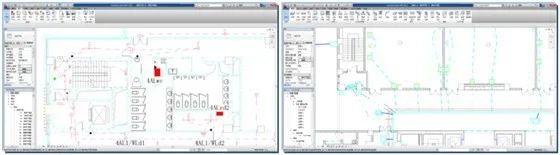
Figure 16: High-Voltage Electrical Specialty | Figure 17: Low-Voltage Electrical Specialty
The project also established a family library, laying the foundation for smooth future implementations.
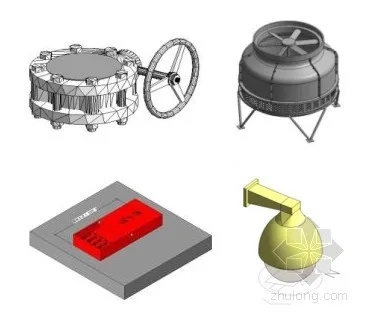
Figure 18: Refined Families
1. Collaborative Design
Models and construction drawings were developed simultaneously within a central file across disciplines, enabling real-time updates and synchronized modifications. This replaced the outdated staged collaboration, which relied on periodic drawing comparisons. The new approach significantly reduces rework, minimizes common drawing errors, identifies construction issues early, reduces on-site coordination challenges, and saves time and labor costs throughout the building’s lifecycle. However, as project complexity grows, design time tends to increase proportionally, so project timelines should be adjusted accordingly.
2. Model Linkage
Changes made in the Autodesk Revit model instantly update plans, elevations, and sections. Page and detail indices are auto-generated, streamlining modifications and greatly improving accuracy and efficiency. 3D visualization frees architects and engineers from 2D abstractions, encouraging a 3D mindset and enabling all project participants to understand and control the building on a macro level.
3. Pipeline Integration
As building scale, shape, and functions become more complex, pipeline integration and clash detection grow increasingly vital. Autodesk Revit’s BIM modeling and clash detection easily identify conflicts in a 3D environment, preventing issues traditionally discovered only during construction. This reduces later drawing changes and on-site coordination costs, aiding schedule control and construction quality. Though pipeline content in this project was moderate, the experience provides a valuable foundation for future complex projects.
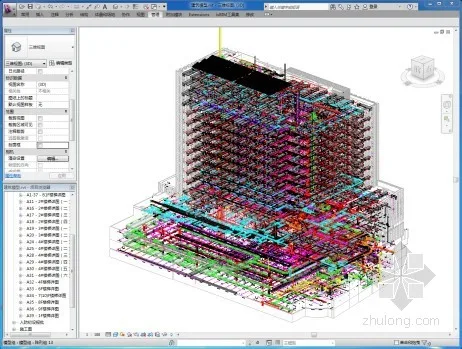
Figure 19: Pipeline Integration
4. Changes in Division of Labor
Revit’s workspace mode enables multiple disciplines to work in a single central file, moving away from traditional work scopes based on drawing content. Experience shows labor can be divided by model elements and node details, or by construction type and building zones. This approach encourages team members to view the entire building rather than isolated plans or sections. Modifications affect others’ work, promoting collective responsibility and cross-checking for design errors.
5. File Management
Design files have shifted from dispersed individual files to centralized, integrated central files. Backups exist on multiple participants’ computers, reducing data risk. Project leaders can monitor design status and quality, identify errors, and assign responsibility promptly. In Revit, modeling replaces traditional drawing-first workflows; drawings are generated after modeling, not during. This new mode requires changes in review and management practices, emphasizing model-based oversight by professional leaders and chief engineers.
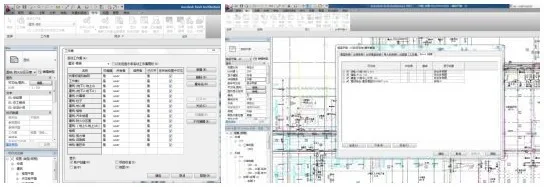
Figure 20: Project Management
6. Standard Family Library
The architecture team customized families extensively in Revit to meet construction drawing requirements. The hydropower discipline created many families adhering to current standards. Although sufficient for this project’s scope, complex buildings will require further development.
7. Statistical Data
The BIM model in Revit contains rich engineering data. BIM’s powerful statistics generate drawing catalogs, door and window schedules, fire zone area tables, and material usage tables automatically, updating in real-time. This relieves designers from tedious manual data tasks, saving significant time. Additionally, material quantities can be accurately calculated, and with market prices, cost estimates are more precise, reducing investment risks and enhancing owner services.
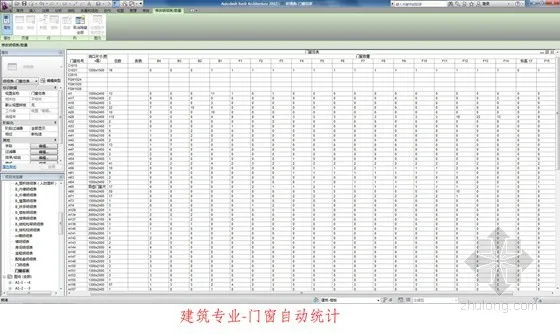
Figure 21: Material Method
Extended BIM Applications
1. Construction Simulation
Using Autodesk Navisworks combined with Autodesk Project Vasari, 4D time attributes were added to BIM projects. Construction schedules can be analyzed and optimized on monthly, daily, and hourly scales. Progress simulations visualize the entire construction process, identify critical challenges, improve efficiency and safety, enhance plan feasibility, and improve constructability for complex projects.
2. Evacuation Simulation
Software enables calculation of individual evacuation times and paths using mathematical models.
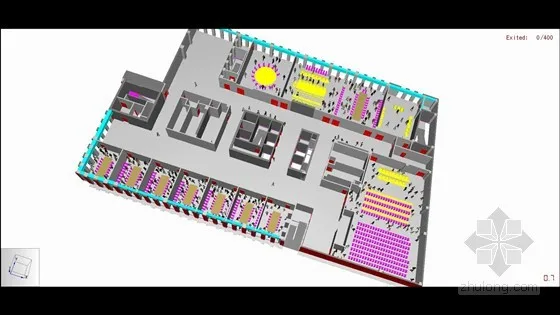
Figure 22: Conference Room Evacuation Simulation
3. Reverse Simulation
In the building’s basement, simulations with varying parameters were exported in different file formats from the same model, facilitating model information transfer across different software platforms.
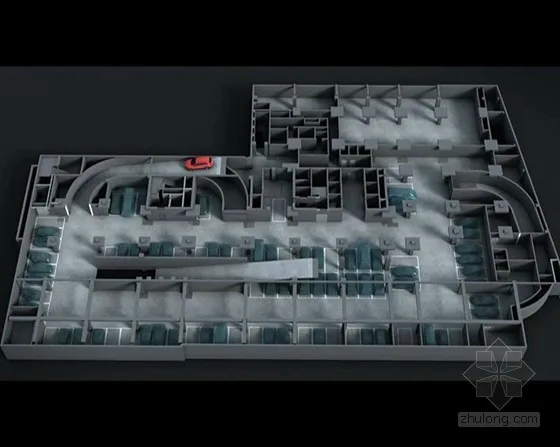
Figure 23: Reverse Simulation
4. 5D Simulation
Using ITWO software, construction simulation was performed on the Autodesk Revit model, visually representing cost and time throughout the construction process.
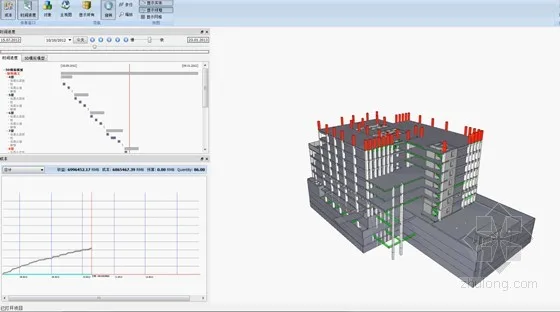
Figure 24: 5D Simulation
5. Custom Development
A proprietary family library management system was developed to centralize storage, sharing, and retrieval of Revit family files within the company. This system standardizes family file management and allows designers to access enterprise families based on permissions, improving efficiency and ensuring deliverable quality. The Autodesk Revit Family Library 2012 acts as a database to store, manage, and classify 2D and 3D families with browsing, uploading, downloading, and editing functions.
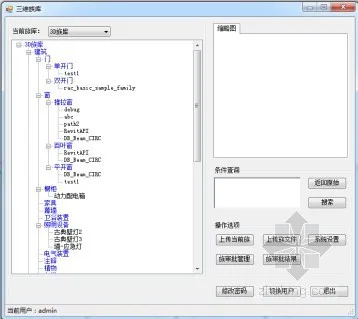
Figure 25: Family Library Management System
















Must log in before commenting!
Sign Up