
BIM Q&A | What Happens in Revit When the Top Cutting Surface Is Below the Cutting Surface
This issue occurs because the top height of the range is set above the profile height.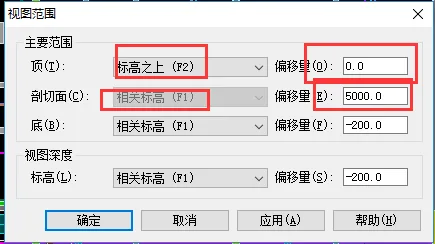 Make sure to carefully check the values in these four boxes. The height values in the top two boxes must be set higher than those in the bottom two boxes. That’s all there is to it.

xuebim
Follow the latest BIM developments in the architecture industry, explore innovative building technologies, and discover cutting-edge industry insights.
← Scan with WeChat















Must log in before commenting!
Sign Up