
BIM Q&A | How to Resolve Revit 2016 Incompatibility with Win7 Pure Version 64-bit System
Revit, a leading BIM software, sometimes faces installation issues that can be frustrating and difficult to troubleshoot. Here, we summarize common causes and solutions to help users successfully install Revit.
1. Operating System Requirements
For Windows 7 users, the system must include the SP1 update package. This means you need to install Windows 7 SP1; without this update, Revit cannot be installed. Note that Windows 7 32-bit systems only support Revit 2014 and earlier versions. Versions 15, 16, and 17 are not compatible with 32-bit Windows 7.
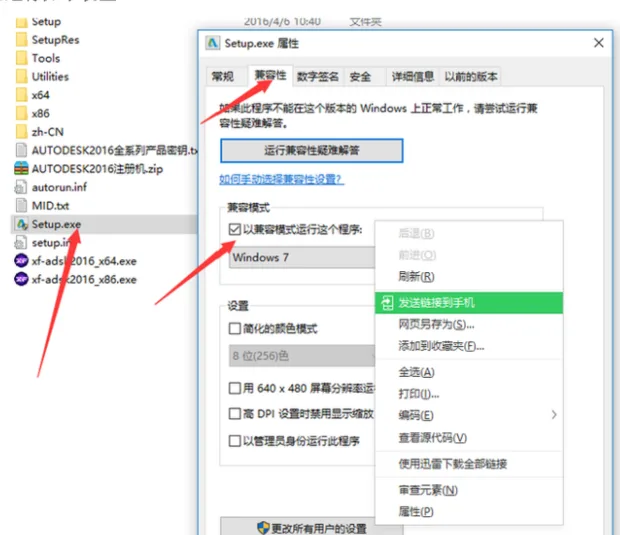
If you encounter installation issues on Windows 8, try adjusting the compatibility settings. Right-click on the setup file, select Properties, then go to the Compatibility tab. See the example below:
2. Installation Path Settings
The installation path should be short and free of Chinese characters. Avoid spaces and special characters as well. It’s best to use English letters only to prevent path-related issues.
3. Run Setup as Administrator
Always right-click the setup file and choose Run as administrator to ensure proper permissions during installation.
4. Thoroughly Uninstall Previous Versions
If you have previously installed Revit, make sure to uninstall it completely before attempting a new installation. Many users miss deleting leftover files, which can cause conflicts. Display hidden files, then search for and delete any remaining Revit-related files manually.
5. DirectX Components
Check that your DirectX components are fully installed and up to date. Missing or outdated DirectX can prevent successful installation. Download and install the complete DirectX package if needed.
These are the main reasons and fixes for Revit installation failures that we have compiled. Most installation problems arise from overlooked details during the setup process. Once Revit is installed successfully, avoid uninstalling unless necessary, as reinstalling can be complex and may require a system reset.
















Must log in before commenting!
Sign Up