
Abstract This project leverages BIM solutions to manage a large-scale development characterized by an extensive project area, high-density piping, and complex electrical conduit systems across various water supply and drainage specialties. Despite the challenges of multiple BIM-required tasks and tight implementation cycles, the project successfully integrates BIM technology.
1. Project Background
Project Name: Baoyuan Residential Community Phase II Project
Design Unit: China Aviation Planning, Construction and Development Co., Ltd
China Aviation Industry Planning and Construction Development Co., Ltd. (AVIC Planning and Construction) is a major national comprehensive survey and design firm. The company serves industries including aviation, aerospace, air force, navy, civil aviation, and civil construction. It provides full value chain services such as planning, design, surveying, construction, and operations, alongside services like engineering cost consulting, environmental impact assessments, bidding agency, and supervision.
Related Software Applications:
- Autodesk Revit Architecture
- Autodesk Revit Structure
- Autodesk Revit MEP
- Autodesk Navisworks
- Autodesk Ecotect
- Autodesk Project Vasari
BIM Application Evaluation and Feedback:
BIM design greatly enhances design efficiency and product quality. At its core, BIM emphasizes collaborative design, making it both a technical and management challenge. It introduces new demands for traditional workflows and quality management systems.
—— Ren Jiang, Deputy Director of Technical Quality and Safety Department and Director of Network Information Center, China Aviation Planning and Construction Development Co., Ltd.
Through the Baoyuan project, we recognized the essential role of BIM. It was instrumental in detecting and resolving inter-disciplinary conflicts, especially in the densely packed outdoor pipeline engineering with limited site space. After integrating the 2D pipeline layouts, hundreds of clashes were identified and addressed during the design phase, providing strong support to meet the owner’s stringent requirements and establishing a solid foundation for our institute’s quality standards.
—— Zhong Yan, Project Manager for Baoyuan Villa, China Aviation Planning and Construction Development Co., Ltd.
Autodesk’s BIM technology excels in eight key areas, including 3D visualization, pipeline integration, energy analysis, simulation, construction sequencing, droplet simulation, and property management—surpassing traditional design methods.
—— Wei Nian, BIM Project Manager, China Aviation Planning and Construction Development Co., Ltd.
2. Main Text
BIM Application and Breakthrough in Baoyuan Residential Community Phase II
Project Overview
The Baoyuan Residential Community project is a garden-style mansion development fully planned by Changjiang Industrial (Group) Co., Ltd. Located in the central villa district of Shunyi, Beijing, it enjoys unique environmental advantages. Adjacent to the north bank of the Wenyu River, which remains unfrozen year-round, the area boasts beautiful scenery. Over 50% of the site is green space, primarily featuring high-end, low-density buildings. Both landscape and amenities meet international villa standards.
The total construction area for Phase II spans 236,405.16 square meters over a 23.482-hectare site. The above-ground building area measures 139,669.44 square meters, with an underground building area of 96,735.72 square meters, resulting in a floor area ratio of 0.59. The project functions primarily as residential space supplemented by public support buildings, totaling 563 households. It includes two villa types: independent villas averaging 560 square meters and connected villas around 360 square meters.
Following the completion of Phase I, the decision was made to implement BIM technology in Phase II during planning and construction. This approach tackled challenges such as the large scale, complex site conditions, high pipeline density, tight schedules, and stringent owner requirements, ultimately enhancing the design institute’s capabilities and client satisfaction.
Project Challenges and Solutions
The project’s technical challenges fall into four categories:
- Large scale: 563 buildings with diverse outdoor platform styles generated model information exceeding software capacity.
- Site complexity: Wide area with fluctuating elevations and complex terrain limited external pipeline routing space.
- High-density specialized pipelines and electrical conduits for water supply and drainage had to be arranged in tight spaces.
- Multiple BIM-required projects faced short implementation timelines.
To address these, AVIC Planning and Construction established a dedicated BIM implementation team working alongside the design team, enabling timely technical support. Key breakthroughs included:
- Defining detailed planning model types early on, including: building unit models for precise structural representation and construction guidance; structural models for analysis; specialized electromechanical models for clash detection; volume models for construction simulation; material calculation models; and green and energy-saving assessment models.
- Using Autodesk Revit’s terrain tools to build realistic site models that interface seamlessly with Revit MEP exterior models. This process began with rough models refined progressively with contour lines to replicate actual site topography.
- Modeling high-density outdoor pipelines by specialty using Autodesk Revit MEP, then linking files for collision detection. Autodesk Navisworks was employed for hard and soft clash detection, generating detailed reports and facilitating prompt resolution, significantly reducing construction costs by addressing issues during design.
- Assigning a dedicated BIM project coordinator with clear responsibilities, including documenting project strategies, ensuring adherence to BIM plans, and managing BIM model setup and maintenance. This structured approach ensured on-time delivery despite the short BIM implementation cycles.
Single Building Model
This project employs Autodesk Revit to meticulously reproduce individual building characteristics.

Figure 1: Real-time footage of Phase I construction site
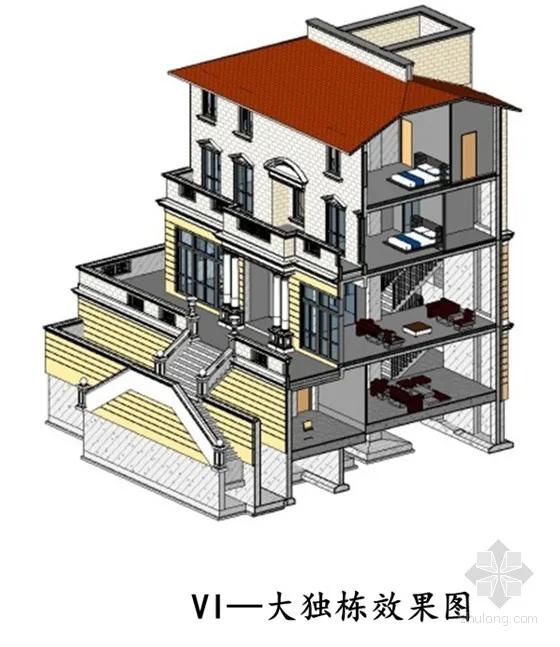
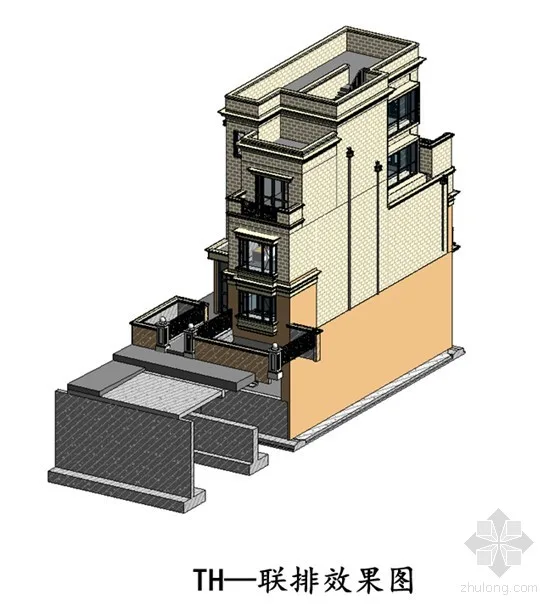
Figure 2: Detailed Autodesk Revit Single Building Model
The key feature of the single building models is their refinement, demonstrated by:
- Layered modeling of walls and floors, using methods consistent with AutoCAD standards.
- Standardized 2D legends and unified naming conventions.
- One-click generation of quantity takeoff tables, fully aligned with engineering specifications and numbering.
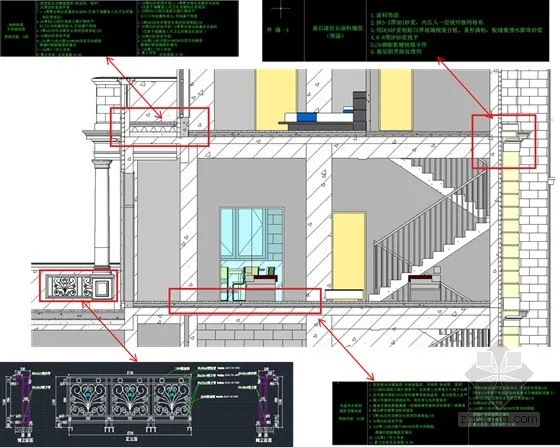
Figure 3: Layered Creation of Walls and Floors
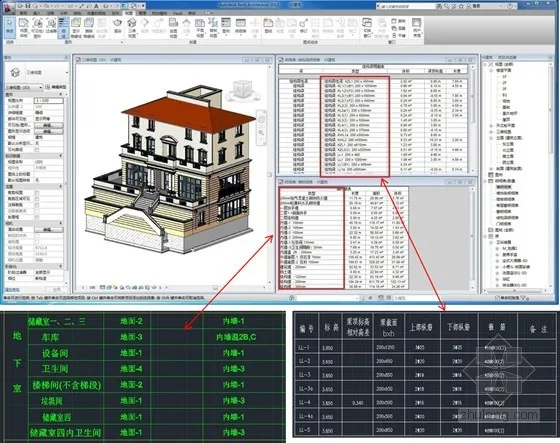
Figure 4: Model creation method consistent with CAD standards
Additionally, over 100 customized architectural families were created, including doors, windows, railings, contours, and rainwater gutters. These families are fully parameterized for realistic appearance and hold strong applicability for other projects.
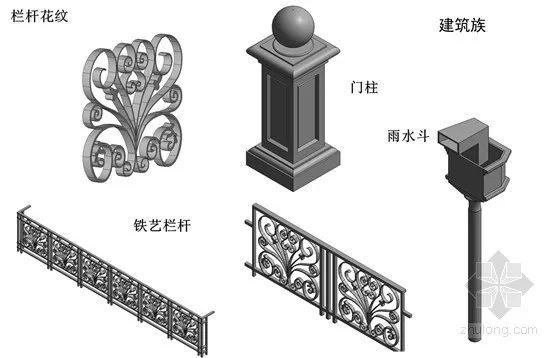
Figure 5: Building families featuring distortion-free modeling of doors, windows, railings, and rainwater gutters
In municipal engineering, families for sewage wells, rainwater wells, drainage wells, and electrical wells were customized per project requirements, with 2D representations fully consistent with traditional legends.
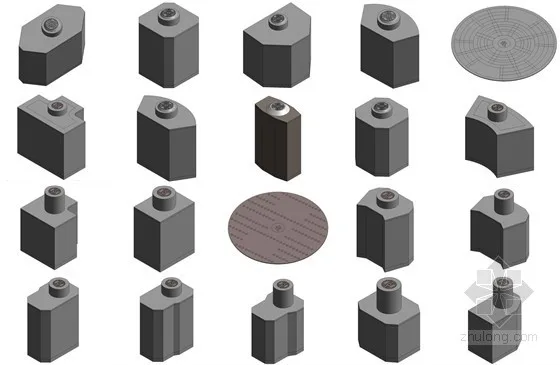
Figure 6: Customized Electromechanical External Line Pipe Well Families
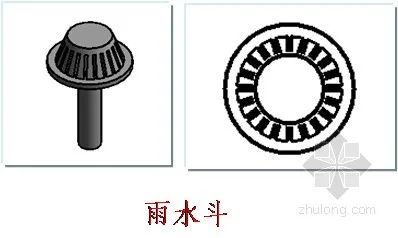
Figure 7: Alignment of 3D models with 2D legend representations
Site Model
Considering project requirements, AVIC Planning and Construction chose to forgo the specialized terrain tool AutoCAD Civil 3D, instead opting for Autodesk Revit’s native site functions. This approach ensured seamless integration between the site and electromechanical models, providing valuable guidance for actual construction.
Due to the large site area and significant elevation changes, modeling was challenging. AVIC adopted a zoning approach—starting with a rough terrain model refined progressively by adding contour lines. Over ten types of external platforms were modeled later to meet on-site construction needs, offering practical guidance.
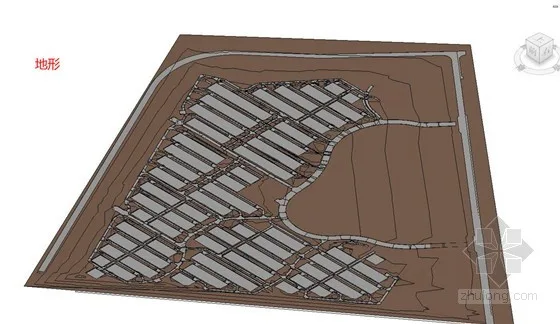
Figure 8: Rough Site Model
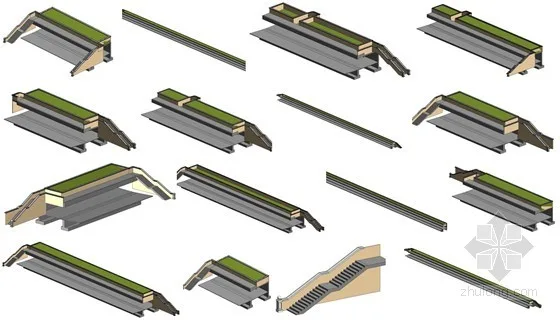
Figure 9: Customized Outdoor Platform Families
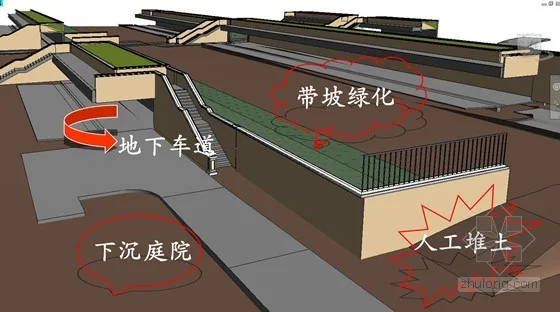
Figure 10: Refined Site Model
Mechanical and Electrical External Line Model
Created using Autodesk Revit MEP by specialty, models were exported as DXF files (including color channel info) and linked into Autodesk Navisworks for collision detection. After completing the 2D pipeline layout, 3D clash detection identified hundreds of collisions, which were resolved during the design phase, preventing construction issues.
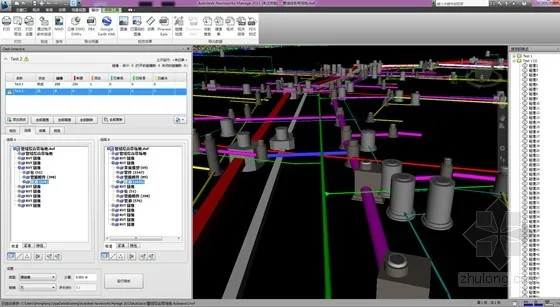
Figure 11: Collision Detection Report
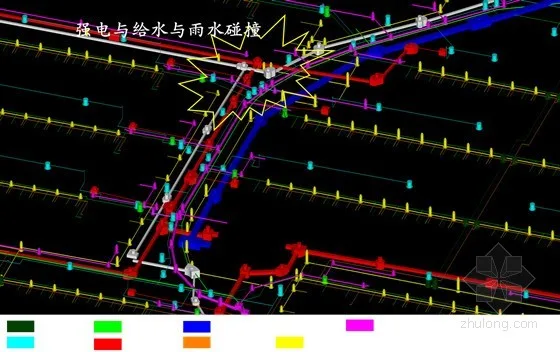
Figure 12: Comprehensive Pipeline Collision Points
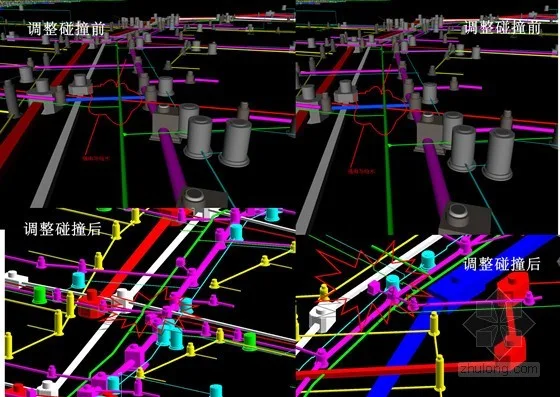
Figure 13: Collision Adjustments
Volume Model
Due to the project’s large scale and model complexity, using precise single building models for construction simulation would overwhelm software capacity. Instead, AVIC Planning and Construction used Autodesk Revit’s volume tools to create simplified mass models with reduced data but effective visualization.
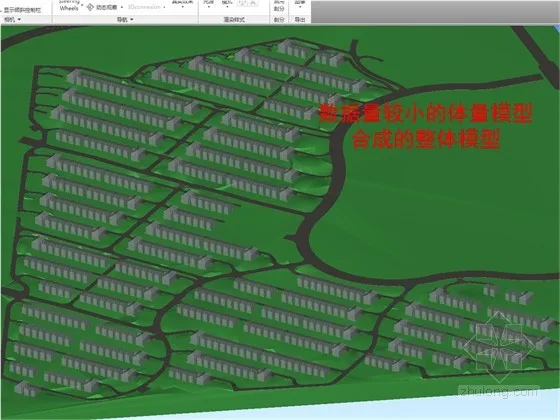
Figure 14: Revit Mass Model for Construction Simulation
Performance Analysis Model
In the early design phase, AVIC used Autodesk Project Vasari to simulate energy consumption. Vasari is a user-friendly conceptual design tool that allows quick form creation and editing, providing rapid energy analysis to optimize design solutions. Sharing the same BIM engine and interface as Revit, Vasari’s volume models can be seamlessly imported into Autodesk Revit for detailed design. Its integration with cloud-based analysis tools enables green design evaluations without workflow interruptions, offering rich visual data for early-stage decision-making.
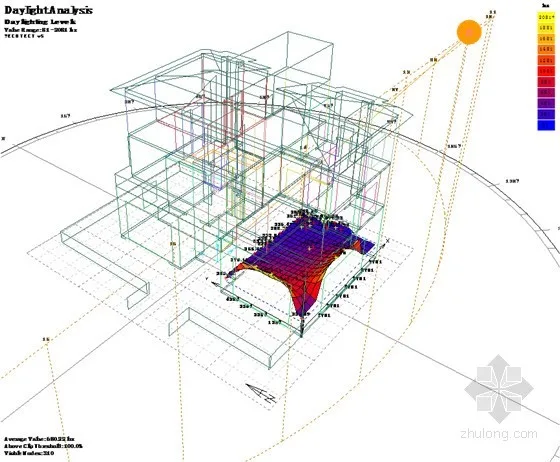
Figure 15: Analysis Model for Performance Evaluation
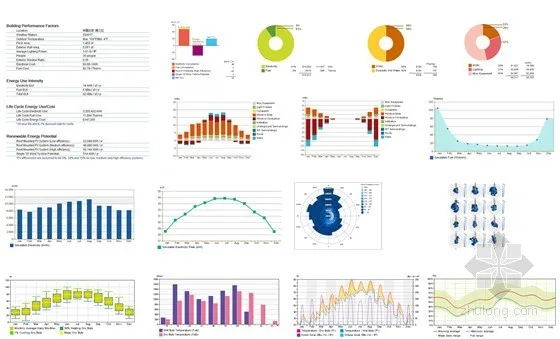
Figure 16: Vasari Simulated Energy Consumption Analysis at Early Planning Stage
Following this, AVIC used Autodesk Ecotect to conduct green building calculations on the Vasari BIM model. Analyses included meteorological data, solar radiation, dry/wet bulb temperatures, building comfort, passive technology applications, lighting, energy consumption, acoustics, and thermal environment. These insights provided strong support for green and energy-saving design, enabling real-time adjustments to the BIM model and making the design process more rational and scientific.
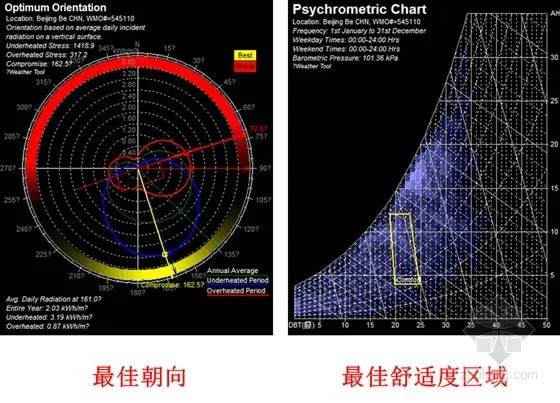
Figure 17: Ecotect Analysis for Optimal Orientation and Layout of Residential Buildings
BIM Project Coordinator and Project Strategy Document
To ensure timely BIM implementation, AVIC assigned a dedicated BIM project coordinator responsible for:
- Developing and maintaining a comprehensive “Project BIM Strategy” document outlining BIM implementation and utilization plans.
- Keeping the strategy document up to date throughout the project lifecycle.
- Ensuring all stakeholders, both internal and external, comply with the BIM strategy.
- Participating in BIM model planning, setup, and ongoing maintenance.
















Must log in before commenting!
Sign Up