
Problem
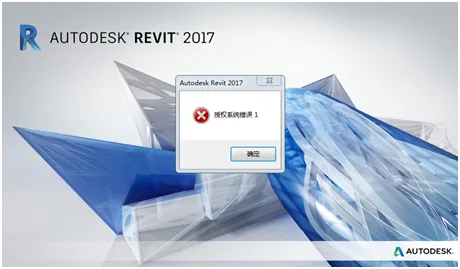
Cause
This issue is usually caused by a missing or corrupted LGS.data file, or because the C:ProgramDataAutodesk folder lacks proper read/write permissions.
Solution
For a Windows 7 system (flagship version), 64-bit with 4GB RAM and a fully English path, also ensuring antivirus software is disabled, the following steps apply:
When launching Revit, you might encounter the error message “unable to initialize adlm”. This happens because Revit detects that the local machine already has Microsoft Visual C++ 2010 x86 (or x64) installed, but not the built-in C++ 2010 x86 (or x64), causing the ADLM service to fail.
To fix this, uninstall the existing Microsoft Visual C++ 2010 x86 (or x64) from your machine. Then, reinstall Revit 2014 or 2015. Make sure you are connected to the internet and activate the software following the activation instructions.
After these steps, Revit 2015 should activate successfully. Good luck!
If the error persists, try right-clicking the Revit icon and selecting Run as administrator. If that doesn’t help, proceed with the methods below, trying them in order.
Method 1: Locate the folder C:ProgramDataAutodeskCLMLGS829I1_2017.0.0.F. If it doesn’t exist, create the folder path manually. Then, download and place the LGS.data file into this folder.
Method 2: If the issue continues, delete the file adskflex_xxx_tsf.data from the C:ProgramDataFLEXnet folder and reactivate Revit. Note that these are hidden files, so ensure that your system is set to display hidden files and folders before proceeding.
Method 3: Navigate to C:Program FilesCommon FilesAutodesk SharedAdLMR12LMU.exe. Here, set LMU.exe to run in compatibility mode for Windows 7 and always run as administrator. (The R12 folder corresponds to the Revit version: for example, Revit 2017 uses R12, and Revit 2016 uses R11.)
Method 4: Grant full read and write permissions to the C:ProgramDataAutodesk folder for the “Everyone” user group. Then, go to C:ProgramDataAutodeskAdlmProductInformation.bit and rename ProductInformation.bit to ProductInformation_mak.pit.















Must log in before commenting!
Sign Up