
BIM Q&A | How to Check Collisions and Modify Models in Navisworks
There are two main steps to follow.
First, when exporting Revit models, ensure that the NWC format export section is enabled. Also, activate the Navisworks switch-back feature.
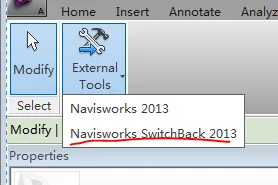
For collision detection and model modification in Navisworks, follow these steps:
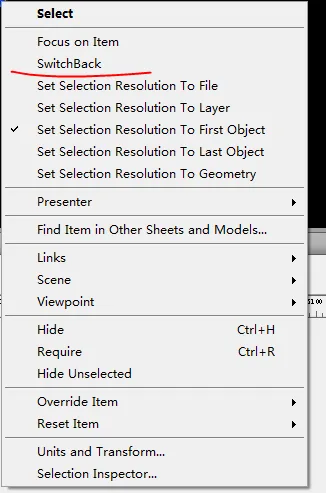
First, select the object involved in the collision. Then, right-click and choose the switch-back option to return directly to Revit for modifications. If this method does not work, you can also locate the object using the Revit ID form. Once selected, you can find its details in the Navisworks property bar.

xuebim
Follow the latest BIM developments in the architecture industry, explore innovative building technologies, and discover cutting-edge industry insights.
← Scan with WeChat















Must log in before commenting!
Sign Up