
BIM Q&A | How to Set Up the AutoCAD Toolbar and What to Do If the Corresponding Attribute Is Missing
Have you opened AutoCAD only to find that the toolbar or menu bar is missing?

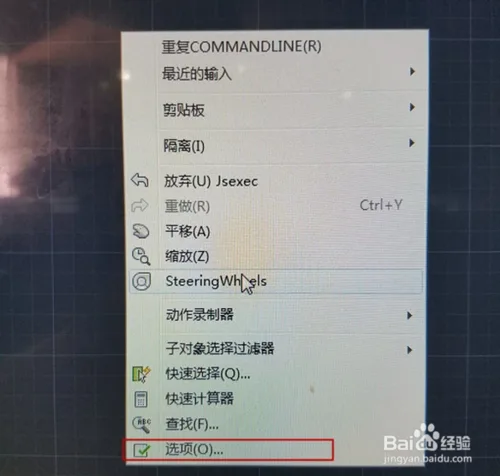
To bring back the toolbar, simply right-click on an empty area within the AutoCAD interface and select Options.
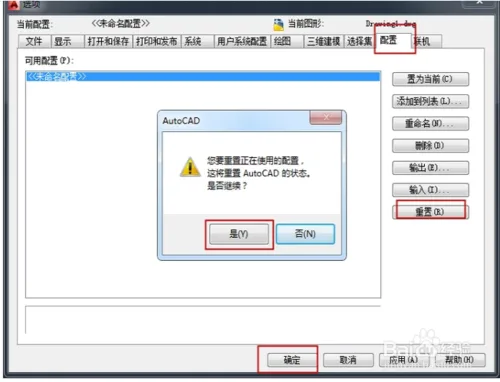
Within the Options window, navigate to the Configuration tab and click the Reset button. When prompted with a dialog box, confirm by selecting Yes.
After completing these steps and returning to the main AutoCAD window, your toolbar and menu bar should reappear.
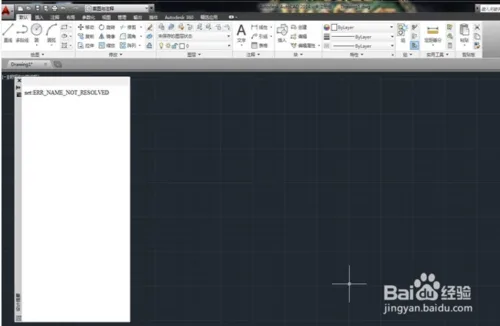
If the toolbar and menu bar still do not appear, it’s best to seek professional assistance rather than attempting further adjustments on your own.

xuebim
Follow the latest BIM developments in the architecture industry, explore innovative building technologies, and discover cutting-edge industry insights.
← Scan with WeChat















Must log in before commenting!
Sign Up