
BIM Q&A | Is Infraworks 2017 Useful? Where to Download and Share
Software Introduction:
Infraworks 2017 is a powerful 3D design software tailored for infrastructure engineers. It allows users to easily build 3D models of existing environments and design elements, create visually compelling comparative solutions, and perform advanced simulations and visualizations. Additionally, Infraworks 2017 offers cloud collaboration features that integrate and connect data, enabling teams to create, view, analyze, share, and manage information more effectively. This helps improve project outcomes and supports environmentally conscious decision-making.
Required Tools: 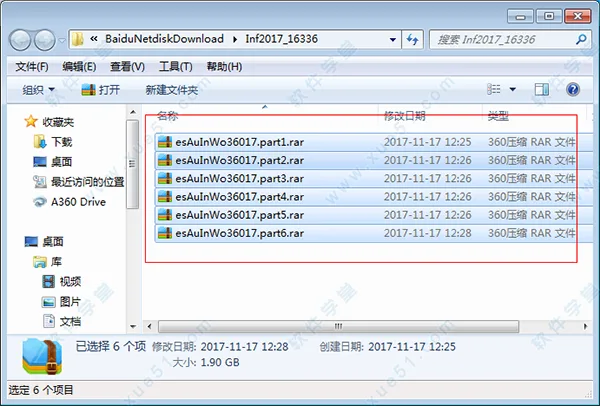
Click here to download Autodesk Infraworks 360 2017 (Chinese version).
Infraworks 2017 Installation Tutorial
1. After downloading the folder from this website, extract all six compressed files simultaneously, as shown below.
infraworks 2017
2. Wait a few minutes for the extraction to complete. Then, open the decompressed folder and double-click Autodesk_InfraWorks_2017-Win_64bit_SLM.sfx.exe to start the extraction process.
3. Ensure there are no Chinese characters in the extraction path, or the process may fail.
4. Once extraction finishes, the installation will automatically begin.
5. The installation may take some time due to the large file size—please be patient. When installation completes, a confirmation screen will appear, allowing you to launch the program immediately.
6. Upon launching Infraworks 2017, create an account to log in. Only an email address is required; no verification code is needed.
7. After account creation, you can use the software without restrictions.
User Guide
1. Modifying Elements
The modification options available depend on the selected feature type. To modify a feature, select it or create a selection set.
Widgets:
- Use widgets to adjust position, orientation, height, and elevation.
- After selecting a widget, either enter a specific value or drag it to the desired location.
- You can change the measurement units by clicking the current unit in the widget’s value box and selecting a different one.
Control Points:
Drag control points to reshape feature boundaries.
Attributes:
Modify properties in the Properties palette or use expressions to edit features.
Undo Changes:
- Most edits can be undone by pressing
Ctrl + Z. To redo an undone action, pressCtrl + Y. - You can also regenerate the model to revert to the original data state. This refreshes the model with the latest data from the source, overwriting any modifications.
- For large models, regeneration may take a while. You can interrupt the process anytime, but this may reduce detail in areas not fully regenerated. You can continue regeneration later.
2. Modifying Feature Properties
Change Properties of a Single Element:
- Select the element you want to modify.
- Right-click the feature and choose “Properties”.
- Make the necessary changes in the Properties palette.
- Click “Update” to apply the changes.
Change Properties of an Entire Feature Class:
- Open the Model Explorer by clicking the utility bar.
- Right-click the desired feature class or subset and select “Select All”.
- Modify the properties as needed in the Properties palette.
- Click “Update” to save the changes.

















Must log in before commenting!
Sign Up