
BIM Q&A | Why Are Revit Beams and CAD Lines Always Center-Aligned?
Have you ever wondered why Revit beams and CAD lines are always aligned in the middle? Unlike walls, which have options to align with boundaries, beams and lines don’t seem to offer adjustment parameters on the options bar for alignment. So, why is this the case?
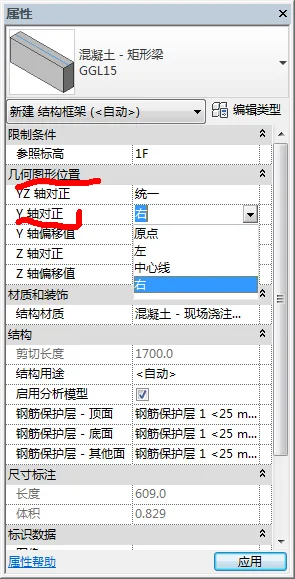
When you select a beam type, check the “Properties” panel. There, under the “Geometric Position” section, you’ll find the “Y-axis Alignment” setting. Clicking on this opens a drop-down menu with alignment choices: “Origin,” “Left,” “Centerline,” and “Right.” By default, the alignment is set to “Centerline,” as illustrated below:

xuebim
Follow the latest BIM developments in the architecture industry, explore innovative building technologies, and discover cutting-edge industry insights.
← Scan with WeChat















Must log in before commenting!
Sign Up