
Preface
Building Information Modeling (BIM) is an innovative, 3D object-oriented computer-aided design (CAD) technology that has gained prominence in recent years. Unlike traditional CAD drawings, BIM integrates spatial and geometric attributes with detailed project data within digital models. This comprehensive database enables other software tools to automatically retrieve or analyze information for tasks such as clash detection, material estimation, structural analysis, daylight simulation, airflow studies, energy consumption, and environmental impact assessments. As a result, BIM has become an essential asset and a major trend in the construction industry.
Despite its advantages, BIM software is often costly and complex, which can make it seem less accessible. However, humans are naturally visual, and interactive 3D model databases—like virtual buildings—offer a more realistic representation of actual environments compared to traditional CAD drawings. This helps bridge communication between professionals and end users. By sharing BIM data models online and enabling access through web browsers, all stakeholders can better visualize the final outcomes, ensuring the built environment meets user expectations. This article showcases several examples to illustrate diverse application scenarios.
Indoor Navigation and Roaming – Autodesk Navisworks ActiveX
Autodesk Navisworks Freedom (for more information, see __AI_ST_URL_0__) incorporates the Navisworks ActiveX component, which can be embedded in HTML objects. This allows users to view NWD files directly within browsers such as Microsoft Internet Explorer (IE). Figures 1 and 2 display the client interface for a building currently under construction at Academia Sinica (see Note 1). Users can explore the model via features like animations, spherical and vertical axis rotations, translations, fly-throughs, zooming, collision detection, and gravity-based walking. This virtual reality environment enables users to provide feedback during the design phase and clarify their requirements.
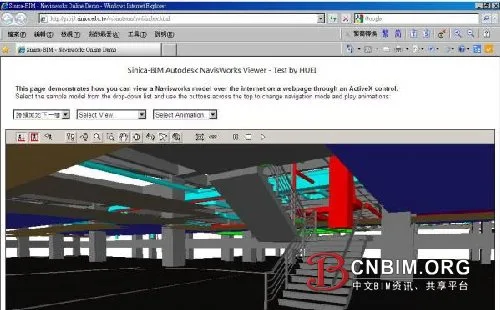
Figure 1: Indoor navigation interface in IE using Navisworks ActiveX (gravity effect enabled)
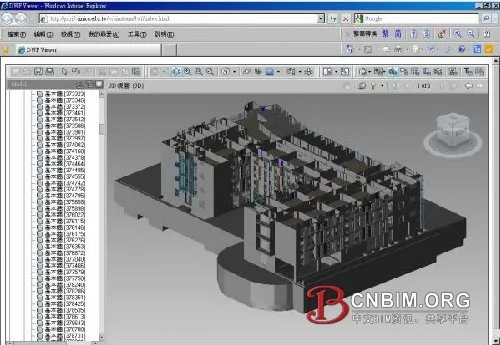
Figure 2: Checking pipeline compliance with workspace or clearance requirements in IE using Navisworks ActiveX
3D Model Viewing and Measurement – Autodesk Design Review
Autodesk Design Review, equipped with the free DWFViewer component, enables users to view DWF files and utilize advanced features including 3D visualization, markup, printing, tracking, sectioning, and intuitive measurement tools. As illustrated in Figures 3, 4, and 5, these functionalities significantly enhance communication, management, and tracking throughout a project (see fixed link: __AI_ST_URL_0__).
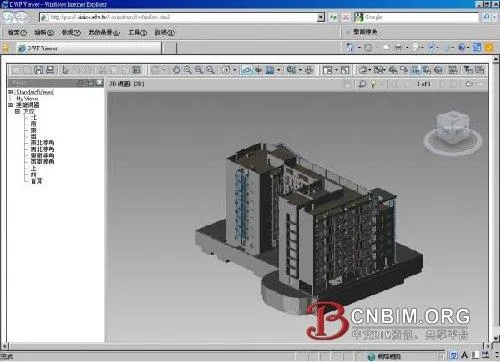
Figure 3: 3D model viewing in IE using Design Review ActiveX
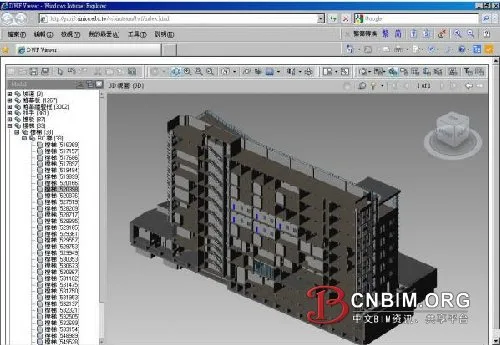
Figure 4: Cross-section of 3D model in IE using Design Review ActiveX
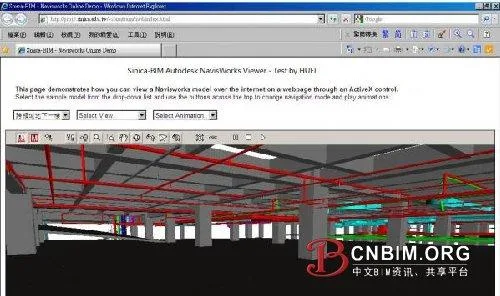
Figure 5: Longitudinal section of 3D model in IE using Design Review ActiveX
3D Dynamic Model eBook – Adobe Acrobat 3D PDF
3D models can also be viewed offline with the free Adobe Reader, which supports embedded ActiveX plug-ins in HTML but offers limited interactivity. Creating a 3D PDF requires Acrobat Extended or a 3D PDF Converter (see __AI_ST_URL_0__ for details).
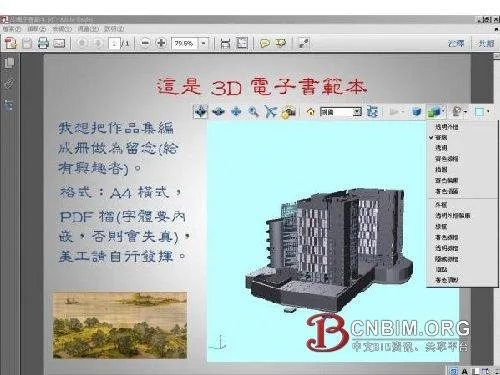
Figure 6: 3D model operation interface in Adobe Reader (1)
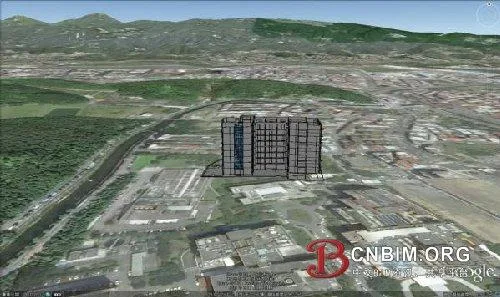
Figure 7: 3D model operation interface in Adobe Reader (2)
Integrating BIM and GIS – Google Earth KML/KMZ
To publish a digital model on Google Earth (see Figure 8), you can use Autodesk’s Globe Link for Revit, Navisworks, or similar software. Accurate integration requires careful parameter settings to convert project coordinates (including true north) to Google Earth’s latitude and longitude (WGS 84), as well as consideration for network bandwidth and processing speed. It is generally recommended to prioritize external building elements (such as walls, doors, windows, roofs) and include internal elements only if file size allows.
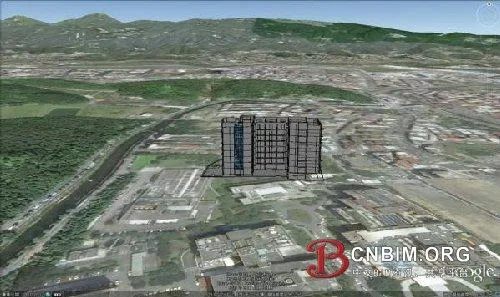
Figure 8: BIM integration with Google Earth
BIM Model Sharing Platform – BIMserver
BIMserver is an open-source program (written in __AI_ST_URL_0__, excluding third-party IFC Engine DLL) compatible with Windows, Mac, Unix, Linux, and other platforms. It can be accessed through browsers like IE, Safari, Firefox, Chrome, and KMeleon, and remains under active development. Installation is simple, requiring only a single file (jar or war; see Figure 9), and its coordinate system can be integrated with GIS.
BIMserver supports uploading and exporting formats such as IFC (see Note 2), ifcXML, WebGL (see Note 3), KMZ, CityGML (see Note 4), and Collada. The core system interprets and processes IFC data, which can be viewed online via the IFC Viewer (see Note 5 and Figure 11). Features include filtering, querying, automatic clash detection, model change detection, and version merging (see Figure 10).
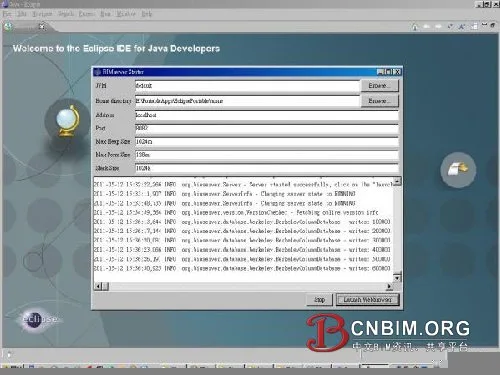
Figure 9: Installing BIMserver with Eclipse (Eclipse: www.eclipse.org)
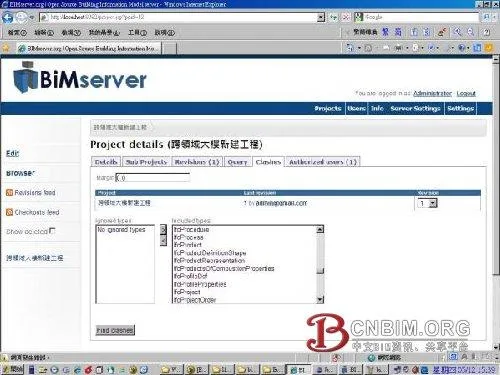
Figure 10: BIMserver operation screen
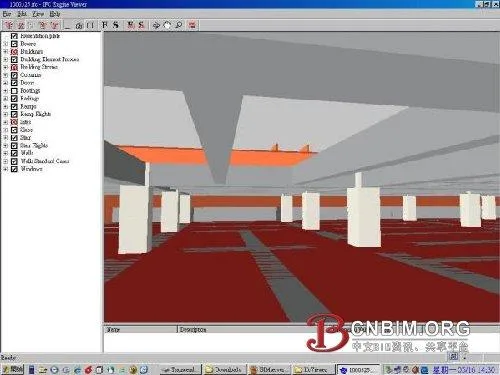
Figure 11: Operating a 3D model using IFC Viewer
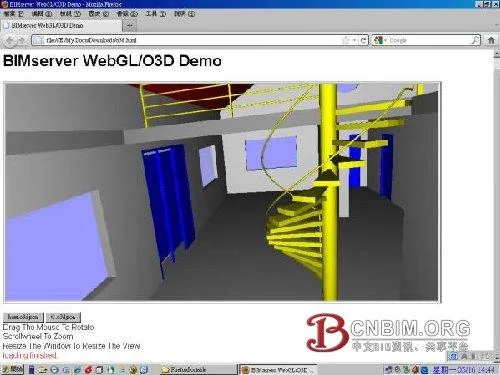
Figure 12: Viewing WebGL/O3D models with Firefox
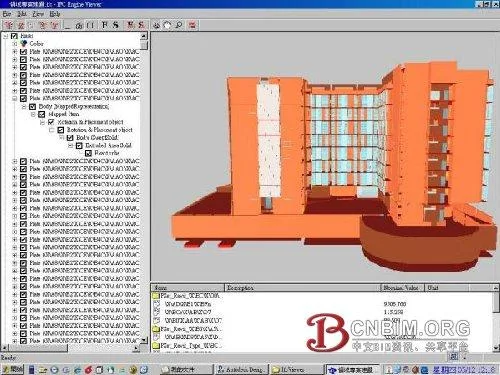
Figure 13: Operating a 3D model using IFC Viewer
Conclusion
While creating and managing BIM model data is vital, publishing this data is equally important, as it enables collaborative operations across regions via the Internet. Sharing 3D dynamic models online improves communication with clients, and an intuitive web service platform can respond to client needs efficiently, enhancing competitiveness.
The scope of BIM model data extends across the entire building lifecycle—from planning and design to construction, renovation, operation, and demolition—which can span up to 50 years. The primary users of digital models are not limited to professionals in engineering and construction; to maximize benefits, this data should also be accessible to the general public. Integrating BIM data with GIS to create a “virtual global village” is a core mission for BIM professionals.
Notes:
- The digital building model featured in this article is the “Interdisciplinary Building of Academia Sinica”; modeling is ongoing.
- The Industry Foundation Classes (IFC) format, developed by the International Alliance for Interoperability (IAI), enables interoperability between different applications.
- WebGL (Web Graphics Library) is a cross-platform 3D web standard based on OpenGL ES 2.0, developed by the Khronos Group. (For more details, see __AI_ST_URL_0__)
- CityGML is an open standard based on Geography Markup Language 3 (GML3), utilizing the extensible Open Geospatial Consortium (OGC) and ISO TC211 for spatial data exchange. It is used to represent 3D urban information models (see more at __AI_ST_URL_0__).
- For free IFC Viewer software, visit http://www.ifcwiki.org/index.php/Free_Software. The software used in this article is IFC Engine Viewer (see http://www.ifcbrowser.com/).
Source: Computing Center of Academia Sinica
















Must log in before commenting!
Sign Up