
T20 Tianzheng HVAC v4.0 is the latest version of the Tianzheng HVAC software, which requires support from a CAD platform. Currently, 64-bit operating systems support AutoCAD versions from 2010 to 2017, while 32-bit systems support AutoCAD versions from 2007 to 2016. This new version introduces the multi-split manufacturer Haier and adds a system selection command that allows users to select all connected water or air systems to check for connection errors before performing hydraulic calculations, thereby improving the success rate of extraction calculations.
It also features viewport layer commands that support selecting viewports within layouts and controlling which pipelines, systems, equipment, and other elements are displayed in each viewport. These enhancements provide designers with more powerful 3D BIM-assisted design capabilities.
Below, you will find the download link for T20 Tianzheng HVAC v4.0, which includes both 64-bit and 32-bit versions, along with a registration tool and expired patches. The software’s time limit has been removed, allowing users to use it completely free of charge. For detailed installation instructions, please refer to the following tutorial.
T20 Tianzheng HVAC v4.0 Major Modules:
1. Heating and Ventilation System Design
The heating and ventilation system is divided into modules based on professional design processes, including system setup, duct layout, equipment placement, connection, editing, annotation, calculation, and statistics.
- Supports layout of common HVAC equipment such as air vents, valve accessories, and fan coil units.
- Enables equipment piping and pipeline interconnection.
- Allows editing of parameters and positional relationships of existing equipment and pipelines.
- Supports labeling of ducts and equipment.
- Includes hydraulic calculation for air ducts with one-click extraction of duct systems, setting calculation and control conditions, and assigning results back to the drawing.
- Automatically adjusts air duct section dimensions and supports exporting calculation sheets to Excel.
- Provides statistics on air ducts and equipment, with customizable scope and output formats in Excel or graphical tables.
Key Features:
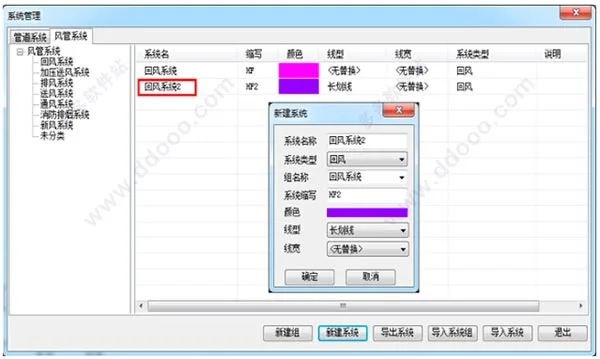
- System Settings: Integrates all system classifications for water pipes and air ducts, supports addition and deletion of system types, and allows unified modification of pipeline colors, line types, and widths. Changes apply to all subsequent drawing and editing operations.
- Equipment Layout: Offers a rich equipment library including air vents and duct valves. Supports multiple methods for arranging air vents and quickly drawing pipeline-attached equipment like valves, filters, static pressure boxes, and mufflers.
- Air System Connection: Provides automatic connection functions for air vents and ducts. Supports batch connection of multiple air outlets or devices to a single duct, automatic extension, and generation of connecting components, with options to include tags.
- Air System Editing: Enables quick modifications and edits of ducts, risers, equipment, and components while maintaining linkage between them to improve design efficiency. Includes local avoidance commands for lifting and offsetting ducts, useful for beam and column wrapping.
- Air System Annotation: Offers free and export annotation styles for ducts, along with tools for labeling air vents, equipment, spacing, and leads, meeting basic drawing requirements.
- Air System Calculation: Supports one-click extraction of air systems for hydraulic calculation, with a calculation interface consistent with T20 operation mode. Allows modification of calculation and control conditions, updates duct cross-sections automatically, and exports Excel reports.
- Material Statistics: Statistical scope can be set by drawing frame or specific layers to analyze ducts, pipes, equipment, and valves. Results can be inserted into drawings as tables or exported as statistical reports.
2. HVAC Water System Design
The HVAC water system design includes modules such as system setup, pipeline layout, equipment placement, connection, editing, annotation, calculation, and statistics, following professional design workflows.
- Supports drawing pipelines and risers, including multiple pipes or wall-aligned piping.
- Enables equipment pipe connections, loose dry vertical connections, and pipeline interconnections.
- Allows editing of parameters and positions for existing equipment and pipelines.
- Supports annotation of pipelines and equipment.
- Includes hydraulic calculations for water and heating systems with one-click extraction of systems or branches, modification of design and control conditions, assignment of results to drawings, automatic pipe diameter updates, and Excel output.
- Provides statistics on pipelines, equipment, etc., with customizable scope and output formats.
Key Features:
- Professional Water Pipe Layout Tools: Horizontal pipelines support wall-aligned and parallel pipe layouts; vertical pipelines support wall, corner, and radiator layouts.
- Comprehensive Plumbing Equipment Library: Includes common HVAC equipment, a rich valve library with user-expandable options, and heating equipment such as water collectors and radiators.
- Intelligent Water Pipe Connection: Supports automatic and classified connection of pipelines using multiple connector types. Equipment and pipelines can be batch-connected similarly to T20. Unique features include radiator-to-main pipe and riser connections for heating systems.
- Scattered Vertical Connection: Supports single tube downstream and crossover system forms, enabling batch connection of radiators and risers.
- Bulk Dry Connection: Connects radiators to main pipes supporting dual pipe, single pipe downstream, and crossover systems, with adjustable lengths for automatically generated branch pipes.
- Automatic Water System Annotation: Provides multiple annotation styles for pipes and radiators, customizable text height and parameters, and labeling for radiators, equipment, and valves.
- Hydraulic Calculation of Water Pipes: Supports one-click extraction, with an interface consistent with T20 mode. Allows modification of calculation and control conditions, updates pipe diameters automatically, and exports Excel sheets.
- Heating Hydraulic Calculation: Supports one-click 3D branch extraction for heating systems with T20-consistent interface, condition modifications, automatic updates, and Excel output.
3. Additional Tools
Import Tianzheng and Export Tianzheng commands allow opening and saving TGL format drawing files created by the T20 Tianzheng series on the AutoCAD platform.
Tianzheng HVAC T20 v4.0 Installation Tutorial:
- Download and unzip both the 64-bit and 32-bit original program and expired patches. Run
"T20 Tianzheng HVAC - havac V4.0.exe"to install the original software and accept the license agreement. - Select the components to install; only executable files are currently available. Choose the default or custom installation directory.
- Create a program folder as requested.
- Wait patiently as the software installs.
- Once installation is complete, proceed with cracking and activation.
- Open the desktop shortcut and select the appropriate CAD platform to launch.
- Upon first launch, a window will appear prompting for registration.
- Open the registration tool, copy the installation ID from the software into the registration machine, and click to generate a registration code.
- Paste the generated registration code back into the software and click OK to complete activation.
- If registration fails, use the Tianzheng HVAC Time Reset V4.0.bat file to crack the software, allowing 999 hours of use without functional restrictions.
New Features in T20 Tianzheng HVAC v4.0:
- New Online Manufacturer Added: Haier
Expanded the equipment library, database, and calculation rules for Haier’s indoor and outdoor units, offering users more updated options. - Manufacturer Maintenance and Improvements:
Indoor and outdoor units now support importing device parameters from Excel and selecting devices from existing equipment libraries, reducing manual data entry and improving efficiency.
On the Excel import interface, simply select a file formatted according to the sample folder. For existing devices, select from current manufacturer units to reference directly. - Equipment Layout Command Enhancements:
Added categories such as water machine hosts (e.g., screw machines), total heat recovery and haze removal fresh air fans, air-cooled heat pumps, water (ground) source heat pumps, magnetic levitation units, and nearly a thousand new equipment parameters and blocks. These represent the latest products from manufacturers, simplifying selection for designers. - Load Calculation Improvements:
- Displays building rotation angle with an option to reset to the original value for easy angle correction.
- Adds ‘Select All’ and ‘Clear All’ functions for selecting load sources when extracting rooms.
- Automatically updates infiltration load room volume based on room settings, avoiding manual errors.
- Includes prompts for additional calculations when exterior doors open, allowing manual input of additional rates and custom floor number settings.
- Fixes the wet load input recovery efficiency of fresh air heat recovery, now calculated using the reverse state point method.
- Increases default floor display in tree structure to 6 floors to enhance heating infiltration load accuracy.
- Duct Settings:
Adds duct annotation codes with automatic updating and addition of annotations on the current drawing. - Delete Annotation:
Sets ‘Select All’ as the default option for convenience. - Pipeline Settings:
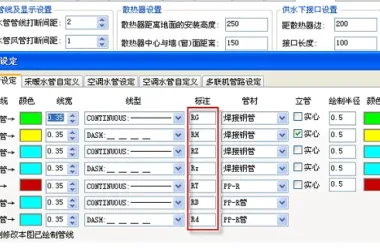
Expands commonly used letter line types for easier real-time selection of layer line types, eliminating manual creation. - Library Management:
Displays only the current command’s relevant library when calling blocks. For example, when arranging air vents, double-clicking the preview shows only vent-related blocks, avoiding wrong block selection and load failures. - System Selection Command:
Allows selection of all connected water or air systems to check for connection errors before hydraulic calculation extraction, improving extraction success rates. - Viewport Layer Command:
Supports selecting viewports in layouts to control which pipelines, systems, equipment, etc., are displayed, enabling one model to be drawn and printed across multiple viewports.











shafa