
T20 Tianzheng HVAC Software V7.0 supports Win7 32-bit AutoCAD 2010-2016 and Win7/10 64-bit AutoCAD 2010-2021 platforms, making it a powerful, specialized, and intelligent HVAC design tool. The software complies with key standards such as “Heating, Ventilation, and Air Conditioning for Civil Buildings GB50736-2012,” “Technical Standard for Building Smoke Control and Exhaust Systems GB 51251-2017,” and “Code for Fire Protection Design of Garage, Repair Shop, and Parking Lot GB 50067-2014.”
Featuring intelligent custom entity technology, pipelines and equipment automatically manage their interrelationships. Tianzheng objects support double-click editing for quick modifications. The software covers a wide range of HVAC specialties, including heating, ventilation, air conditioning, and multi-split design. It enables rapid floor plan layouts, automatic system diagram generation, and comprehensive material statistics.
With powerful calculation modules, designers can easily perform various computations and export calculation sheets, allowing them to focus more on engineering innovation. While efficiently generating 2D drawings, the 3D view synchronizes in real-time, enabling quick transitions from 2D plans to 3D models for clear project overviews. Changes made in the 3D view automatically update other views simultaneously.
T20 Tianzheng HVAC Software 7.0 New Features
- Enhanced settings menu by integrating line management, line library, and initial settings into pipeline settings; custom commands are now accessible via right-click.
- Added pipeline setting commands for water systems, heating, labeling, and more. Supports adding/deleting pipeline systems, codes, drawing styles, and layer settings. Also supports partitioning within pipeline systems with individual code, style, and layer assignments. Imports layer standards and supports full import/export of pipeline settings.
- Pipeline and riser drawing commands now support zone selection.
- Added vertical pipe elevation setting for radiators.
- The radiator modification command now supports meter number changes and options to include units in annotations.
- Option to generate pipe diameter annotations for main or riser pipelines in the command line, supporting connections within the same system partition.
- Updated water pipe valve interface to distinguish electric and non-electric valves. Added an electric valve library to the image library, allowing selection of electric valves with corresponding valve layers in each pipeline partition.
- Material statistics interface updated to a tree structure for easier classification and selection. Added water system pipeline zoning statistics, supporting user-defined water systems and zones. Supports differentiation between electric and non-electric water and air valves.
- Geothermal coil replication now supports replication with water collectors.
- Multi-split system calculations now include floor boxing with automatic orthogonality toggle for easier floor selection.
- Multi-tube drawing supports pipelines, partitions, and custom pipelines.
- Added a text line type production button in pipeline modification. The layer change dropdown supports selecting all pipeline types under heating and air conditioning systems.
- Added recommended interface size based on air volume in the air duct editing interface.
- Introduced a new version of the ‘Output Calculation Book Settings.’ Users can select output items in a tree format and choose calculation sheet formats. Supports creating new styles and importing/exporting calculation sheet settings.
- Added automatic saving of load calculation files to prevent data loss. Users can set save location and intervals in the habit settings.
- Fresh air heat recovery system now differentiates total heat recovery and sensible heat recovery.
- Room and wall heights now adjust based on floor height and room functionality.
- Room height correction automatically reads room height and adjusts correction coefficients for radiator heating and floor radiation heating.
- Increased external window heat load and corrected window-to-wall ratio with a factor greater than 1.
- Added room drag functionality for easier moving of rooms within layouts.
- Added winter human moisture load calculation.
- Supports multiple calculations simultaneously and adds same number of rows of doors and windows to convex windows.
- Optimized enthalpy humidity chart interface: selecting a city automatically displays current summer atmospheric pressure and offers winter pressure options.
- Hydraulic calculation for air ducts now includes local resistance viewing and zooming via double-click.
- Supports automatic annotation deletion when arranging equipment, including multi-split indoor/outdoor units.
- Device interface supports batch device replacement.
- Valve arrangement supports batch valve replacement.
- Added preview function for line types in the line type manager.
- Renamed heating in load calculation projects to “heating.”
T20 Tianzheng HVAC V7.0 Installation Guide
- Open the decompressed folder T20 Tianzheng HVAC V7.0 and double-click
setupto start installation. - After installation, open the patch folder and copy all files inside to the root directory of the T20 Tianzheng HVAC V7.0 software. (Tip: Right-click the T20 Tianzheng HVAC V7.0 shortcut on your desktop and select “Open file location.”)
- Double-click the
T20V7.0 HVAC registryfile, choose “Yes,” then confirm.
T20 Tianzheng HVAC V7.0 Usage Instructions
- The software requires AutoCAD support, so ensure AutoCAD is installed on your computer.
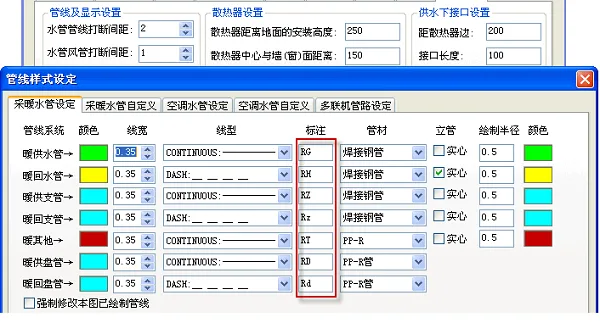
- Heat sink setup: Install heat sinks 250 mm above the ground, with a 150 mm distance from the heat sink center to the wall/window surface.
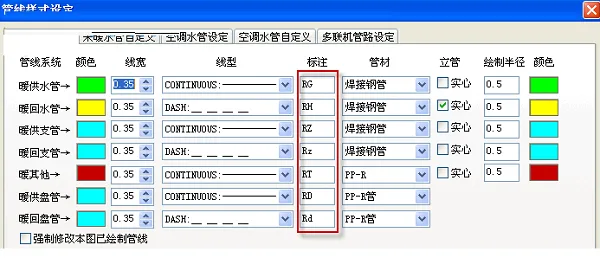
- Pipeline system: Includes warm water supply pipe, warm return pipe, warm supply branch pipe, warm return branch pipe, warm others, and warm supply coil.
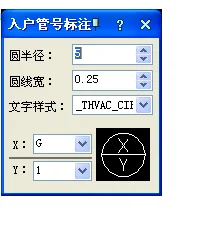
- Entry pipe number annotation: Circle radius: specified, circle width: 0.25, text style: THVAC.
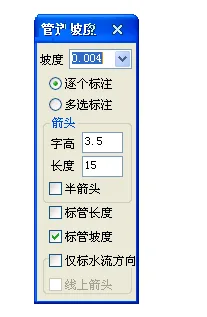
- Slope settings: Slope value 0.04; label individually or select multiple labels; arrow style with half arrow; letter height 3.5; length 15; mark pipe length and slope; annotate water flow direction only.
- After selecting this command from the menu or by right-clicking, users can customize annotation content via options. The command line will prompt accordingly.
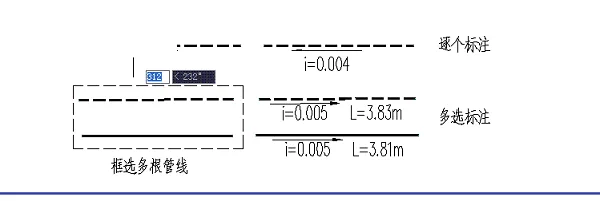
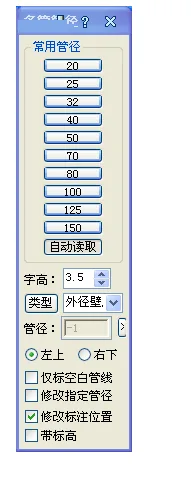
- Supports marking only blank pipelines, modifying specific pipe diameters, adjusting annotation positions, and including elevation data.
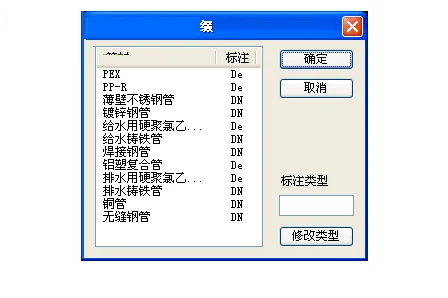
- Define prefixes for pipe labels such as PEX, PP-R, thin-walled stainless steel pipe, galvanized steel pipe, and hard polyvinyl chloride for water supply.
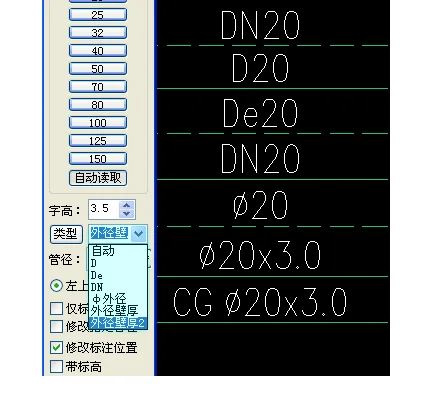
- Annotation styles can be switched to include pipe diameter * wall thickness formats.
- Supports annotation format with pipeline elevation and automatic recognition of pipeline types.
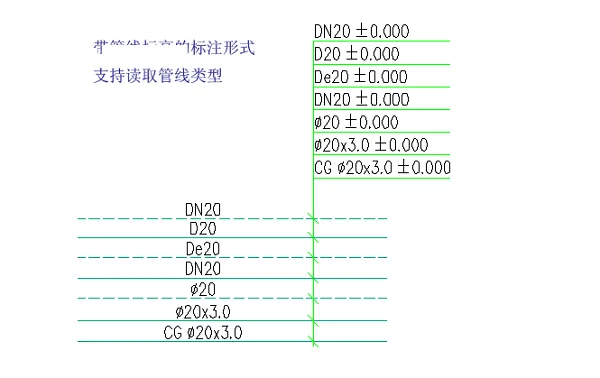
- Double-click annotation or right-click “Object Edit” to open the “Multi-tube Annotation – Modify” dialog box.
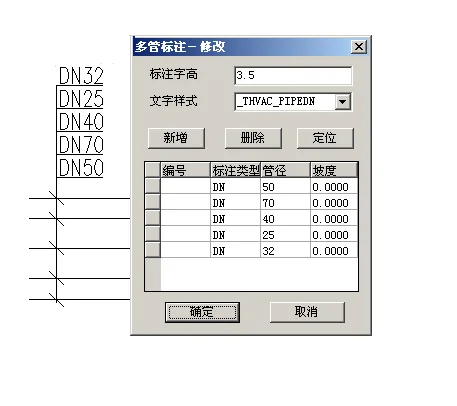
- Add or delete pipelines within the software, with located pipelines highlighted.
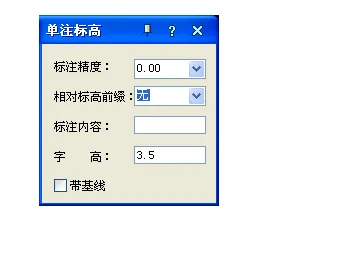
- Configure single annotation elevation, annotation accuracy, relative elevation prefixes, annotation content, font height, and baseline settings.
- Automatic bracket addition for floor elevations with manual input options and multi-level elevation descriptions.
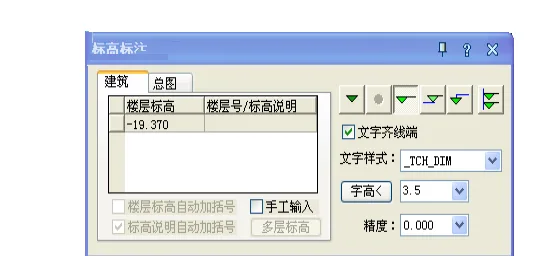
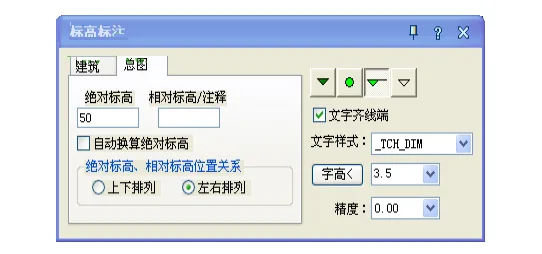
- Elevation annotations for architectural master plans include absolute and relative elevations, with automatic conversions between them.
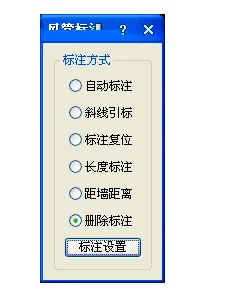
- Annotation methods include automatic annotation, diagonal marking, reset, length annotation, distance from wall, and deletion.
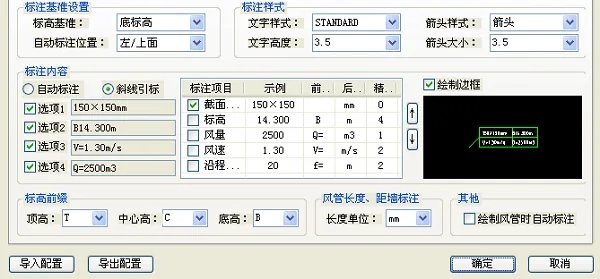
- Annotation benchmark settings allow setting elevation benchmarks, bottom elevations, and automatic annotation positions (left/top).
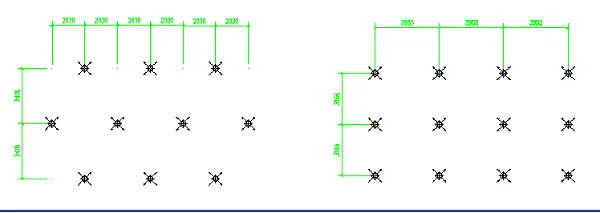
- Using the ‘Gap between air vents’ command (menu or typing ‘fkjj’), select air vents to label, confirm with right-click, and place labels at desired positions.
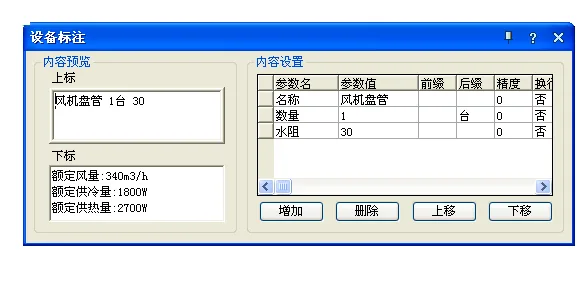
- Rated air volume: 340m³/h, rated cooling capacity: 1800W, rated heating capacity: 2700W.
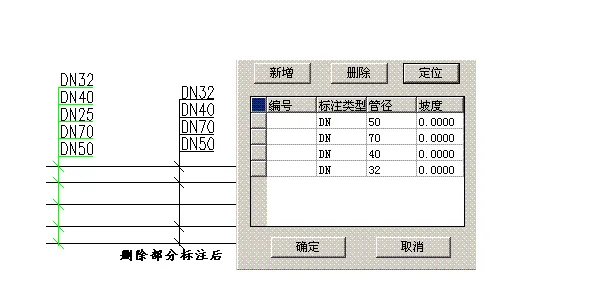
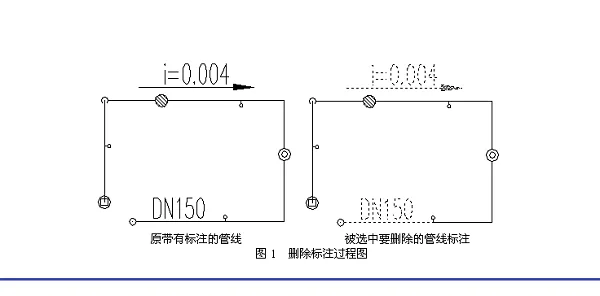
- Illustrated process for deleting annotations from original pipelines and selected pipelines.
T20 Tianzheng HVAC V7.0 Common Shortcut Keys
- General shortcuts:
F1: Help
F2: Toggle between drawing and text window
F3 or Ctrl+F: Toggle object snap
F4: Toggle dynamic input
F5: Isometric plane switch
F6: Toggle coordinate display on status bar
F7: Toggle grid display
F8: Toggle orthogonal mode
F9: Toggle grid snap
F10: Toggle polar tracking - Drawing commands:
PO, * POINT
L. LINE (Draw line)
XL. XLINE (Draw construction line)
I. INSERT (Insert block)
W. WBLOCK (Write block to file)
DIV, * DIVIDE (Divide into equal segments)
ME (Measure – divide at fixed distance)
BH, * BHOCH (Fill hatch)
HE, * HATCHEDIT (Modify hatch pattern or gradient fill)
DI (Measure distance and coordinates) - Modify commands:
MA (Match properties)
C. * COPY
MI, * MIRROR
A. ARRAY
O. * OFFSET
RO, ROTATE
M. MOVE
E. DEL key * ERASE
X. EXPLODE
T. TRIM
EX, * Extend
T20 Tianzheng HVAC Update Log
T20 Tianzheng HVAC Software V7.0 supports 32-bit AutoCAD 2010-2016, 2018, 2019, and 64-bit AutoCAD 2010-2021 platforms.
- Added 64-bit support for AutoCAD 2021 platform.
- Introduced automatic pipe diameter annotation and length filtering in pipeline settings.
- Added “Scattered Connection” dialog to expand radiator connection methods; radiators’ connection methods can be selected.
- System diagrams now support latest scattered connection methods.
- Added “Single Tube Connection” command supporting connections between single tubes, radiators, and risers.
- Supports latest single tube connection methods, including loose, vertical, dry connections.
- Heating riser: Added positioning frame for flexible riser arrangements.
- Added “Condensation Riser” command in multi-split module for easier routing.
- Pipeline drawing displays pipe diameter based on selected pipe specs.
- Water pipe riser positioning frame added for easier arbitrary arrangements.
- “Arrange air vents” supports text position and distance settings.
- “Valve Layout” supports text position and distance settings for valves.
- Added list box for commonly used electric valves with manual replacement support.
- Duct annotation now includes an automatic annotation code checkbox reading from duct settings.
- Added toggle to label external reference ducts in duct annotation.
- Enabled position and distance adjustment functions for air vent text labels.
- Batch editing for air duct valve components added.
- Multi-leaf exhaust outlet supports fixed control end; parameter changes only affect outlet position, not control end length.
- Air outlet labeling supports multi-leaf exhaust outlets.
- Material statistics now include multi-leaf exhaust vents.
- Unified column width function added in material statistics.
- Added “Component Library” and “Component Storage” functions.
- Introduced “thick line switch” and “fill switch” features.
- Added commonly used shortcut keys.
- Expanded right-click functions in block editor.
- Smoke control layer customization supported.
- Device editing function added via right-click on devices.
- Valve editing supports batch editing after multiple selections.
- “System Conversion” dropdown scroll bar added for numerous pipeline systems.
- Vertical air duct width and height interchangeability added.
Bug Fixes
- Corrected misalignment of fan coil unit connectors with duplicates.
- Resolved lag in enthalpy and humidity map capture.
- Fixed issue of ineffective addition/removal of unmarked vertical pipes.
- Corrected floor display errors in batch hydraulic calculations.
- Fixed pipeline fan interface image library popup failure on soft connection double-click.
- Resolved spacing issues between code and diameter labels after pipe sorting.
- Fixed duct fan misalignment caused by rotation arrangements.
- Corrected air vent editing to display diameter instead of length and width.
- Fixed floor number display in pipeline and annotation settings.
- Material statistics fixed for air handling unit accounting.
- Automatic labeling issue fixed for return pipes in heating double pipe layouts.
- Fixed ineffective radius settings in air vent arrangement command.
- Corrected middle edge distance in air vent layouts.











Must log in before commenting!
Sign Up