
T20 Tianzheng Architecture Software V8.0 supports both 32-bit AutoCAD 2010–2016 and 64-bit AutoCAD 2010–2022 platforms. Built on the latest AutoCAD graphics platform, this version continues to enhance construction drawing design using advanced architectural object concepts, making it a preferred choice for architectural CAD professionals.
Developed by Tianzheng Company after 20 years of dedicated research and extensive user feedback, T20 Tianzheng Architecture Software addresses industry needs by integrating and expanding effective information management throughout the design process. It creates a truly effective BIM application model through interface, data, and standards integration, as well as seamless connectivity between Tianzheng’s series of software and external platforms like Revit. The software excels at embedding, carrying, and expanding data information.
To streamline design workflows, commonly used commands have been categorized and placed on a palette above the drawing area. Users can activate commands quickly with a single click, avoiding repetitive navigation through multi-level menus, thereby improving efficiency in completing engineering drawings.
Tianzheng Building T20V8.0 Installation and Activation Guide
- Download and run T20 Tianzheng Building V8.0.exe, then accept the license agreement. (Note: The official version has been updated.)
- Select the installation path, typically defaulting to
C:TangentTArchT20V8. - Follow the installation prompts until completion, then exit the installer.
- Copy the patch file
tch_initstart.arxto the installation directory and replace the existing file (default path:C:TangentTArchT20V8sys24x64). - Launch the software and associate it with AutoCAD as shown below.
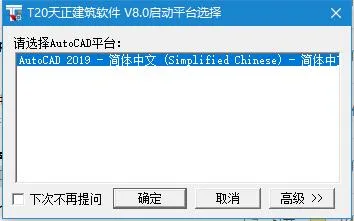
Key Features of Tianzheng Architecture
Design Objectives: The software leverages professional object technology to synchronize the creation of 3D models and floor plans, accommodating repeated revisions common in construction drawings.
By exploiting Tianzheng’s advanced object modeling, users can generate sunshine analysis models and occlusion models for planning and design purposes (see example below), as well as energy-saving building analysis models required for compliance with building energy-saving regulations.
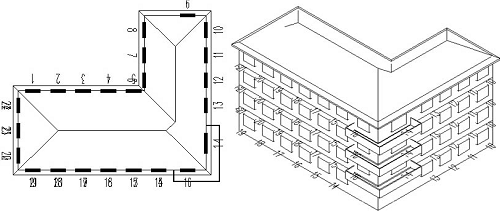
The core development goal of Tianzheng Architecture CAD software remains achieving efficiency, intelligence, and visualization.
Custom Object-Based Architectural Components
Tianzheng has developed a suite of customizable architectural objects characterized by ease of use and broad applicability. Wall components, for example, feature complete geometric and material properties, allowing them to be manipulated like standard AutoCAD graphics. Users can stretch shapes using grips or double-click to edit parameters such as wall thickness and height. Doors and windows intelligently link to walls based on their relationships, dramatically enhancing editing efficiency. Changes are reflected instantly in the 3D view, enabling seamless 2D/3D integration.
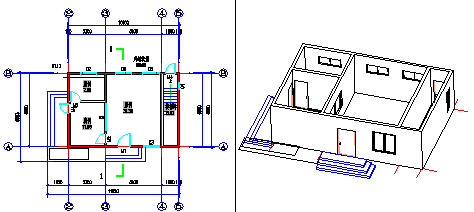
User Interface Enhancements
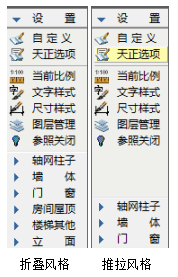
- Intelligent Menu System: The interface uses 256-color icons, vivid graphics, clear hierarchy, and a foldable menu structure. Mouse wheel scrolling enables quick submenu switching. Right-click menus offer rich functionality, including real-time assistance, directory navigation, command startup, and customization.
- Context-sensitive right-click shortcut menus detect selected object types, presenting relevant editing options and allowing personalized menus to suit user habits. Chinese Pinyin shortcuts and one-click commands accelerate drawing workflows.
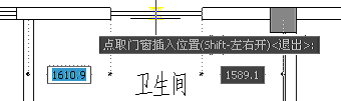
- Dynamic Object Input Across Platforms: AutoCAD’s interactive dynamic input and editing methods are fully integrated into Tianzheng objects. Direct dimension input on graphics enhances drawing efficiency, demonstrated by dynamic door and window dimension adjustments.
- Advanced Status Bar Features: Controls allow users to set and modify current scales, manage grouping, wall baseline display, bolding, filling, and dynamic annotations, aiding elevation and coordinate workflows.
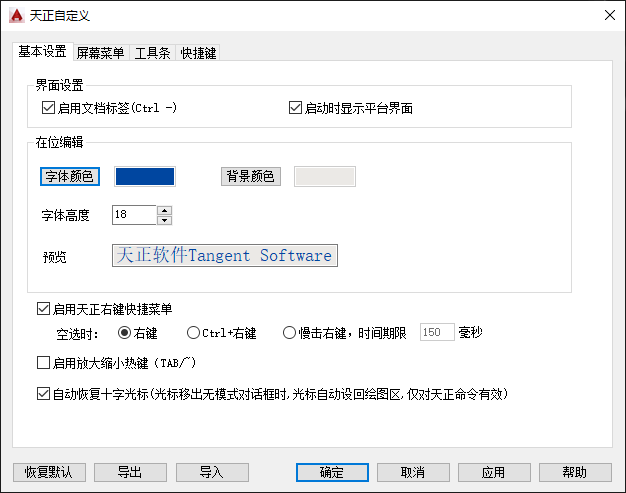
- Customization Support: Users can customize interface forms, commands, and architectural design parameters. Settings can be exported as XML files for sharing within teams and restored to defaults when needed.
Specialized Annotation System
Tianzheng offers a tailored annotation system for construction drawings. Axis labels, dimension marks, symbols, and text are all implemented as custom objects optimized for architectural standards, replacing traditional annotation methods.
This system enables flexible modification of dimension objects, simplifies structure, reduces memory use, and streamlines command sets, enhancing usability. Custom symbol annotations comply with standard drawing legends and feature professional grips and scalable information. Grip behavior supports intuitive editing consistent with design habits, effectively standardizing CAD symbol annotations.

New Text and Table Functions
The custom text object supports easy input and editing of mixed Chinese and Western text, subscripts, special characters, and circled text. It allows separate aspect ratio adjustments for Chinese and Western fonts, solving font height discrepancies in AutoCAD’s *.shx and *.ttf fonts, and ensuring compliance with national drafting standards.
Tianzheng Text also supports background blocking for clearer visuals. Its in-place editing lets users double-click text to edit directly within the graphic, enhancing convenience.

Tianzheng Table utilizes advanced table objects with an interface similar to Excel, empowering users to control table appearance and create personalized layouts. Notably, it supports bidirectional data exchange with Excel, making engineering spreadsheet management as easy and efficient as metric calculations.
Robust Gallery and Block Management
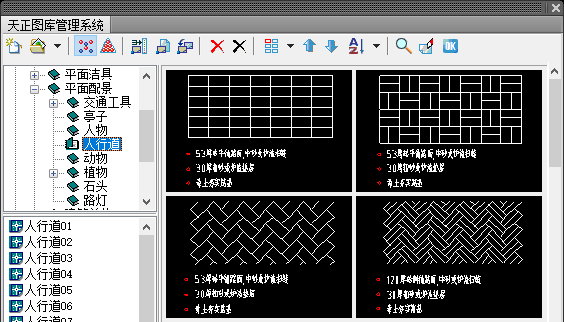
The image library system uses TKW file format for managing multiple libraries in a clearly organized tree structure. Users can freely adjust the visual sizes and relative positions of category names and block preview areas. Blocks support drag-and-drop sorting, batch renaming, and automatic naming based on dimensions for easy management.
The library interface features a flat icon toolbar and menu bar consistent with popular software design. System and user libraries are maintained independently, facilitating smooth version upgrades.
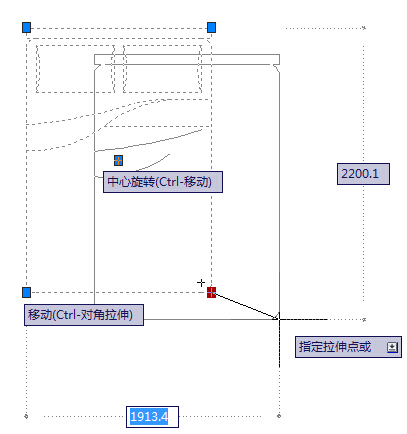
The Tianzheng block offers five grips to perform diagonal scaling, rotation, and movement directly. The “Block Shielding” feature allows blocks to mask background objects without cropping. Precise size and corner adjustments are possible anytime via object editing.
Dynamic CAD blocks and dynamic graphic libraries for furniture are also supported.
Project Manager with Drawing Set and Floor Table
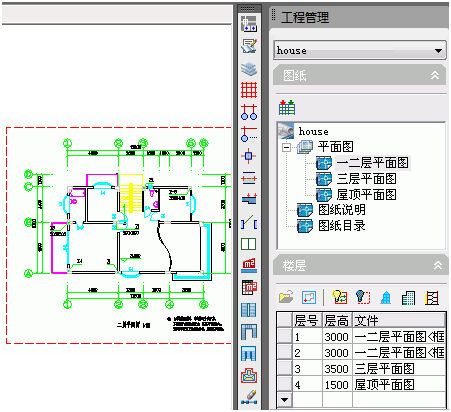
The project manager combines drawing sets and floor tables into one entity, integrating functions like building sections, 3D model combinations, door and window tables, and drawing catalogs. It manages engineering drawing files efficiently, allowing direct opening from drawing sets or floor table file icons.
The system supports saving multiple floor plans in a single DWG file, individual DWG files per floor plan, or a combination of both.
Enhanced Vertical Profile Drawing
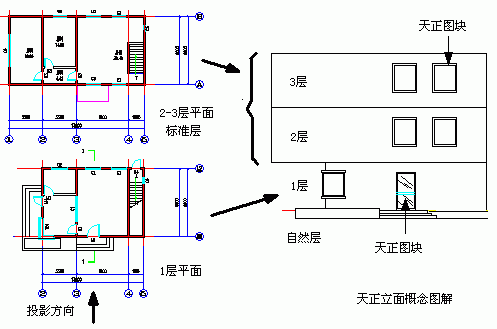
Tianzheng Architecture extracts 3D information from floor plans, combines it via the floor table, and automatically generates elevation and section drawings by removing hidden elements. This simplifies workflows and significantly improves drawing quality.
Engineering Data Queries and Area Calculations
After floor plan completion, users can automatically count doors and windows and generate corresponding tables. The software calculates volumes, weights, and wall areas of components to support further analysis.
Tianzheng Architecture offers various commands for calculating room usage area, building area, balcony area, and more.
Comprehensive AutoCAD Tool Support
Tianzheng objects integrate with AutoCAD’s property palettes, enabling simultaneous parameter modifications across multiple objects. Feature matching (format brush) allows quick and intuitive copying of object properties.
Building Object Display Characteristics
Tianzheng Architecture ensures construction drawing displays comply with regulations and that 3D models closely reflect actual components.
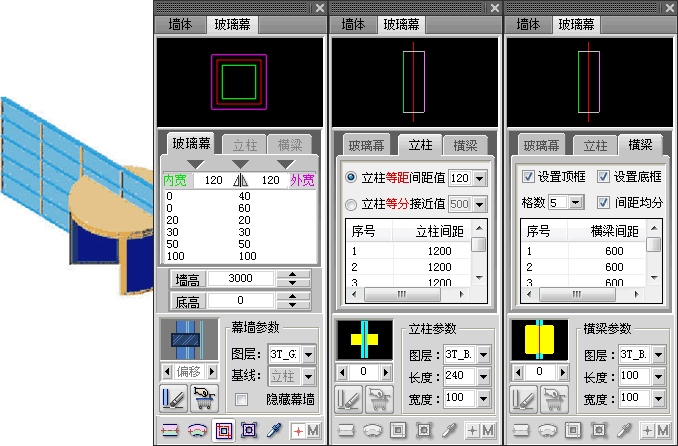
Glass Curtain Wall: Two-dimensional representations simplify glass curtain walls using door and window lines, while 3D models deliver precise depictions, ensuring consistency between drawings and models.
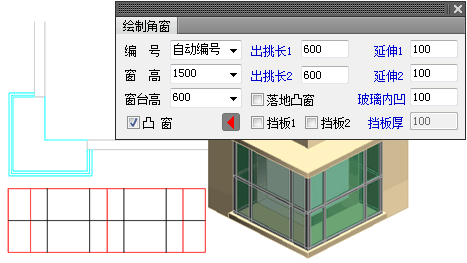
Corner Convex Window: Parameterized as unified window objects, corner and convex windows automatically snap to walls and handle side occlusion for accurate placement.
New Features and Improvements in Version 8.0
- Support added for 64-bit AutoCAD 2022 platform.
- Annotation System Enhancements:
- Improved ‘Single Axis Annotation’ to recognize axis lines in external references and block references.
- Added ‘Axis Number Schematic’ command to display floating axis numbers at view edges when annotations are outside the current view.
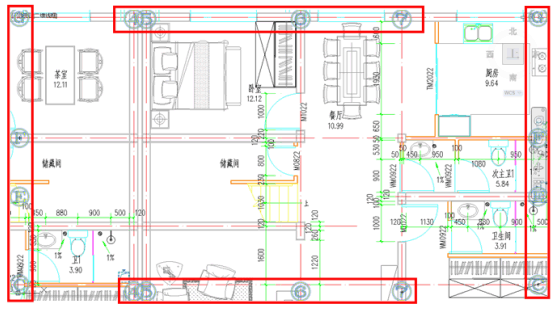
- Enhanced ‘Incremental Text’ to support orthogonal rotation during incremental changes; spacing can be set directly on the drawing. Added support for multi-level text, single-layer elevation, exit annotations, and circled text.
- Improved ‘Find Replace’ to recognize celestial radius, diameter annotations, inward view symbols, slot window numbering, and fire zones.
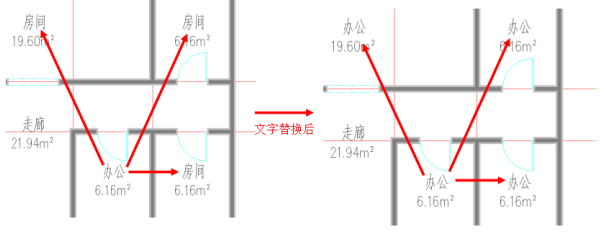
- Added ‘Text Replacement’ command to replace target text with source text content.
- Added ‘Text Extraction’ to export text content from selected objects into Notepad or Word.
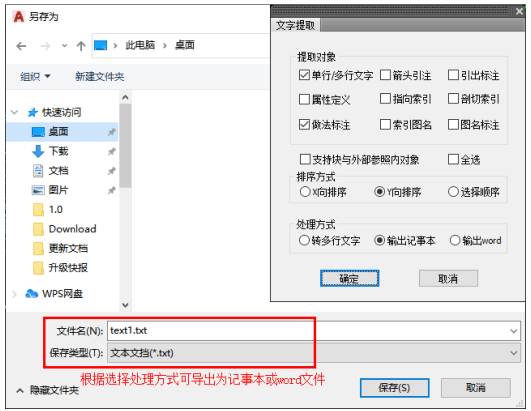
- Added ‘Character Conversion’ to switch text into attribute definitions and vice versa.
- Table cell editing dialog now supports mouse drag-and-drop resizing.
- Improved ‘New Table’ command with header selection from component library.
- Added ‘Read into Word’ command to create or update Tianzheng tables from Word selections.
- Enhanced ‘Door and Window Annotation’ to ignore wall baseline annotations and support strip and corner windows.
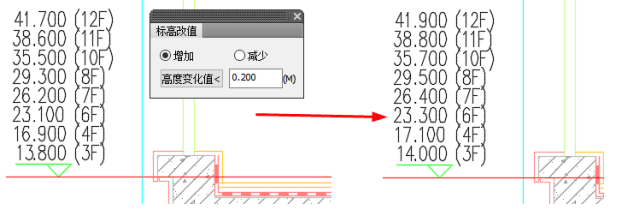
- Improved ‘Equation Annotation’ with added annotation precision settings.
- Added ‘Merge Annotations’ to annotate total dimensions across multiple selected dimensions.
- Added ‘Elevation Change Value’ to batch adjust elevation values.
- Enabled moving or copying multiple elevation levels with dynamic annotations that auto-update values.
- Improved arrow annotations with CAD scaling, background masking, and new “in arrow” alignment option.
- Enhanced export annotations with CAD scaling, background masking, line length auto-adjustment, and editing tools for annotation points.
- Added commands for quick addition and deletion of annotation points.
- Improved annotations for symmetry axes, compasses, index symbols, drawing names, cutting symbols, cloud lines, and internal view symbols—all with CAD scaling and enhanced editing features.
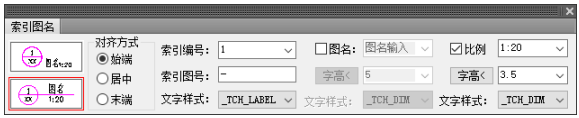
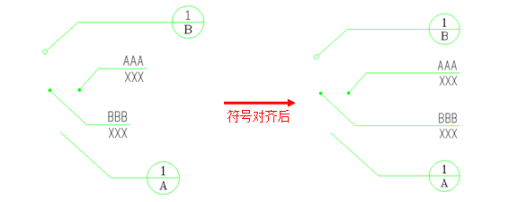
- Added ‘Symbol Alignment’ for end alignment of exported annotations and index symbols.
- Room Area Features:
- Added room-related settings in Tianzheng options for controlling room object display.
- Enhanced ‘Search Room’ command to batch generate balcony areas, support zigzag rooms, and read settings from basic options.
- Improved ‘Query Area’ with presets for room names, contour display, column deductions, and area boundary calculations. Added support for zigzag rooms and batch area queries.
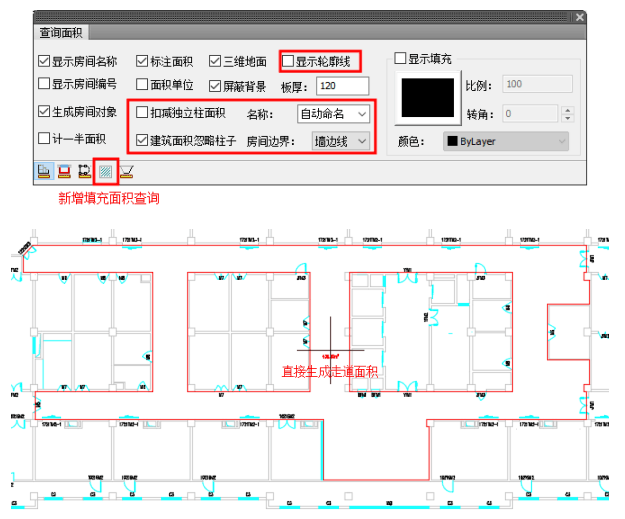
- Improved ‘Inner Area’ command to read display and labeling settings from basic options.
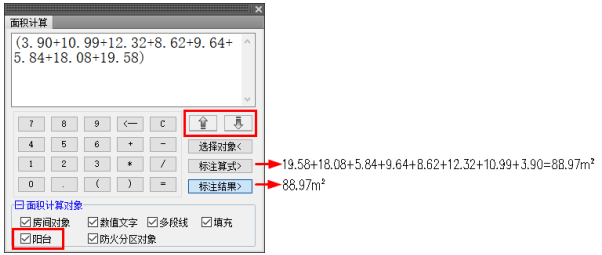
- Optimized ‘Area Calculation’ process with added balcony support, expression output, drag-and-drop resizing, and automatic text wrapping.
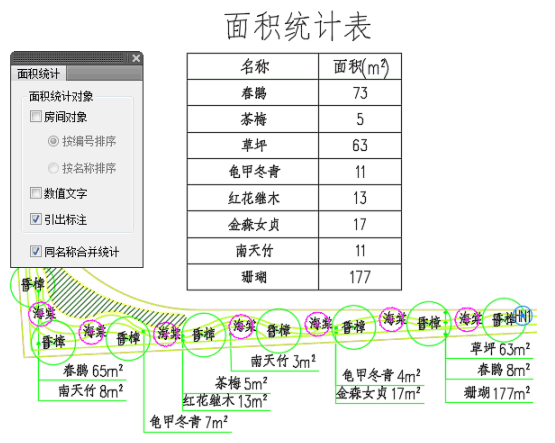
- Added ‘Area Statistics’ to calculate and tabulate areas of different object types.
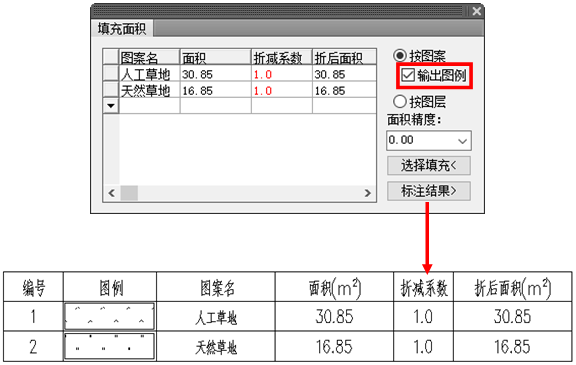
- Improved ‘Fill Area’ command with added numbering and legend output.
- Image Gallery Updates:
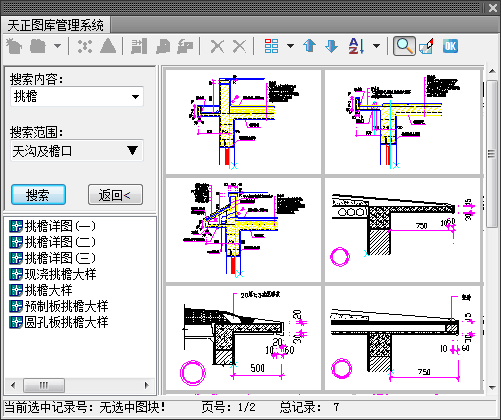
- Enhanced ‘General Library’ with image block search and mouse wheel page flipping in the preview pane.
- Improved ‘Block Replacement’ for replacing selected blocks with multiple selection support.
- Enhanced ‘Block Layer Change’ to batch modify layers within blocks, pick target layers, and unify object colors to ‘bylayer’.
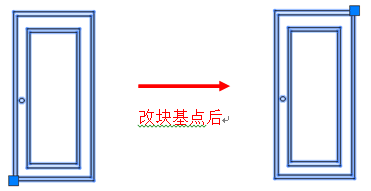
- Added ‘Change Block Base Point’ for quick base point modification without moving inserted blocks.
- Added ‘Extract Within Block’ to extract copied block references or selected objects outside blocks.
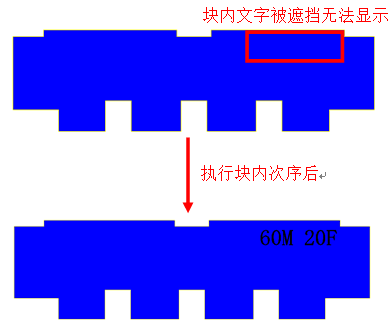
- Added ‘Block Order’ to reorder objects within blocks without exploding them.
- Improved ‘Block Conversion’ to convert unnamed blocks to named and support batch operations.
- Added ‘Quick Block Building’ to quickly create CAD blocks from selected objects following naming rules.
- Enhanced ‘General Library’ with image block search and mouse wheel page flipping in the preview pane.
- Other Improvements:
- Enhanced ‘Draw Wall’ command to capture intersections of wall edges and appearances.
- Modified exterior wall display modes for interior/exterior identification, with continuous highlighting of exterior walls.
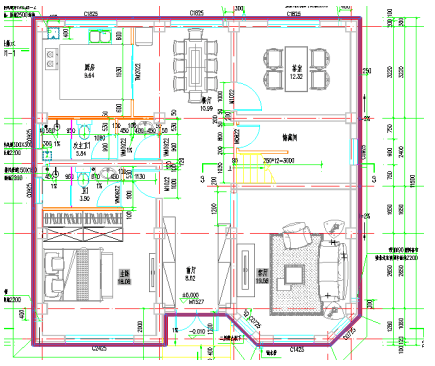
- Added independent layer settings for civil air defense doors.
- Door and window library supports double-click to adjust column widths, with memorization of changes.
- Automatic door/window numbering supports six-digit numbers and updates dynamically when widths change.
- Strip window width calculation supports wall centerline, inner skin, or outer skin settings.
- Improved door/window number dropdowns to auto-adjust width based on content length.
- Enhanced ‘Door and Window Table’ command with options to exclude openings and improved numbering calculation.
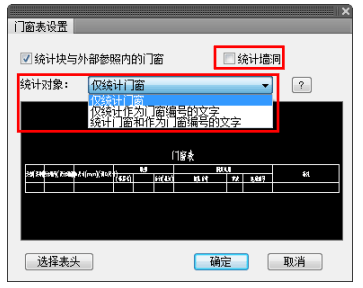
- Improved general door/window table to avoid failure if header block is deleted, with updated calculation basis.
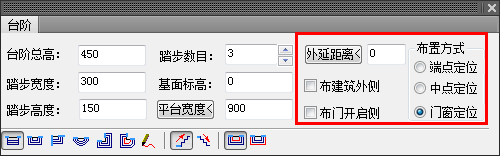
- Enhanced ‘Steps’ command to generate side edges for rectangular single-sided steps, including platform width and total step width selection, with extension distance settings.
- Enhanced ‘Line Pattern’ command to extract pattern parameters from images.
- Improved ‘Insert Frame’ to highlight scale during paper space frame insertion.
- Streamlined ‘Customization’ by merging operation and interface configuration into a ‘Basic Settings’ page.
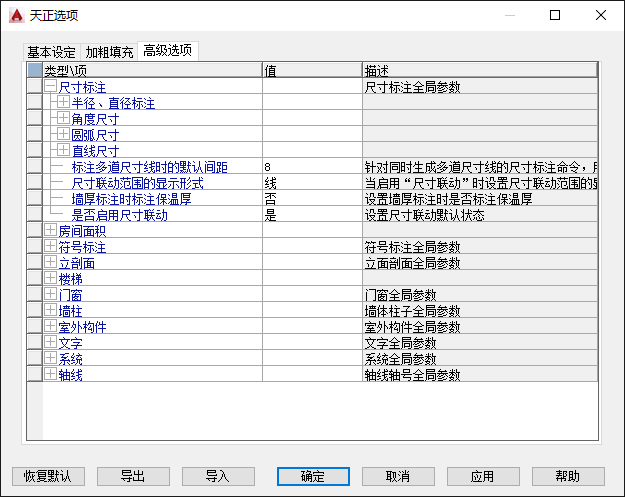
- Extended ‘Tianzheng Options’ with new display modes, drawing modulus settings, automatic recent project loading, stair section lines, and evacuation radius colors.
- Added reference button to toggle recognition of objects within block references.
- Enhanced ‘Batch Binding’ to select all files across multiple folders simultaneously.
- Improved export commands with external reference binding options and persistent save types.
- All Tianzheng objects now support viewport layer property overrides.
Bug Fixes
- Fixed abnormal dialog box displays under certain system display settings.
- Resolved redo command failure after using ‘abandon’ operation.
- Corrected grid annotation issues with radial axis intersections.
- Fixed overlapping and incorrect axis number generation in grid annotations.
- Corrected axis number positioning after stretching operations.
- Fixed discrepancies in radial axis numbers during multi-axis operations.
- Resolved automatic rounding of standard column angles after editing non-integer values.
- Fixed inability to draw walls shorter than 20 meters in metric units.
- Resolved crashes when using single line to wall command with locked axis layers.
- Fixed crashes when modifying composite doors/windows layers in AutoCAD 2013/2014.
- Corrected door/window generation near coordinate origins when canceling copy operations in AutoCAD 2015+.
- Resolved digit limitations in door/window number dialogs for special door types.
- Fixed issues with parameter input for convex windows in door/window libraries.
- Corrected adding/removing doorway lines on specified sides in user coordinate systems.
- Fixed incorrect door/window display after room search operations on specific drawings.
- Resolved building area contour search failures during room searches on certain drawings.
- Fixed crashes when dragging room contour grips to special positions.
- Corrected area query inaccuracies with large coordinate values.
- Fixed in-place editing issues for Tianzheng text on AutoCAD 2022 floating windows.
- Resolved missing characters and incorrect placement during incremental text operations.
- Fixed extra dimension generation in Tianzheng dimension annotations during cutting.
- Corrected overlapping text issues in dimension annotations after self-adjustment.
- Addressed polar axis tracking conflicts with horizontal/vertical annotation methods.
- Fixed incorrect annotation results within viewport points in layout space.
- Resolved block annotation errors on dynamic blocks.
- Fixed selection issues for angle annotations in reference alignment mode.
- Corrected positioning errors for angle and arc length annotations after mirroring.
- Fixed cell selection problems during table cell merging in large coordinate systems.
- Resolved preview and display failures for Tianzheng objects inside blocks during unit illustration.
- Added support for ellipsis input in multi-level floor elevation editing dialogs.
- Fixed elevation checks and corrections for multi-level elevation annotations with non-uniform floor heights.
- Corrected default text style and height reading for arrow captions in stair objects.
- Fixed inconsistent spacing between annotation texts and leader lines.
- Resolved text position shifts after double-click editing without parameter changes.
- Corrected displacement of numbering texts during cutting symbol stretching.
- Fixed inability to modify colors of index image name objects.
- Corrected text reset issues for index image name objects with scales other than 1:100.
- Fixed incremental text operation failures for index image names in user coordinate systems.
- Resolved flipping and deformation of cloud lines after mirroring.
- Corrected internal view symbol positioning for certain viewing angles during in-place text editing.
- Fixed failure of precise background masking for blocks during printing in specific cases.
- Addressed object display order changes after block renaming operations.
- Fixed component drawing orientation issues in user coordinate systems.
- Resolved wood grain filling problems in user coordinate systems.
- Fixed incorrect pattern preview displays in angled user coordinate systems.
- Improved performance when opening, locking layers, and other operations.
- Fixed object query panel display issues with floating interfaces on AutoCAD 2022.
- Corrected bold curve operation failures in layout space.
- Fixed ineffective alignment commands after repeated operations in the same DWG.
- Resolved invalid color settings for Tianzheng rectangles set to byblock.
- Corrected incorrect viewport layers generated by viewport definition commands.
- Fixed cleaning of floor frame text styles during PU operations.
- Resolved text loss in floor frames when exporting in T8-T20V3 formats.
- Fixed crashes caused by double-clicking text in high-resolution AutoCAD versions.
- … and many more minor fixes.











Cannot be replaced, cannot be opened
The downloaded file is not the official version, it is still a trial version. After installation and replacing the file, it still cannot be opened. CAD2018 version
File data corruption occurred after decompression