
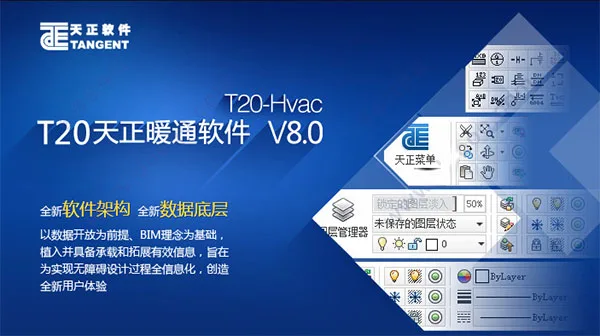
T20 Tianzheng HVAC Software V8.0 supports Win7 32-bit AUTOCAD 2010-2016 and Win7/10 64-bit AUTOCAD 2010-2022 platforms, positioning itself as a specialized and intelligent HVAC design software. This software complies with key standards such as “Heating, Ventilation, and Air Conditioning for Civil Buildings GB50736-2012,” “Technical Standard for Building Smoke Control and Exhaust Systems GB 51251-2017,” and “Code for Fire Protection Design of Garage, Repair Shop, and Parking Lot GB 50067-2014.”
The software utilizes intelligent custom entity technology to automatically manage the interactions between pipelines and equipment. It supports double-click editing to modify Tianzheng objects seamlessly. Covering a broad spectrum of HVAC specialties—including heating, ventilation, air conditioning, and multi-split design—it enables rapid floor plan layouts, automatic system diagram generation, and comprehensive material statistics.
Powerful computational modules simplify complex calculations for designers, allowing easy export of calculation sheets so that users can focus more on engineering innovation. While efficiently producing 2D drawings, the software simultaneously synchronizes the 3D view, enabling quick switching between 2D plans and 3D solids for a clear project overview. Edits made in the 3D view automatically update all other views, ensuring consistent project management.
T20 Tianzheng HVAC v8.0 is a highly advanced professional HVAC design software that introduces an innovative design approach combining drawing and calculation. It adheres to the latest design standards and automatically extracts fundamental calculation data. With its professionalism and stability, the software offers HVAC designers a fresh and efficient operating experience.
The software provides hundreds of comprehensive design features addressing various HVAC needs, allowing designers to complete projects quickly. It encompasses extensive HVAC knowledge, including heating, ventilation, air conditioning, and multi-split design. Users can rapidly layout floor plans, generate system diagrams automatically, and perform required material statistics. Its user-friendly interface makes it an ideal design tool.
Compared to previous versions, T20 Tianzheng HVAC v8.0 fully supports Win7/10 64-bit systems and the AutoCAD 2022 platform, delivering enhanced compatibility and stability. It offers many new features, such as the wind system function, which introduces commonly used wind systems and layers like insulation, fireproofing, lining, and filling. This feature allows easy control of layer display status and color by object.
The software comprehensively improves air duct drawing, bends, diameter changes, and plane alignment, adding numerous parameters and functions. Material statistics now support insulation and fire protection layers by area, system-wise statistics for water pipes and air ducts, and merging system statistics to improve accuracy. These enhancements provide precise statistical data, assisting designers in creating better projects.
In addition to new features, many bugs have been fixed and some functions improved. This includes resolving software crashes caused by deleting air valve blocks during layout, correcting errors in multi-split calculation rule data creation and saving, and enhancing pipeline settings, geothermal coil, riser labeling, multi-tube labeling, heat sink labeling, and cutting symbols. These updates enhance the user experience and boost design efficiency.
Tianzheng HVAC T20V8.0 Activation and Installation Tutorial
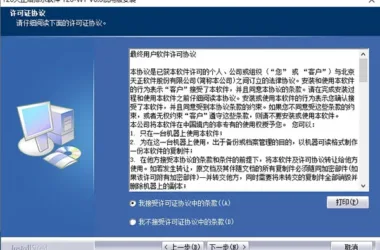
- Download and run the T20 Tianzheng HVAC software (T20 HVAC V8.0), then accept the license agreement. Note: The official version has been updated.
- Select the installation path, typically defaulting to
C:TangentTHvacT20V8sys24x643. Follow the installation prompts until completion, then exit. - Copy the patch file
tch_initstart.arxto the installation directory, replacing the existing file. (Default path:C:TangentTHvacT20V8sys24x64) - Run the software and associate it with AutoCAD.
New Features and Improvements
1. 64-bit Support for AutoCAD 2022 Platform
2. Wind System
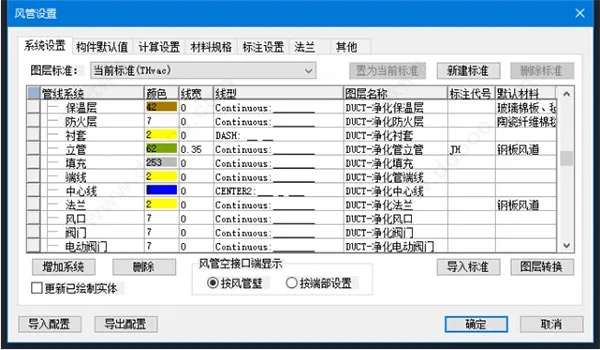
- Duct Settings – System Settings: Added multiple commonly used air systems and layers such as insulation, fireproofing, lining, and filling, enabling easier control of layer display and color by object.
- Component Default Values: Added options to show or hide insulation, fire protection, and lining for initial display settings.
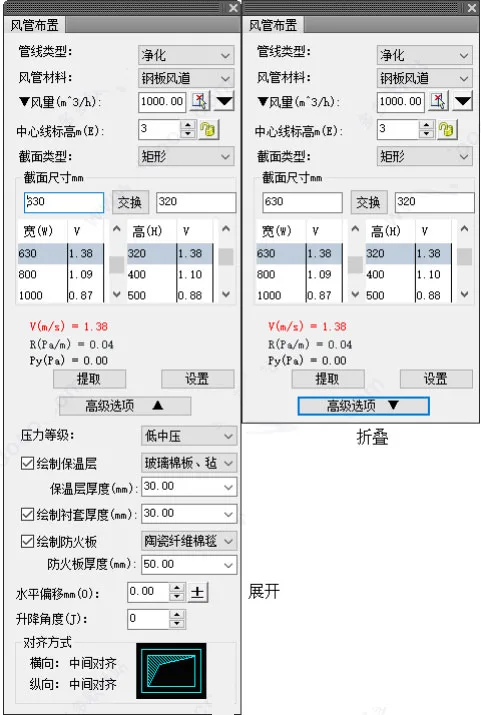
- Duct Drawing Dialog: Supports folding/unfolding to minimize space for uncommon parameters.
- Duct Drawing: Added insulation and fire-resistant layer drawing with real-time material selection that auto-matches thickness based on cross-sectional dimensions. Also supports modifying lining thickness.
- Vertical Duct Drawing: Similar folding functionality and support for insulation, fire-resistant layers, and lining with material selection and thickness adjustments.
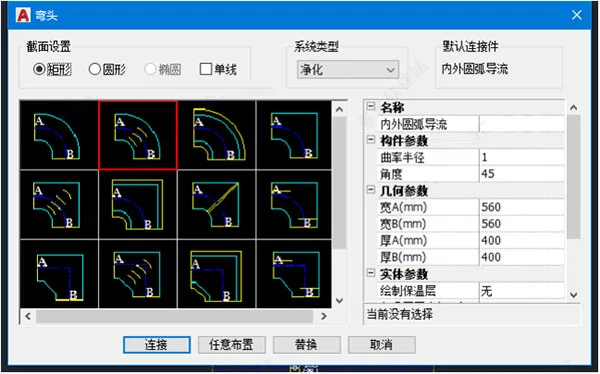
- Elbows: Integrated styles, including options with guide vanes and external noise reduction.
- Bends and Variable Diameter Components: Add physical parameters including insulation and fireproof materials with thickness settings and inner lining support.
- Wind System Editing Commands: Now support editing of insulation, fireproof, and lining layers.
- Alignment Features: Plane and vertical alignment support selection on drawing surfaces; vertical adjustment supports automatic starting elevation extraction.
- New Duct Fill Command: Allows batch filling of air duct systems with style settings, fire-resistance limit labeling, complying with “Technical Standards for Building Smoke Control and Exhaust Systems.”
- Riser Editing: Supports editing insulation, fire protection, lining, and toggling flange drawing. Vertical duct style editing has been streamlined.
- Height Increasing Elbow: Provides parameter reminders for minimum height differences and supports real-time parameter modification to reduce errors.
- Equipment on Pipes: Supports breaking insulation, fireproofing, and lining objects along with wind pipes.
- Annotation and Labeling: Commands support batch deletion, unit updates, format brushing, and automatic generation for vertical air ducts.
- System Conversion Command: Updates system layers to ‘bylayer’ for synchronized layer changes.
- Optimization: Enhanced automatic processing of air duct connections, linkages, air valve relationships, and ducts with lifting angles.
- Air Vent Spacing: Supports annotation under UCS.
- Four-Way Command: Added support for simultaneous reversing and parameter modification.
3. Material Statistics
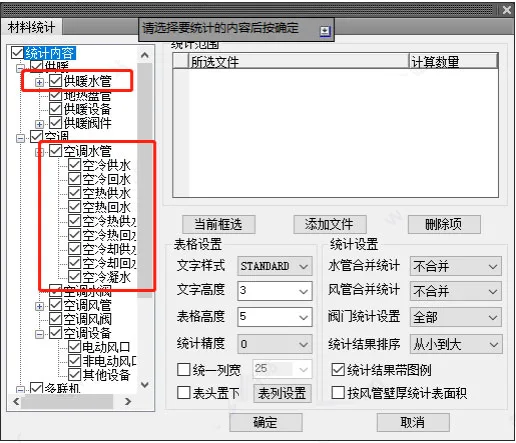
- Improved classification of pipelines for selective statistical analysis.
- Refined distinction between electric and non-electric equipment, allowing separate statistics.
- Supports area-based statistical analysis of insulation and fire protection layers.
- Supports splitting and merging of water and air pipe system statistics.
- Allows sorting statistical results by size.
- Offers customizable statistical table widths, including uniform width output.
- Option to include or exclude legends in statistical results.
- New “Statistical Query” command lets users select rows in statistical tables corresponding to objects on the drawing.
- Calculates insulation and fire protection layer thicknesses.
- Expanded statistical accuracy for better reliability.
4. Water System and Other Features
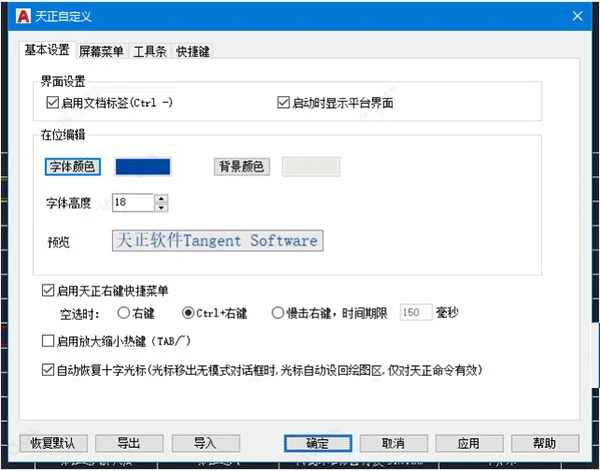
- Added “Customize” command under settings for shortcut key customization and related settings.
- Pipeline drawing from risers or pipes supports leading from the top, bottom, or middle of risers with automatic connector generation.
- System Heat Sink supports free arrangement and insertion point updates.
- New commands for drawing expansion joints and underfloor heating sleeves, supporting style switching and size modification.
- Indoor and outdoor unit editing includes options for labeling equipment and setting label positions.
- Optimized multi-split system calculation algorithms for better accuracy.
- New “Offset Lift” command manages local lifting and offsetting of water pipes with adjustable parameters.
- “Sleeve Insertion” command automates adding sleeves to pipelines passing through walls, with customizable layers and styles.
- Constant pressure water replenishment calculation page supports ESC to exit.
- Radiator calculations are now non-modal dialogs, supporting real-time updates and easier interaction.
- “Batch Binding” command enables batch binding of references.
- Font Check command improved to support font replacement in both Chinese and English.
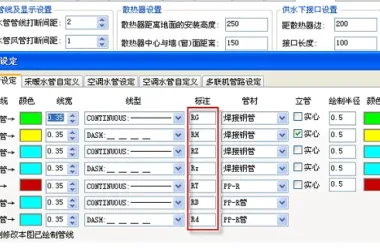
- Pipeline Settings expanded to include non-system layers for expansion joints, holes, and more.
- Geothermal coil parameters updated to better fit engineering requirements.
- Riser annotation supports batch one-click annotation and existing styles, with ESC to exit.
- Multi-tube annotation automatically adjusts label position according to pipe diameter.
- Improved compatibility between high and low platforms for standard heat sinks.
- Section cutting commands merged and enhanced with style selection.
- Layer Management command updated.
- Non-air conditioning heating load calculation sheet default output items adjusted.
- Added automatic air duct and outlet layout functions with indoor unit installation.
- Fan coil unit installation supports soft connection removal when return air duct length is zero.
- Riser labeling includes automatic verification and update to prevent mislabeling.
- Radiator arrangement command disables and re-enables capture automatically for smoother operation.
- “Filter Selection” command added in drawing tools to filter HVAC equipment models and names.
- Text table commands “Transfer WPS” and “Read WPS” added for WPS file management.
5. Smoke Control and Exhaust
- Optimized smoke control and exhaust calculation tree structure with right-click functions.
- Addressed linkage issues in smoke plume calculation regarding smoke storage compartment thickness and height.
- Fixed calculation inconsistencies in natural smoke exhaust outlet cross-sectional area when switching window styles.
- Updated rules for minimum clear height in smoke exhaust corridors to accommodate provincial variations.
- Restricted modification of second or third row doors in evacuation door lists on floors with closed stairwell evacuation doors.
Bug Fixes
- Resolved software crashes caused by deleting air valve blocks during air valve layout execution.
- Fixed annotation displacement issues in multi-split production system diagrams.
- Corrected errors in creating and saving multi-split calculation rule data.
- Fixed accumulation issues for cooling capacity in special multi-split system branch pipes.
- Corrected incorrect capitalization of labeled radiator units.
- Adjusted insertion point deviations for freely arranged system radiators.
- Fixed material statistics excluding double line valves and water pipe risers.
- Corrected incorrect keyword layer reading when switching between single and double air ducts.
- Fixed labeling dimension errors in multi-leaf exhaust vents using device labeling commands.
- Resolved font display issues with Win fonts in text styles.
- Restored deleted timetable in load calculation to enable proper calculations.
- Fixed multi-leaf exhaust vent exploding and layer issues.
- Reduced high memory usage caused by too small air outlet spacing settings.
- Updated single-layer louver blocks.
- Optimized valve layout to prevent valve core loss.
Common Questions
Q1: Can file crashes during load calculation be restored?
Versions T20 3.0 and above include a load calculation file recovery feature. In the load calculation interface, locate the auto-save path in the habit settings and retrieve the saved copy.
Q2: How to resolve “Failed to load block” when setting air valves?
The air valve arrangement dialog only supports air valves, not equipment or other blocks. When prompted, click OK, return to the layout interface, double-click the preview image, and the Tianzheng Library Management System will open. Find and select the corresponding air valve block.
Q3: Does the software support adding pipeline partitions?
Yes, from version T20 3.0 onward, users can add partitions in Pipeline Settings by selecting the desired pipeline system and clicking the highlighted “Add Partition” button.
Q4: How to draw with added partitions?
Added partitions highlight an arrow next to the pipeline drawing command. Click the arrow to display all included pipelines, select the partition pipeline, and start drawing.
Q5: Is custom line type supported?
Yes. In Pipeline Settings under Other Settings, click “Create Typeline” to operate in the pop-up dialog. After creation, return to Other Settings, click “New Production and New Type Storage,” then go to Water System Settings to select the new line type from the dropdown.
Q6: How to share manually added multi-split manufacturers?
From version T20 2.0 onward, the ‘Import/Export’ function supports exporting manually added multi-split manufacturers, databases, blocks, calculation rules, etc., enabling easy sharing.











Download Warm Weather Forever Electric. Did the merchant make a mistake