
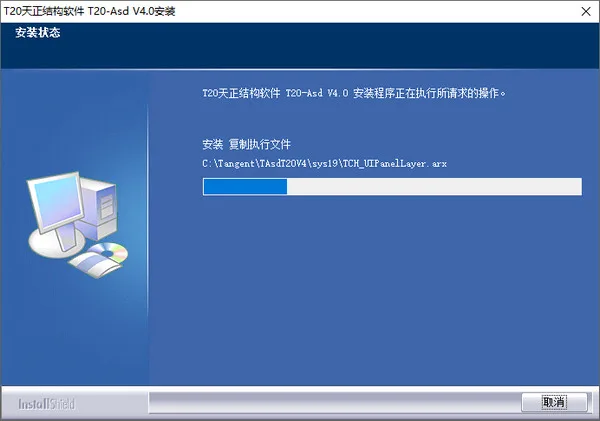
Tianzheng Structure 4.0 Free Version is a powerful post-processing software designed for structural drawings. It offers a wide range of built-in drawing tools and structural libraries, primarily focused on concrete and steel structure design. The latest version introduces several improvements, including enhanced functionalities, support for CAD2017, and new features such as coordinate annotation settings and numbering options, making your design process more convenient. Users interested in this software can download it below.
New Features in Tianzheng Structure 4.0
- Supports CAD versions 2015 through 2017.
- Can open drawings from Tianzheng architecture, water, heating, and electricity modules, and perform collision checks.
- When editing numerical input in the “In situ Annotation” dialog, the cursor is positioned at the front.
- Updated layers for the “Wall Body Table”, “Wall Column Table”, and “Wall Beam Table”.
- Fixed an issue where board hole filling modification was ineffective.
- Resolved incorrect insertion after modifying angle input for the wall column section.
- Added coordinate annotation setting and numbering functionality.
- Improved the grid annotation dialog box.
Installation Guide for Tianzheng Structure 4.0
- Download Tianzheng Structure 4.0 from this website, unzip the package, and run the installation file.
- Read and accept the software license agreement by checking “I accept the terms in the license agreement”.
- Choose the authorization method; currently, only the trial version is available.
- Select installation components, including executable files and regular libraries, which are essential for Tianzheng structural drawing.
- Choose the installation folder, defaulting to the C drive, which can be changed by clicking “Browse”.
- Set the program folder (default settings are recommended).
- Follow the on-screen instructions to complete the installation.
Software Features
1. Enhanced Basic Calculation Capabilities
- The “Basic Calculation” command now includes a live load reduction factor when reading SATWE/TAT load calculations. If a WDCNL.out file is present in the directory, the coefficient is extracted from it.
- Fixed an error where the design value was mistakenly used to calculate the base area when reading WDCNL.out or DCNL.out files.
- The “Bearing Platform Calculation” command has been updated similarly, adding live load reduction factors and fixing the same base area calculation error.
2. More Comprehensive Steel Structure Design
- Added European standard HE steel data to the hot-rolled H-beam database.
- Updated the bolt calculation module in the Steel Calculation Table to include additional steel plate thicknesses and support calculations for various bolt types.
3. Other Improvements
- Updated dialog box inputs for [asde_ct], [asde_stale], and [asde_stcale].
- Enhanced the “System Configuration” command to control whether the self-adjustment function for inserting or pasting block proportions is enabled.
- Added the “Insert Adjustment” command to enable or disable the self-adjustment feature within the current drawing.
- Introduced the “Convert Layer” command, which converts entities in the drawing from the naming conventions defined in
layerdefold.inito those inlayerdef.ini. - Modified the insertion section of the gallery module to automatically perform layer conversion.
- Updated commonly used standards, including:
- “Code for Design of Concrete Structures GB50010-2010”
- “Technical Specification for Concrete Structures of Tall Buildings JGJ 3-2010”
- “Mandatory Provisions of Engineering Construction Standards (Building Construction Part) 2009 Edition”
Tianzheng Structure Shortcut Keys
Below is a list of shortcut keys available in Tianzheng Structure 4.0, designed to expedite your workflow:
- ZSWB: Explosive Prose Edition
- XFZ: Writing Annotations
- Axis Net:
- ZXZW: Straight axis grid
- YHZW: Arc axis grid
- TJZX: Add axis line
Click @ at the selection point with BR, then disconnect at the selection point.












Must log in before commenting!
Sign Up