
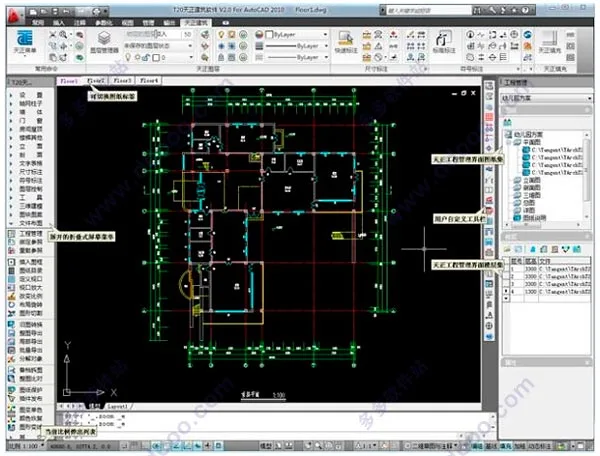
T20 Tianzheng Building v4.0 comes with registration machines and time patches that flawlessly activate the software, allowing users to enjoy unrestricted, free access. Built on the AutoCAD graphics platform, the all-new T20 Tianzheng Architecture v4.0 offers advanced architectural object concepts tailored for construction drawing design. It has become a preferred architectural CAD software thanks to its ability to embed, carry, and expand data information.
Through seamless interface integration, data consolidation, and standardized processes, it connects Tianzheng series software internally and externally with platforms like Revit, establishing a truly effective BIM application model.
Please note, T20 Tianzheng Architecture v4.0 requires 32-bit AutoCAD 2007-2016 or 64-bit AutoCAD 2010-2017 graphics platforms. It supports Windows 7 (32/64 bit) and Windows 10 (64 bit). Pay special attention to the difference between 32-bit and 64-bit systems; 64-bit requires AutoCAD 2010 or newer.
The latest version enhances the site layout module with new features such as red line setback, parking space numbering, tree name annotations, tree statistics, and coordinate tables. It also improves existing functions like road elevation and parking space layout.
Additionally, a new building fire protection module has been added, offering tools for creating fire zones, local spraying, floor openings, area corrections, and more.
Other new functions include fill area statistics and circular hole drawing. Auxiliary drawing tools like Tianzheng filling, area calculation, and incremental text have been improved, making this software an excellent tool for architectural design.

New Features in T20 Tianzheng Building v4.0
T20 Tianzheng Architecture v4.0 supports 32-bit AutoCAD 2007-2016 and 64-bit AutoCAD 2010-2017 platforms.
Key updates and enhancements include:
- Support for 64-bit AutoCAD 2017 platform.
- Introduction of building fire protection modules:
- ‘Annotation Settings’ to customize fire zone annotation display.
- ‘Partition Creation’ for quickly creating and marking fire zones.
- ‘Area Correction’ to adjust fire compartment areas.
- ‘Local Spray’ to configure local fire spray zones.
- ‘Floor Opening’ to add or remove openings for rooms or fire compartments.
- Enhancements to the venue layout module:
- ‘Red Line Retreat’ allows users to select existing red lines and input segment retreat distances to generate setback lines.
- Improved ‘Road Elevation’ with simplified operations, dialog boxes, and new methods for elevation calculations.
- Enhanced ‘Parking Space Layout’ enabling rectangular area layout, closed polyline selection, and group layout settings.
- ‘Delete Parking Space’ command for quick removal of parking spaces and their numbers.
- ‘Parking Space Number’ to automatically number selected parking spaces.
- ‘Tree Name Annotation’ for labeling tree names.
- ‘Tree Statistics’ to classify and count different trees and generate reports.
- Upgraded Coordinate Annotation with improved settings for text style, font height, numbering, and batch annotation support for site red line objects.
- ‘Generate Coordinate Table’ to create coordinate tables from celestial coordinate annotations and export data.
- ‘Fill Area’ command for classifying and calculating fill areas by layer or pattern.
- Expanded pattern filling library with overall plot filling legends.
- Additional improvements:
- Refined dialog boxes for ‘Draw Grid’ and ‘Grid Annotation.’
- Enhanced door/window insertion and editing interfaces, including circular openings, deletion functions, and a ‘Type’ button for door, window, and arc window pages.
- ‘Draw Wall’ supports deleting wall width data via DEL key.
- Boolean operations now support fire partition objects.
- Incremental Text features incremental settings and expanded array increment options.
- Default font heights for symbols such as coordinates, elevations, and drawing annotations can be preset.
- Improved ‘Tianzheng Fill’ with layer filtering, parameter picking from images, and CAD system variable support.
- Area Calculation supports fire zones, polyline lines, and filling.
- Floor frame display added to Engineering Management.
- Enhanced BIM export interface with added ramp support.
- AutoCAD 2016+ color scheme settings are no longer mandatory to be set to clear.
Bug Fixes
- Fixed incorrect filling and display issues on certain wall positions in diagrams.
- Resolved wall width and layer errors when modifying wall materials during editing.
- Corrected wall thickness display issues when selecting multiple walls with different thicknesses.
- Fixed wall and column filling lines displaying incorrectly on bold lines in R20 platform.
- Addressed incorrect 2D display of certain openings.
- Resolved door and window info display issues when specific options are enabled.
- Fixed road drawing, rounding, and landscape road intersection rounding under UCS.
- Fixed large tree generating additional zero-area regions.
- Corrected incomplete coordinate grid generation issues.
- Resolved UCS coordinate system point-by-point annotation problems.
- Fixed text in-place editing issues on AutoCAD 2012+ platforms.
- Corrected incremental text preview display on CAD 2016+ platforms.
- Fixed right-click menu incremental text command issues on R20 and R21.
- Resolved crashes when incrementing units outside table bounds.
- Fixed wall internal/external property changes due to roof line search errors.
- Resolved control accuracy recording issues during line-to-double-line transformations.
- Corrected wall insulation fill pattern conversion problems.
- Fixed CAD decomposition command causing line pattern disappearance.
- Rectified pattern adding/reducing command failures in UCS.
- Fixed crashes from selecting non-closed polylines when drawing column elevation lines.
- Resolved CAD fill command crashes related to celestial objects within cutting lines.
- Corrected unclear Tianzheng status bar button display on R20+ platforms.
- Fixed Tianzheng menu bar position recording issues.
- Addressed non-functioning settings modifications during customization.
- And many more fixes.
T20 Tianzheng Building v4.0 Crack Installation Tutorial:
- Download and extract the T20 Tianzheng Building v4.0 compressed file.
- Run “T20 Tianzheng Building v4.0 – Trial Version.exe” to install the original software.
- Accept the software agreement.
- Select all installation components, including executables, example projects, and texture files. You may change the installation directory.
- Create a program folder.
- Wait for the installation to complete.
- Once installed, launch T20 Tianzheng Building v4.0 and choose the compatible AutoCAD platform (supports 32-bit AutoCAD 2007-2016 and 64-bit AutoCAD 2010-2017).
- If AutoCAD is not installed, you can download it from __AI_S_TURL_0__.
- When opening the software for the first time, a dialog box will appear as shown.
- Open the registration machine file “T20Keygen-v2.00.exe” from the extracted files.
- Copy the Installation ID from the dialog box into the keygen’s machine code field and click “Generate Registration Code.”
- Paste the generated registration code back into the software activation field and confirm to complete the crack.
- T20 Tianzheng Building v4.0 is now successfully activated and ready for unrestricted use.
- If the registration machine fails, use the time patch included in the package, granting up to 1000 hours of unlimited use.
Function Overview of T20 Tianzheng Building v4.0
- Software Function Design Goals:
Utilizing professional object technology, it synchronizes 3D models and floor plans, catering to frequent construction drawing modifications.
It leverages Tianzheng’s object modeling to provide sunshine analysis and occlusion models for planning, as well as energy-saving building analysis models to comply with mandatory energy-saving design.
The development goal is efficiency, intelligence, and visualization. - Custom Object Construction Components:
Tianzheng offers a range of user-friendly architectural components with comprehensive geometric and material characteristics.
These components behave like standard AutoCAD graphics, with grips for stretching and shape adjustment, double-click modification for parameters like wall thickness and height, and intelligent door/window linkage.
Changes are immediately reflected in 3D views, achieving seamless 2D-3D integration. - Advanced User Interface:
- Intelligent menu system with 256-color icons, clear hierarchy, foldable menus, and mouse scroll support for quick navigation.
- Right-click menus offer commands like real-time assistance, directory jumping, startup commands, and customization.
- Context-sensitive shortcut menus adapt to selected object types, allowing personalized menus and faster drawing with Chinese Pinyin commands and one-click shortcuts.
- Dynamic input support across platforms, enabling direct dimension input on graphics, enhancing drawing efficiency.
- Powerful status bar controls for scale, grouping, wall baseline display, bolding, filling, and dynamic annotations.
- Extensive customization options with export/import of settings via XML for organizational sharing and easy restoration.
- Specialized Annotation System:
Tianzheng replaces traditional dimension and text objects with custom objects tailored for construction drawings, supporting flexible modifications and memory efficiency.
Professional symbol annotations conform to drawing standards, with intuitive grips and scale info to standardize CAD symbols. - New Text and Table Features:
Custom text objects facilitate mixed Chinese and Western text, special characters, subscripts, and circled text with adjustable font aspect ratios to meet national drafting standards.
In-place text editing provides convenient direct editing, while advanced table objects offer Excel-like interfaces with hierarchical control and bidirectional data exchange with Excel. - Gallery and Block Management:
The image library uses TKW file format, managing multiple libraries via a clear tree structure.
Blocks support drag-and-drop sorting, batch renaming, automatic dimension-based naming, and dynamic adjustments including scaling, rotation, and movement.
Background blocking (Block Shielding) is supported without cropping underlying objects.
Dynamic blocks are fully compatible. - Material System Compatible with ACAD:
Tianzheng Library supports multi-view blocks with attached materials, displaying 2D views and shaded colored materials, with accurate previews. - Project Manager with Drawing Sets and Floor Tables:
Integrates drawing sets and floor tables to manage entire projects, including building sections, 3D assemblies, door/window schedules, and drawing catalogs.
Supports multiple floor plans in single or separate DWG files, with direct file opening from the interface. - Enhanced Vertical Profile Drawing:
Extracts 3D data from floor plans to generate elevation and section drawings by eliminating hidden elements, streamlining drawing steps, and improving quality. - Engineering Data Query and Area Calculation:
Automatically counts doors and windows, generating schedules.
Provides volume, weight, and wall area data for components, supporting further analysis.
Offers area calculation commands for rooms, balconies, and building areas, assisting real estate statistics and design approval. - Comprehensive AutoCAD Tool Support:
Tianzheng objects integrate with AutoCAD property palettes, enabling simultaneous parameter editing for multiple objects.
Feature matching allows quick copying of object properties between celestial objects.
Display Characteristics of Building Objects
Tianzheng Architecture emphasizes compliance with regulatory standards for construction drawing displays, ensuring 3D models closely match actual components.
For example:
- Glass Curtain Wall:
Simplified 2D representation uses door and window lines, while the 3D model provides detailed accuracy, ensuring consistency between drawings and models. - Corner Convex Window:
Corner and convex corner windows are unified into a parameterized window object that automatically detects wall contact and completes side occlusion.











How was it installed? I’m not very good at installing this Tianzheng plugin. Can you explain it in detail
20Keygen-v2.00.exe couldn’t be found
Can CAD2018 be used
T20 Tianzheng Building v4.0 does not support AutoCAD 2018 version.