
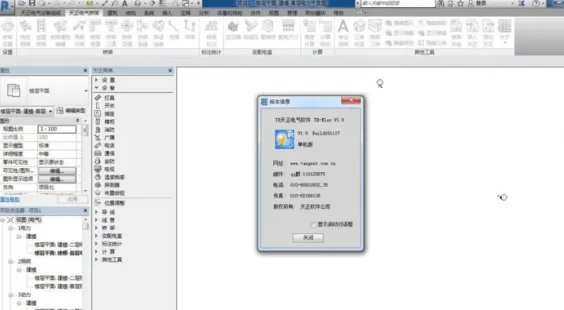
TR Tianzheng Electrical Software – Electrical System T-Elec, designed for Revit 2015-2017, maintains the consistent style of Tianzheng software, featuring a simple interface and convenient drawing tools. This intelligent electrical design software incorporates the design requirements collected from numerous design units, offering a perfect balance between systematic functionality and operational flexibility to closely align with engineering design needs.
Tianzheng Software – Electrical System is suitable for both civil and industrial electrical design projects. The platform provides TR Tianzheng Electric software with expired patches, which can be downloaded by interested users.
The software offers multiple methods for arranging flat equipment and wiring. When placing flat equipment, the output interface uses a floating window combined with dynamic previews, WYSIWYG editing, and a flexible right-click menu, enabling easy drawing of power, lighting, weak current, fire protection, transformer and distribution room layouts, as well as lightning protection grounding plans. All graphic elements are parametric, allowing one-time data input with automatic annotation and material list compilation.
The main improvements in this software version include:
- Support for Revit 2015 to Revit 2017 platforms.
- Enhanced lightning protection design calculations, including features for unequal height buildings and electronic information systems.
- New grounding design functions (__AI_C_SC0_ and __AI_C_SC_1__), allowing automatic detection of enclosed exterior walls and drawing grounding wires along these lines; grounding grid generation supports horizontal and vertical wire placement based on defined spacing.
- Added drawing function (__AI_ST_2C_2_2) for reserved holes with customizable hole types, styles, and annotations.
- Automatic connection (__AI_C_SC_3__) between Tianzheng electrical equipment and nearby cable trays, busbars, and cable trenches.
- Optimized commands (__AI_C_SC_4__ and __AI_C_SC_5__) for setting fire protection equipment points, with circuit inspection features displaying counts of fire protection devices and control points.
- Layer control enhancements, including locking and unlocking functions for non-electrical layers.
- Batch labeling capabilities for wires, supporting different wire types within a diagram.
- FASBAS cable laying module improvements (__AI_C_SC_6_ and __AI_C_SC_7__), featuring color-coded starting and ending devices for easy identification; cable labeling and specification settings at control points, with export options.
- Wire setting now includes labeling buttons for grounding and flashing wires, enabling labeling and statistics.
- When generating sections in power distribution rooms, a dialog prompts roof parameter settings if the section cuts through Tianzheng walls, allowing customized roof designs.
- Added total cable count display in the bridge calculation command interface, with additional wire calculations such as BV.
- The command ‘__AI_T_SC_8__’ introduces a load factor multiplier for circuit load capacities, customizable by users; system diagram generation now includes enhanced main switch current settings, import/export functions for distribution box circuits, and increased spacing between feeder components.
- Offset distance control added to set cable trench positioning relative to the drawing base point.
- Wire labeling buttons for grounding and flashing wires have been added, enabling labeling and statistics.
- Calculation table styles and contents have been optimized, providing detailed calculation sheets.
- Improved automatic layout methods, editing functions, wire linkage during device movement, and copy functionality.
- Custom PL line equipment adapts to drawing block width during layout.
- The library category dropdown box has been extended to fully display Tianzheng’s default categories.
- When devices are placed on wires, the software automatically breaks the wire and inserts the device.
The software uses the 09dx national standard legend for equipment blocks, adds building control types and wire layers, and offers a wider selection of wires for users.
Temperature Sensitive Smoke Detector
Based on parameter settings and relevant standards, the layout and quantity of temperature and smoke detectors within a given area are automatically calculated. Users can view the detection range of each sensor and make slight adjustments based on previews to ensure comprehensive coverage without blind spots.
Electrical System Design
The software enhances intelligence in drawing system diagrams. It can automatically generate lighting, power, and low-voltage single-line system diagrams, while also supporting the creation of various weak current system and secondary wiring diagrams. Automatically generated distribution box system diagrams include load calculation functions.
Additionally, the system offers hundreds of commonly used high and low voltage switchgear circuit schemes and over 80 principle diagrams for user selection.
Electrical Calculations
Comprehensive electrical calculation functions support building electrical design, including:
- Point-by-point illumination
- Illumination calculations
- Multi-line illumination calculations (utilizing the utilization coefficient method)
- Load calculation
- Reactive power compensation
- Short circuit current calculations
- Low voltage short circuit current calculations
- Voltage loss calculations
- Annual lightning strike frequency calculations
- Relay protection calculations
All results can be exported to Word or Excel for documentation.
Point-by-point illumination calculates lighting at every point in a space, displaying maximum and minimum values, supporting irregular areas, considering light occlusion factors, and generating equal illuminance distribution curves with Word report outputs.
The coefficient method calculates the number of lighting fixtures needed based on room area and required average illuminance, also determining power density. Users can select from various lighting fixture types and models or customize fixtures based on light intensity. It supports irregular room illumination and simultaneous calculations for multiple rooms, with automatic fixture arrangement.
Load calculations use the coefficient method, reading system diagram data or manual input. They automatically compute reactive power compensation, select transformers, and support multi-transformer calculations.
Annual lightning strike calculations comply with the latest GB50057-2010 standard, determining protection categories and considering surrounding structures. Results can be viewed in tables or detailed calculation sheets.
Cross-Section Query
Current carrying capacity data from standards such as 10CD106 (Shide aluminum alloy cable), 09BD1 (replacing 92DQ), 04DX101-1, and North China Standard 92DQ enable users to query wire and cable cross-sectional areas and conduit diameters based on calculated current, as well as view corresponding current carrying capacities.
Grounding and Lightning Protection
Users can freely draw lightning rods, lightning strips, grounding wires, and electrodes. The software automatically generates lightning protection belts for Tianzheng building condition maps.
Rolling ball lightning protection supports multi-pin 2D and 3D protection, instantly updating protection areas for moving lightning rods. By outlining buildings with PL lines and assigning heights, users can view 3D lightning protection state diagrams and protection ranges for individual rods.
The new ‘Line Lightning Protection’ feature supports lightning rod placement on flat and mountainous surfaces.
High Voltage Short-Circuit Calculation Module
This module uses the “node admittance” method for integrated calculation and drawing. Users can build main wiring and impedance diagrams for any solution, with automatic impedance diagram conversion.
Extracted impedance data enables automatic high-voltage short-circuit current calculations, including motor feedback currents. The module supports simultaneous short-circuit current calculations at multiple points (both three-phase and asymmetric), with results exportable to CAD and Word calculation reports.
This intelligent data processing eliminates the need for manual table lookup or star-delta transformations, greatly improving accuracy and efficiency.
Transformer and Distribution Room
Quickly create plan, elevation, and section drawings of distribution cabinets and cable trenches. Parametric editing allows easy modification of cable trenches and distribution cabinets, with automatic generation and adjustment of cabinet dimensions and quantities. The software also automatically generates sectional views of power distribution rooms.
3D Bridge Frame
The “3D Bridge” command series facilitates drawing of multi-layered, curved, and other complex bridge structures. Components such as bends, tees, crosses, and reducers are generated automatically during drawing.
Vertical sections and corresponding vertical components are generated according to drawing requirements. Components are interrelated, allowing linked movements when parts are dragged.
Multiple support and hanger styles and specifications are available, with automatic annotation and component statistics.
Extract Inventory
The “Extract Inventory” function supports simultaneous extraction of basic data such as cable start and end points, cable numbers, and control cable identifiers from multiple system diagrams. Control cables are highlighted in red for easy distinction from power cables. Extracted data can be imported into existing cable inventory files.












Very good website, thank you for sharing!