

Small construction companies leverage AECOsim Building Designer to optimize workflows and enhance productivity.
The Role of BIM Throughout the Project Life Cycle
AG5 is a small construction firm based in Copenhagen, Denmark, specializing in minimalist and sustainable design. Brian Sheldon, a partner at AG5, explains, “Our focus is clear. Through technological processes, we maintain a consistent approach from initial concept to construction, delivering unique designs tailored to each project’s location and goals.”
The company’s three partners and five full-time employees collaborate with clients across various sectors—including private enterprises, public institutions, and government agencies—both locally and internationally.
For AG5, design software serves as a tool to achieve their vision: creating comfortable, sensory spaces that clients will truly appreciate. Sheldon adds, “We rely on BIM (Building Information Modeling) to ensure professional quality and precision, and Bentley’s AECOsim Building Designer has been instrumental in helping us reach this standard.”
AECOsim Building Designer combines multi-disciplinary BIM applications into one platform, supporting integrated workflows and boosting productivity. This complete BIM solution enables AG5 to efficiently manage larger and more complex projects through seamless collaboration among widely distributed teams.
Utilizing Federated Data Models
One of AECOsim Building Designer’s key features for AG5 is its federated data model capability. Sheldon explains, “With Bentley software, we access the main data model of an existing project and break it down into sub-models managed by different teams—whether by floor, interior, exterior, or steel framework.”
Regardless of project size or complexity, experts can independently work on these sub-models, which are then referenced back into the main model.
This approach allows AG5 to consolidate all project-related data—including work from third parties using various design tools—into a single federated model. Sheldon notes, “We value Bentley software for its data interoperability. For example, during our work on Gran Rubina, a 22-story office building in Jakarta, Indonesia, our local partner was eager to learn Denmark’s sustainable development philosophies and BIM practices.”
Before starting 3D modeling, much preliminary work had been completed: extensive simulations, 2D drawings of central components like elevators and stairs, and even 3D sketches. The partner’s large office employs nearly 50 full-time CAD specialists.

AG5 recognizes that switching entirely to Bentley software would be unrealistic for their partner, nor do they want to discard existing work. Instead, they reference their partner’s third-party files within AECOsim Building Designer’s joint 3D model. This referencing allows AG5 to integrate diverse work into one comprehensive model, facilitating collision detection, computational analysis, and other critical tasks.
Sheldon explains, “Bentley software enables us to reference these files into 3D. Although we don’t directly modify these files, as others continue working in 2D, we can bring their work into the 3D environment and keep everything updated until a full 3D workflow is established.”
Generating 2D Views and Drawings from 3D Models
By synchronizing all data from the Gran Rubina project into one federated model, AG5 creates reports, dynamic views, and forms based on this comprehensive data. Sheldon notes, “From a 3D model, we can generate dynamic 2D views to further refine the design or convert them into 2D formats for collaborators who rely on other tools.”
This flexibility allows the design to be introduced into a 2D environment whenever it helps simplify workflows and reduce costs.
Moreover, AG5 closely monitors detailed design work. Sheldon adds, “The referencing process is dynamic and operates like a real-time system, maintaining cross-referencing, which is crucial as detailed design progresses continuously. From this, we can produce engineering and scaled drawings, focusing on dimensioning and annotations before publishing the final documentation.”
Cross-referencing also ensures the 3D model updates automatically whenever referenced documents change. Sheldon remarks, “Everything in the system is fully dynamic in real time. So, whenever someone makes an update, it propagates throughout the entire federated data model.”
AG5 can effortlessly access all related files—including 3D models, 2D views, and forms—all linked via hyperlinks for seamless navigation. AECOsim Building Designer recognizes files related to specific operations, allowing annotations to be added directly to the 3D model at any time.
Accelerating Collaboration Through Data Interoperability
AG5 frequently taps into AECOsim Building Designer’s data interoperability to enhance collaboration both internally and with external partners.
For example, when working with a steel manufacturer on a structural model for a small school, AG5 designers initially created the steel framework based on engineers’ input. The steel manufacturer then refined the model, using AG5’s file as a foundation. “We simply export the file as IFC, and they make their modifications,” Sheldon explains.
Once the updated IFC model is returned, AG5 imports it back into the federated data model for visual inspection and clash detection. They then generate profiles and drawings based on the steel manufacturer’s input.
In another case, AG5 participated in bidding for a steel tower high-rise residential project in New York. Partnered with Ramboll Group in London, who uses third-party parametric software, AG5 did not require them to switch tools. Instead, they established a workflow where Ramboll designers modeled the design in their preferred software and exported BIM elements to Bentley software.
Sheldon states, “After exporting BIM elements via plugins, Bentley software recognized them as BIM components, which was impressive. This approach ensured smooth workflow integration.”
Generating Reports, Calculations, and Simulations with BIM Data
AG5 also utilizes BIM data to produce essential project reports. In one project, the construction manager requested basic information from the 3D model to be categorized into different groups. Sheldon recalls, “The client wanted the report in Excel, their preferred format. Many might not consider Excel part of BIM processes, but since the client required it, we delivered accordingly.”
Because BIM models contain extensive data, AG5 can extract spatial and regional information directly from the 3D model and organize it into Excel spreadsheets tailored to the client’s template.
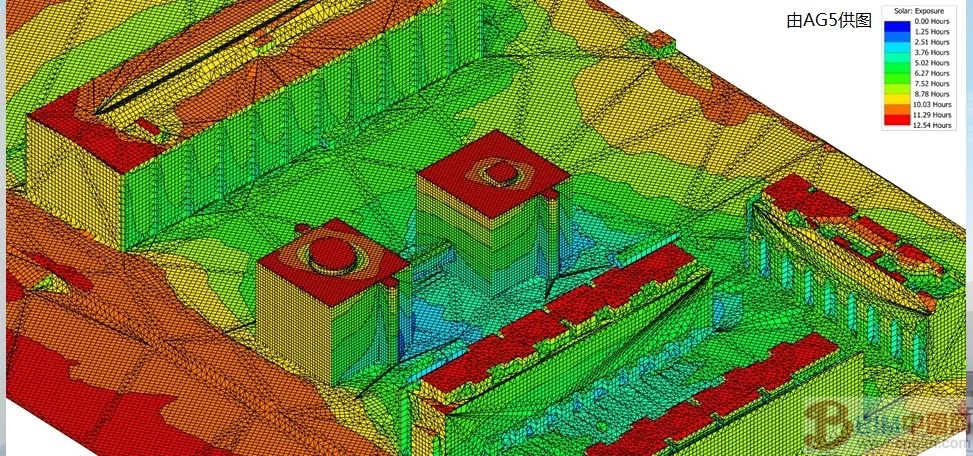
AG5 also applies BIM for energy consumption calculations and operational simulations. Sheldon explains, “We conducted a year-long study on sunlight exposure, gaining insights into the relationship between shading treatments and daily sunlight hours on building façades.”
They often use AECOsim Building Designer beyond essential tasks, especially when handling complex geometric shapes. “AECOsim helps us understand complex geometries,” Sheldon notes. “Beyond energy calculations and simulations, we value 3D modeling for visualization and data extraction.”
“We chose AECOsim Building Designer not only for project requirements but because we believe it represents the best way to work,” concludes Brian Sheldon, AG5 Partner.













Must log in before commenting!
Sign Up