
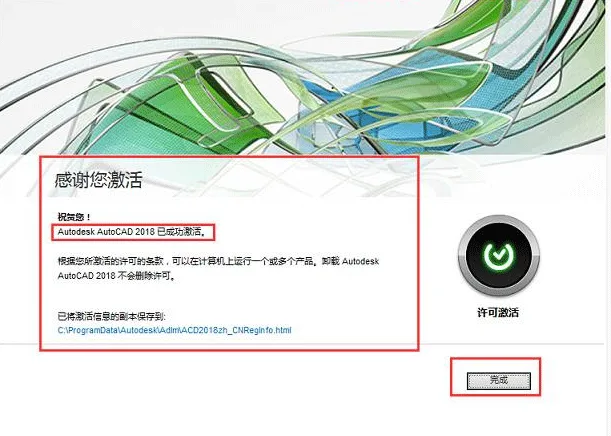

AUTODESK AUTOCAD 2018 Simplified Chinese version is a professional drafting tool developed by Autodesk. Are you eager to be among the first to try the AUTOCAD 2018 beta? Don’t wait any longer—explore the new features today!
Application Fields of AUTODESK AUTOCAD 2018 Simplified Chinese Version:
Engineering Drawing: Architectural engineering, interior design, environmental art, hydroelectric engineering, civil construction, and more.
Industrial Drawing: Precision parts, molds, equipment, etc.
Clothing Processing: Garment pattern making.
Electronics Industry: Printed circuit board design.
This software is widely used across various industries, including civil engineering, decoration, urban planning, landscape design, electronic circuits, mechanical design, apparel, aerospace, light industry, and chemical industry.
Autodesk provides industry-specific versions and plugins, such as AutoCAD Mechanical for mechanical design and manufacturing, AutoCAD Electrical for electronic circuit design, and Autodesk Civil 3D for surveying, earthworks, and road design.
The Simplified Chinese version is commonly used in educational institutions for teaching and training purposes.
Qingfeng Interior Design Training Institute leverages cloud-based 3D technology to enhance CAD drawing efficiency.
For companies in clothing, machinery, electronics, and construction without special requirements, the AutoCAD Simplified Chinese version serves as a versatile, general-purpose solution. Additionally, for mechanical design, there is a dedicated AutoCAD Mechanical version.
Key Features of AUTODESK AUTOCAD 2018 Simplified Chinese Version:
- Supports high-resolution (4K) monitors with accurate display of UI elements such as cursor, navigation bar, and UCS icon. For the best experience, use Windows 10 and a DirectX 11 graphics card.
- Enhanced PDF import functionality: PDF files generated from CAD drawings (including SHX files) can now store text as geometric objects.
- Improved visual experience: Pattern fills and performance are enhanced; anti-aliasing and high-quality graphics settings can be controlled independently on supported graphics cards. Off-screen selection now works as expected.
- External reference paths default to relative for more flexible file management.
- Updated DWG file format increases efficiency when opening and saving files.
- Comprehensive graphic drawing capabilities.
- Robust graphic editing tools.
- Supports multiple development methods and user customization options.
- Ability to convert various graphic formats with strong data exchange features.
- Supports a wide range of hardware devices.
- Compatible with multiple operating systems.
- Universal and user-friendly, suitable for a broad audience.
Since AutoCAD 2000, many powerful features have been added, including AutoCAD Design Center (ADC), Multi-Document Environment (MDE), internet drivers, new object snap functions, enhanced annotation tools, and local file opening/loading capabilities.
How to Activate AutoCAD 2018:
AutoCAD 2018 Product Key: 001J1
AutoCAD 2018 Serial Numbers: 666-69696969, 667-98989898, 400-45454545, 066-66666666
- After installation, launch the software without disconnecting from the internet. Click “Activate” to open the product license activation window. Copy the “Application Number” for later use. Do not close this window yet.
- Run the keygen as administrator. Click the “Patch” button to modify the system hosts file and block network authentication. Paste the copied “Application Number” into the “Request” field, then click “Generate” to create the activation code. Copy the code from the “Activation” field. You may now close the keygen.
- Return to the AutoCAD activation window, select “I have an activation code from Autodesk,” paste the generated activation code, and click “Next.” A confirmation message will appear indicating successful activation.
Note: If activation fails, delete all files in
C:ProgramDataMLEXNet, disconnect from the internet, and try activating again.














Can only be downloaded from Baidu Netdisk
Why can’t I download it?
How to solve the problem of many fonts not displaying when opening a drawing in CAD2018
Due to the lack of font, select font replacement when opening.
Where are the registry files? The resources are one 32-bit and one 64 bit, and the other seems to be still 32-bit
The file named [xf-adsk2018]
Why wasn’t naviswks managed after I installed it? 2018
This is AutoCAD, not Navisworks
I know I can’t find where to write a comment
Do you want to unzip the password
No need, just download it directly.