
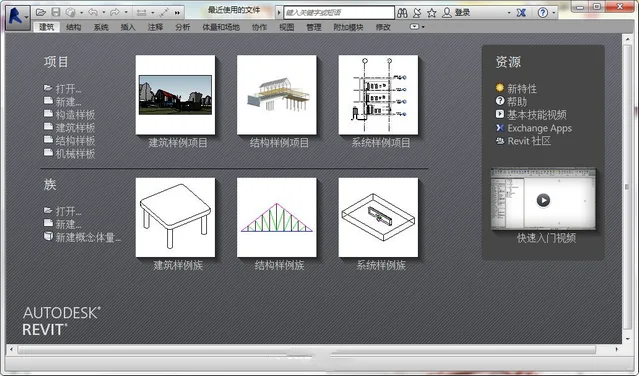
Autodesk Revit 2018 is a professional BIM (Building Information Modeling) software developed by Autodesk. This latest version introduces new features fully compatible with Windows 10, enhancing your design workflow. Key functionalities include energy analysis, exporting graphics in GBXML format, and improved visualization of main railings, handrails, and walls. If you work in 3D modeling, this software is a must-have.
Autodesk Revit is specifically tailored for building information modeling, supporting integrated processes based on coordinated and reliable project data that spans design, construction, and operation.

BIM enables construction companies to use consistent information throughout the project lifecycle, facilitating innovative designs and improved communication. It allows accurate visualization of buildings and simulates real-world performance, helping project stakeholders understand costs, timelines, and environmental impacts.
Architects benefit from BIM by being able to predict the final building before construction begins, giving them a competitive edge in today’s complex business environment. BIM reduces errors and waste, increases profitability and client satisfaction, and fosters sustainable, precise designs.
By optimizing team collaboration, BIM supports clear communication among architects, engineers, contractors, builders, and owners.
With Autodesk Revit 2018, you can explore cutting-edge design concepts early in the project and consistently express your design intent throughout construction documentation. Designed for BIM, Revit 2018 supports sustainable design, clash detection, construction planning, and facilitates improved collaboration among all project participants. Any changes during the design process automatically update all related documents, ensuring a coordinated and reliable workflow.
Revit 2018 offers intuitive tools for conceptual design, including freeform modeling and parametric design. You can freely sketch, quickly generate 3D shapes, and interactively modify forms. Built-in features allow you to clarify complex geometries and prepare models for construction.
As your design evolves, Revit 2018 automatically builds parametric frameworks for the most intricate shapes, providing precise control, flexibility, and accuracy. The entire process from concept to construction documents takes place in a user-friendly environment.
Enhanced Features in Autodesk Revit 2018
Depth cues in “Architecture” and “Coordination” views improve visualization in elevation and section views by using gradient colors to indicate distance from the view’s front plane. For more information, see the documentation on depth cues and how to define them.
After importing point clouds into your model, you can control the visibility of individual scan positions and areas per view. This feature allows you to hide irrelevant point cloud data and improves system performance when working with large datasets.
New Features in Revit 2018
1. Improved Software Interactivity
(1) Support for Linking NWD/NWC Files
Navisworks software supports common 3D file formats, and now Revit 2018 can link NWD and NWC files. This expands the range of compatible file formats for better multi-software coordination. Under the “Insert” tab, a new “Coordinate Model” button allows linking to NWD and NWC models, with options to reload, unload, or remove them.
Additionally, a “Coordination Model” tab has been added in the “Visibility/Graphics Overrides” dialog, enabling users to adjust the transparency of linked NWD/NWC files to distinguish them from native Revit elements.
(2) Direct Import of Rhino Models
Revit 2018 adds support for importing Rhino’s 3DM files via the [Insert] – [Import Revit] function. Imported SAT and 3DM geometries can be:
- Recognized by face to place face-based families.
- Assigned to categories to control visibility, generate detailed schedules, and add annotations.
- Easily dimensioned by snapping to edges and faces.
This makes imported geometries behave very similarly to native elements.
2. Building Modeling Enhancements
(1) Multi-Story Staircases
Previously, multi-story stairs could only be created with uniform elevation spacing. Revit 2018 introduces automatic multi-level stair generation based on elevation, with individual adjustments possible. After creating a staircase, selecting it reveals a “Select Elevation” option in the contextual tab to specify which level to draw stairs on, enabling automatic multi-story stair creation.
(2) Handrail Improvements
Handrails now support multi-story stairs, allowing a unified handrail across multiple levels. They can also detect and connect to more host elements such as roofs, floors, walls, and terrain surfaces.
3. Enhanced MEP (Mechanical, Electrical, Plumbing) Features
(1) Electrical Circuit Path Editing
In Revit 2018, you can edit electrical circuit paths directly. Selecting a circuit now shows a “Line Editing” option to control elevation, direction, and length of circuit paths. The line length updates automatically with edits, which is essential for accurate voltage drop calculations and wire sizing.
(2) Pump Family Parameter Enhancements
Flow rate and pressure drop parameters are now linked to pump components, with automatic background calculations.
(3) Hydraulic Calculations
You can analyze hydraulic connections between pipeline systems and equipment by selecting the system and using the analysis connection function to add relevant devices.
(4) Fresh Air Information for Spaces
Revit 2018 adds fresh air parameters to space properties. Fresh air info can be set for both building and space types in the settings, supporting default values or customized data for partitions.
4. Prefabricated Component Module Enhancements
(1) Multi-Point Wiring for MEP Prefabricated Components
This feature allows you to draw prefabricated components like regular pipelines, with Revit automatically generating connectors for elbows, tees, and other components. The “Prefabricated Parts” module, introduced in 2016, is isolated from standard pipelines but has seen workflow improvements in 2018, including converting regular pipes to prefabricated parts and enhancing drawing efficiency.
(2) Sloped Pipes for Prefabricated Parts
You can now draw prefabricated pipes with slopes and uniformly adjust slopes for connected pipes.
5. Other Improvements
(1) Group and Linked File Schedules
New categories for Revit Links and Model Groups enable creating detailed schedules for linked models and group files.
(2) Special Characters
Special characters can be easily inserted by right-clicking when editing text comments. The Windows Character Map dialog now stays open continuously, improving workflow.
(3) Global Parameter Enhancements
Revit 2017 introduced global parameters for controlling component sizes and annotations. Revit 2018 extends this by adding radius and diameter annotations and enabling global parameters to control sketch-based elements like floor slabs.
(4) Structural Improvements
- Over 100 new steel structure connection details added via the Steel Connections for Revit add-on.
- Support for custom frame families enables Revit to analyze and generate structural geometry parameters, simplifying connection placement.
- Priority settings for primary and secondary steel elements in connections.
- New structural section geometry properties in Type and Family dialogs, enhancing prefabricated geometry definition and custom framework analysis.
- Reinforcement placement now supports freeform concrete objects such as curved bridge piers and roof slabs.
- Multiple reinforcement sets can be distributed along surfaces, including freeform objects, improving detailing efficiency.
- Reinforcement can be added to concrete elements imported from SAT files or InfraWorks.
- Graphic Reinforcement Constraints Editor is now available in 3D views for more accurate steel bar placement.
Keywords: Autodesk Revit 2018 Chinese version download, Revit 2018 localization patch download, Revit 2018 serial number registration machine download, Revit 2018 download, Revit 2018 64-bit version download
Installation Guide for Revit 2018:
Serial numbers: 666-66996969, 667-98989898, 400-45455445, 066-6666666661.
After downloading, unzip the compressed file to access the installer.
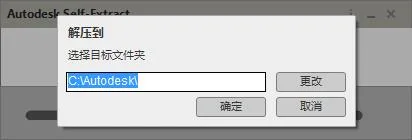
The default extraction path is in the Autodesk folder on the C drive. Open this folder, run the setup, and select Install.
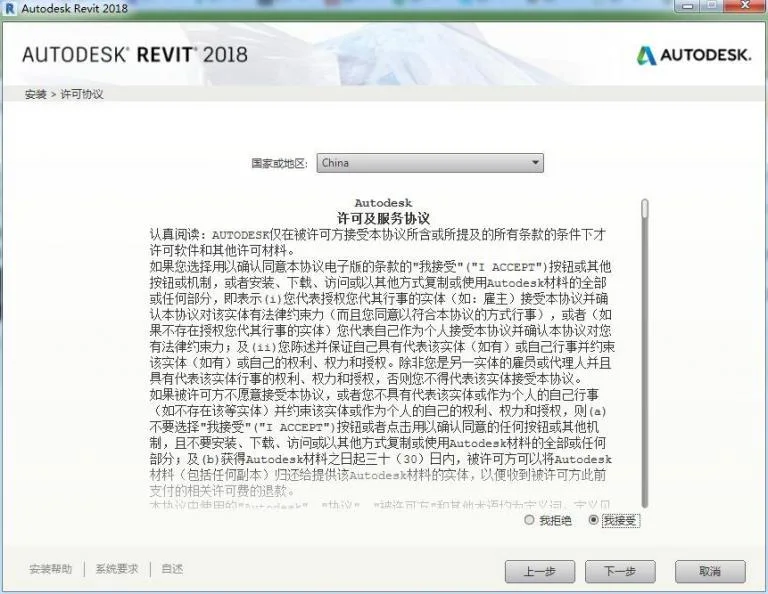
Select “I agree” to accept the license agreement, then click “Next”.
Choose the installation path and click “Install”.
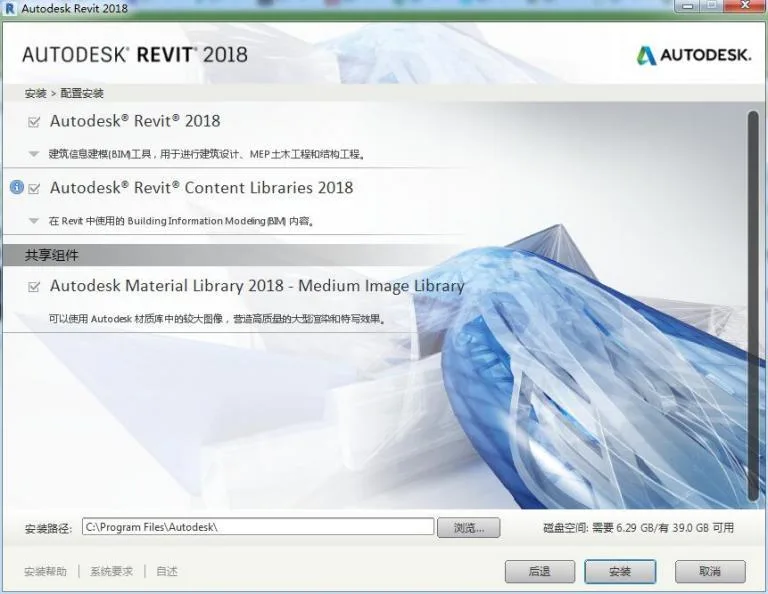
The installation may take some time; please be patient. Once complete, the software is ready to use.
Activation Guide
- Disconnect from the internet by unplugging Ethernet or disabling your network adapter.
- Launch Revit 2018 from the desktop shortcut and click “Enter Serial Number”.
- Accept the license agreement by clicking “I agree”.
- Click “Activate”.
- Enter serial number “066-06666666” and product key “829J1”.
- Run the Revit 2018 keygen as administrator and click “Patch”.
- Copy the “Application Code” from Revit to the keygen, click “Generate” to get the activation code.
- Choose “I have an activation code from Autodesk”, paste the code, and click “Next”.
- Activation completes, and you can now start using Revit 2018.
Complete List of Autodesk 2018 Product Keys:
001J1 AutoCAD 2018
057J1 AutoCAD LT 2018
128J1 Autodesk 3ds Max 2018
129J1 AutoCAD Map 3D 2018
140J1 AutoCAD OEM 2018
151J1 RealDWG 2018
185J1 AutoCAD Architecture 2018
200J1 Autodesk Design Academy 2018
206J1 AutoCAD Mechanical 2018
208J1 Autodesk Inventor 2018
213J1 AutoCAD Utility Design 2018
225J1 AutoCAD Electrical 2018
235J1 AutoCAD MEP 2018
237J1 AutoCAD Civil 3D 2018
240J1 Autodesk Revit Architecture 2018
241J1 AutoCAD Revit Architecture Suite 2018
255J1 Autodesk Revit Structure 2018
256J1 AutoCAD Revit Structure Suite 2018
257J1 AutoCAD Revit MEP Suite 2018
262J1 Autodesk Showcase 2018
295J1 Autodesk Showcase Professional 2018
340J1 AutoCAD Raster Design 2018
424J1 Autodesk Quantity Takeoff 2018
426J1 AutoCAD Plant 3D 2018
448J1 AutoCAD P&ID 2018
495J1 Autodesk 3ds Max Design 2018
498J1 Autodesk Mudbox 2018
506J1 Autodesk Navisworks Simulate 2018
507J1 Autodesk Navisworks Manage 2018
529J1 Autodesk Inventor LT 2018
535J1 T1 Enterprise Multi-flex 2018
545J1 AutoCAD LT Civil Suite 2018
546J1 Autodesk Robot Structural Analysis 2018
547J1 Autodesk Robot Structural Analysis Professional 2018
548J1 Autodesk Entertainment Creation Suite Ultimate – Secondary Schools 2018
549J1 Autodesk Vault Collaboration 2018
555J1 Autodesk Vault Office 2018
559J1 Autodesk Vault Workgroup 2018
562J1 AutoCAD ecscad 2018
569J1 Autodesk Vault Professional 2018
570J1 Autodesk Simulation Moldflow Adviser Standard 2018
571J1 Autodesk Simulation Moldflow Adviser Premium 2018
572J1 Autodesk Simulation Moldflow Adviser Ultimate 2018
573J1 Autodesk Simulation Moldflow Insight Standard 2018
574J1 Autodesk Simulation Moldflow Insight Premium 2018
575J1 Autodesk Simulation Moldflow Insight Ultimate 2018
576J1 Autodesk Simulation Moldflow Design Link 2018
577J1 Autodesk Simulation Moldflow CAD Doctor 2018
579J1 Autodesk Simulation Moldflow Synergy 2018
589J1 Autodesk Revit MEP 2018
590J1 Autodesk Softimage 2018
596J1 AutoCAD Inventor LT Suite 2018
636J1 Autodesk Inventor Engineer-to-Order Series Distribution Fee 2018
651J1 Autodesk Education Master Suite 2018
654J1 Autodesk Product Design Suite for Education 2018
657J1 Autodesk Maya 2018
660J1 Autodesk Maya Entertainment Creation Suite Standard 2018
661J1 Autodesk 3ds Max Entertainment Creation Suite Standard 2018
662J1 Autodesk Softimage Entertainment Creation Suite 2018
666J1 Autodesk Inventor Publisher 2018
667J1 Autodesk Simulation Multiphysics 2018
669J1 Autodesk Simulation Mechanical 2018
675J1 Autodesk Opticore Studio Professional 2018
692J1 Autodesk Real-Time Ray Tracing Cluster 2018
710J1 Autodesk Alias Automotive 2018
712J1 Autodesk Alias Design 2018
718J1 mental ray Standalone 2018
727J1 Autodesk MotionBuilder 2018
736J1 Autodesk Alias Surface 2018
741J1 Autodesk SketchBook Designer 2018
752J1 Autodesk Inventor Engineer-to-Order Server 2018
757J1 Autodesk Factory Design Suite Premium 2018
760J1 Autodesk Factory Design Suite Ultimate 2018
763J1 Autodesk Plant Design Suite Premium 2018
764J1 Autodesk Plant Design Suite Ultimate 2018
765J1 Autodesk Building Design Suite Premium 2018
766J1 Autodesk Building Design Suite Ultimate 2018
767J1 AutoCAD Design Suite Standard 2018
768J1 AutoCAD Design Suite Premium 2018
769J1 AutoCAD Design Suite Ultimate 2018
770J1 Autodesk Alias TC Integrator for GM
771J1 GM CAD Convertors 2018
774J1 Autodesk 3ds Max Entertainment Creation Suite Premium 2018
775J1 Autodesk Maya Entertainment Creation Suite Premium 2018
777J1 AutoCAD for Mac 2018
781J1 Autodesk Product Design Suite Ultimate 2018
782J1 Autodesk Product Design Suite Premium 2018
783J1 Autodesk Product Design Suite Standard 2018
784J1 Autodesk Building Design Suite Standard 2018
785J1 Autodesk Infrastructure Design Suite Ultimate 2018
786J1 Autodesk Infrastructure Design Suite Premium 2018
787J1 Autodesk Infrastructure Design Suite Standard 2018
788J1 Autodesk Plant Design Suite Standard 2018
789J1 Autodesk Factory Design Suite Standard 2018
793J1 Autodesk Entertainment Creation Suite Ultimate 2018
796J1 Autodesk Infrastructure Map Server 2018
797J1 Autodesk Inventor Professional 2018
798J1 Autodesk Inventor OEM 2018
801J1 Autodesk Vault Collaboration AEC 2018
805J1 Autodesk Inventor Engineer-to-Order Series 2018
808J1 Autodesk Infrastructure Modeler 2018
809J1 Autodesk Simulation CFD 2018
810J1 Autodesk Simulation CFD Advanced 2018
811J1 Autodesk Simulation CFD Motion 2018
812J1 Autodesk Simulation CFD Design Study Environment 2018
815J1 Autodesk Simulation CFD Connection for NX 2018
819J1 Autodesk Simulation CFD Connection for ACIS 2018
822J1 Autodesk Simulation CFD Connection for Pro/ENGINEER 2018
824J1 Autodesk Simulation CFD Connection for Parasolid 2018
827J1 AutoCAD LT for Mac 2018
828J1 Autodesk Revit LT 2018
829J1 Autodesk Revit 2018
835J1 Autodesk PLM 360 2018
837J1 Autodesk Simulation DFM 2018
839J1 Autodesk Fabrication CADmep 2018
840J1 Autodesk Fabrication FABmep 2018
841J1 Autodesk Fabrication ESTmep 2018
842J1 Autodesk Fabrication CAMduct 2018
843J1 Autodesk Fabrication Tracker 2018
844J1 Autodesk Fabrication CAMduct Components 2018
845J1 Autodesk Fabrication RemoteEntry 2018
848J1 Autodesk Simulation 360 2018
854J1 Autodesk BIM 360 2018
857J1 Autodesk Simulation 360 Ultimate 2018
A46J1 Autodesk T-Splines Plug-in for Rhino 2018
A47J1 Instructables Direct 2018
A48J1 Instructables Membership 2018
A49J1 Instructables Other 2018
A50J1 Autodesk tsElements Plug-in 2018















Does it not support Win7
The WIN7 system can be used normally.
Does it not support Win10
Supports WIN10 system.
After downloading and decompressing, an unsupported damaged system pops up during installation
Why can only enter 12 digits for my serial number
How to solve authorization system error 1
Reason: The LGS.data file is missing or damaged, and the folder does not have read/write permissions.Solution reference: __AI_ST_URL_0__
Win7 64 bit 8g i5 can install that version, but I cannot install the latest version as it does not meet the minimum requirements
The system has high requirements for configuration, and it is also possible that the hard disk capacity is insufficient.
The registration machine just doesn’t work, I’ve tried several times
Note that running with administrator privileges can generally solve the problem.
Unable to install, out of a total of four, three have been installed, and the remaining Revit server cannot be installed. I cannot install it on this computer because it does not meet the minimum system requirements. I am using Win10
Can’t open after installation, what’s the problem
Normally, this situation does not exist. Please check if the installation was not successful or if the computer responds slowly.
Download path click on display error
Which of the three installation packages?
Double click one of them, and the other will automatically decompress.
Is there no installation tutorial
There is already an installation tutorial in the article.
How to install a family library when disconnected from the internet
Unable to install the family library due to network disconnection.
The online installation speed is too slow. When installing offline, should we uncheck Autodesk Revit Content Libraries 2018 and import these three files from the RVT2018 directory on the C drive after installation? Family Templates Libraries Templates
Indeed, it is so.
How do I know to extract the code?
Same question
You can see the download page.
Can the Win7 Flag Edition be used
If it is a 64 bit computer, it can be used.
Why don’t I have a serial number when downloading?
Provided.
It’s been over an hour since installation, but it hasn’t been installed yet. What’s going on
Downloading family libraries or templates online may be slow, but it can be resolved by installing them offline.
When you opened the registration machine, did you say you needed to copy the application code? May I ask what the application code is
Opening the activation interface of the software will prompt for an application code.
Win 7 64 bit sp1 operating system, installation initialization crashes, even running as an administrator does not work
There should be a problem during the download process, with MD5 checksum inconsistency. Please download again.
What should I do if there is an authorization system error
To activate it in a different way, you can use this registration machine, __AI_S_TURL_0__
Do I have to download all three files in the installation package and then run one of them? Why is the file missing during my installation? Even after downloading it again, it still doesn’t work
The problem should be on your own computer, the installation package is fine.
When activating the 2018 version, the page that allows activation cannot be opened, and the current page script keeps showing errors. I have tried many times, but it still doesn’t work. I would like to ask how to solve this problem
Try it when the network is disconnected, select ‘Yes’
Thank you for resolving it
Excuse me, where can I download the 32-bit Revit software?
Download the 2013 version, the higher version does not have 32-bit.
Sorry, I also want to ask, how can I delete all the Revit registry? Can you delete all the folders related to Autodesk using regedit
Ctrl+F3 search, then delete search related results.
I installed 48 products for the first time, uninstalled them, and then reinstalled only 28 products. What’s going on
Some have already been installed and do not require further installation, such as C++
May I ask if there is an uninstallation tutorial for Revit2018? My computer was not completely uninstalled, so it doesn’t work when I reinstall it
Run – regedit in the bottom right corner to delete the revit2018 related files from the registry
ok, thank you
May I ask for the download link path? If the page does not exist, how can I download it
In Xinjiang, Xizang and Taiwan, Baidu cloud disk sharing and downloading are not available.
After installing Revit2018 on the W10 system, the startup point activation results in a blank box. What should be done.
Close and then open again.
Why is my activation code only able to enter 8 digits and has been invalid
Enter the serial number “066-06666666” and the key “829J1″The activation code can be directly copied and pasted without the need for input.
What should I do if the installation initialization page crashes
Turn off antivirus software and run it as an administrator.
Where are the three compressed files (Family Templates Libraries Templates) extracted from? Can you be more specific? Don’t always mention the corresponding locations. Where are the corresponding locations? Can you attach an installation instruction to explain what these three installation files are for
It is a backup offline installation package. If the installation main program does not have family libraries or template files, it is necessary to use them. Please refer to this: __AI_S_TURL_0__
How to extract or where to extract the three decompression packages of family templates, libraries, and templates
This is an offline family file library and template file that can be copied to the corresponding software installation location.
What is the extraction code
6FAZC1ZXWEJXSCD1UTW6FHUEKJ0WVDLP7SUN1TNVLWL59GX85436UZ61Z, Why are there always 5 fewer generated characters
Yes, there’s no problem. Just click next.
Registration activation error (0015.111)It’s always such a mistake
Cut off the network, run with administrator privileges, click patch first, and then generate an activation code to activate.
How to run as an administrator
Baidu on your own. If you have any questions, please submit a technical work order in the user center.
There are three installation programs in the installation package, are they all the same? Or are they divided into several majors: architecture, structure, and mechanical and electrical engineering?
Similarly, for volume compression and self decompression, simply click on one.
After uninstalling and reinstalling, I always receive prompts on what to do when installing, and what to do if the registry is not completely deleted
Open the registry, search for keywords to delete, or use Microsoft’s “Windows Installer” tool for cleaning.
Do I need to run all three files in the software package?
Just run one, there’s no need to run every one.
What are the other folders after downloading used for, and do they need to be moved to other locations
No need, it’s the registration machine, template files, and family. Extract them to the corresponding directory when needed.
Hello, after clicking on the activation button, there is a script error. I keep clicking ‘yes’ and then’ undefined ‘appears, but I don’t see the area for entering the serial number. What is this situation
Close the window and reopen it to activate it.
Installation prompt unable to load: revitcontpackui.dll
There are not enough administrative privileges on Windows to install. Please check if you have obtained administrator privileges before installation. (Right click to install with administrator privileges)
What should I do if the current page script error is displayed when activating?
Due to your system security level, it does not affect. Click ‘Yes’ to proceed.
I also encountered the same problem. There are still two spaces in the activation code. Just click next, and the result shows “registration activation error”. What should I do?
Run the registration machine with administrator privileges while the network is disconnected. First, click on Patch to regenerate the registration code
What if there are two spaces left in the activation code
Just go to the next step directly
The first time I disconnected from the internet, I couldn’t connect successfully. After trying again, it inexplicably became
Thank you! Installed
The first step of decompression prompts that at least one file is missing or has not been downloaded yet. How can I solve this problem
You may have damaged the files during the download process, or not downloaded all of them. You can download them again and install them.
I am also in the same situation, even if I download it again, it won’t work