
BIM 3D significantly reduces the time required for project assignments compared to traditional CAD models. However, traditional CAD has notable limitations in terms of dimensions and technology, making it insufficient for the demands of the modern construction industry. The introduction of BIM addresses many of these shortcomings, bringing substantial improvements. Today, I will discuss the differences between BIM and CAD from the perspectives of various stakeholders.
Owner
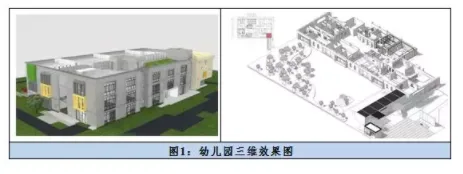
Traditional CAD models often create communication barriers between owners and designers due to the specialized knowledge required to interpret drawings related to project requirements, foundation area, building appearance, or intended use. These barriers can hinder overall project progress. BIM overcomes this by creating a “What You See Is What You Get” (WYSIWYG) experience through a 3D visual data model. This not only enhances the project viewing experience but also lowers communication obstacles. Owners no longer need professional expertise to gain a comprehensive understanding of the entire project. By interacting with the model—rotating, stretching, and examining it—they can fully grasp elevations, sections, floor plans, and more, providing a solid foundation for smooth project advancement.
Design Team
Using a BIM 3D visualization model allows designers to easily detect errors, omissions, and defects that are difficult to identify in traditional CAD models without sifting through extensive 2D drawings. Designers can also enrich the BIM model by integrating component data, enabling them to verify the design’s functionality and aesthetics more effectively. BIM’s interconnected features transform the traditional CAD process—where each change requires manual checking and correction—into a streamlined workflow where one modification automatically updates all linked components, greatly enhancing efficiency. Additionally, construction simulations based on BIM help identify and resolve potential conflicts between different specialties during the design phase, providing clear guidance for the construction team.
Contractor
In traditional CAD workflows, construction typically relies on paper drawings, and any issues discovered on site often require returning to the design phase for revisions. BIM models empower contractors to proactively identify conflicts and collisions during construction, boosting work efficiency, reducing rework, and lowering costs. Construction simulations allow for the anticipation of critical and challenging construction points, helping to find optimal solutions and avoid wasting labor and materials. Moreover, with projects becoming larger and more complex and involving multiple teams, the traditional 2D approach no longer suffices for project management. BIM extensions such as 4D and 5D models provide integrated platforms to manage project schedules, costs, and other factors, including site safety, enabling better control over projects and budgets.
Today’s discussion focused on the differences between BIM and CAD from the viewpoint of various participants. Due to time and space constraints, I did not cover the operations and maintenance teams, partly because of limited experience with them. This means the comparison is somewhat incomplete, and I ask for your understanding. We also warmly welcome professionals from operations and maintenance to contribute and engage in further discussions.














Must log in before commenting!
Sign Up