
In this article, we will explore the Instance.GetTransform method in the Revit API.
Notably, the Instance.GetTransform method does not account for reflection. The image below shows a mirrored family instance alongside its corresponding transform value:
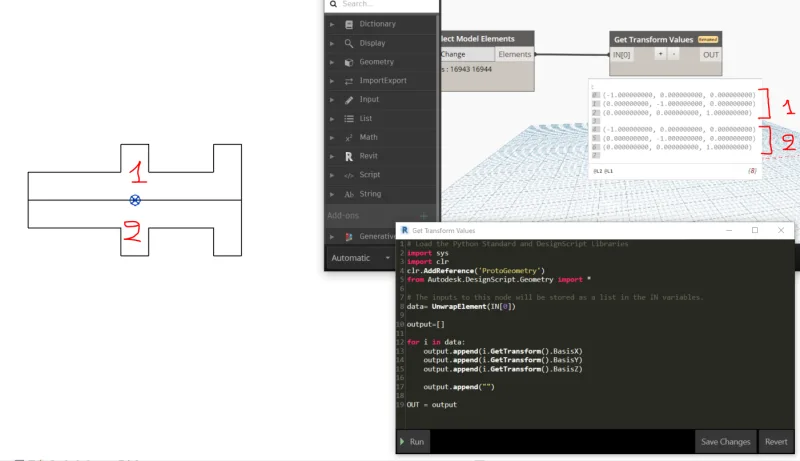
Here is the Python code example used:
import sys
import clr
clr.AddReference('ProtoGeometry')
from Autodesk.DesignScript.Geometry import *

data = UnwrapElement(IN[0])
output = []

for i in data:
    output.append(i.Location.Point)
    output.append(i.GetTransform().BasisX)
    output.append(i.GetTransform().BasisY)
    output.append(i.GetTransform().BasisZ)
    output.append("")

OUT = output
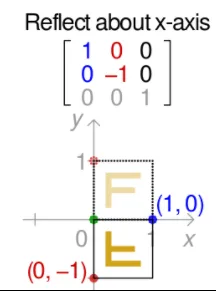
This behavior is intentional within Revit. However, from a mathematical standpoint, this seems inconsistent. According to Wikipedia’s transformation matrix definitions, reflections along the X-axis should produce different transformation matrices:
Our investigation shows that Revit applies a combination of reflection and rotation to implement various mirroring and flipping operations:
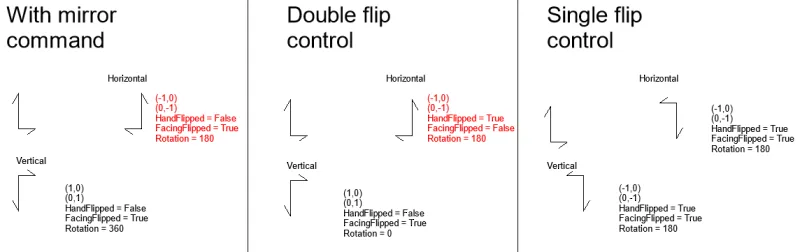
It is important to distinguish between the horizontal double flip control on the same axis and the mirror command (highlighted in red). Though these operations appear almost identical graphically, the horizontal flips result in opposite facing directions and hand states. In other words, visually they look the same, but the actual facing direction differs.
Previously, I observed that a single flip control behaves more like a rotation than a mirror, since it does not produce a reflected geometric shape. While this is reflected in the transformation matrix, the facing direction remains unchanged. The manual state for this is also set to true.
Overall, I believe the facing direction and hand state are internal family management data. The internal geometry may be reflected, but the family instance itself is not—unless a transformation is explicitly applied.
To fully understand the behavior, you may need to check the flip status, rotation, and transformation properties. These controls were likely introduced long ago for door components to indicate the hinge side and swing direction. However, when these controls are applied to other elements, ambiguity arises—resulting in a kind of double negation where the final visual representation is the same, but defined in two different ways.
Original link: __AI_S_TURL_0__
















Must log in before commenting!
Sign Up