
Article source: Binfu BIM Consulting

To create legends in Revit, navigate to the View tab, then the Create panel, and select the Legend command, as illustrated in Figure 2-7. This feature allows you to generate legends that display lists of various building components and annotations used throughout your project.
Legends can represent a wide range of elements, including materials, symbols, line styles, engineering phases, keynotes, and more.
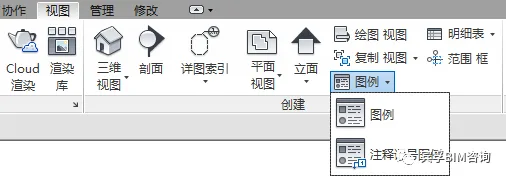
Figure 2-7: Legend Settings
The Legend feature allows you to compile lists of building components and annotations used within your project. Any element that can be placed in a drawing view can also be included in a legend.
The Annotation Legend is specifically designed to create lists of annotation symbols along with their definitions. Additionally, you can create keynote legends to group common keynote types for easier reference.
















Must log in before commenting!
Sign Up