
Many users face a common issue when installing Revit: despite completing the download, they discover that the family library is missing or incomplete, and sometimes the project template files are absent as well. This problem usually occurs because these files were lost during the installation process. So, how can you fix this?
The solution is straightforward: you can download the missing components directly from the official website.
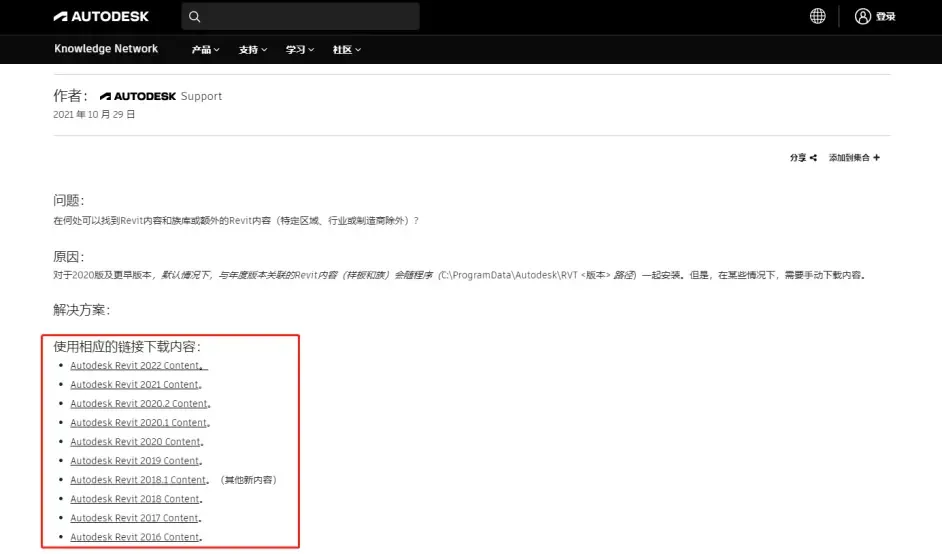
Once on the website, select the version of Revit installed on your computer. For example, if you are using Revit 2016, click on the “Autodesk Revit 2016 Content” link shown in the image above. This will take you to the page displayed in the screenshot below:

Switching to Simplified Chinese on the page, as shown below, you will find two executable files: RVT2016_Cs_FamStyles_Templates.exe (72 MB), which installs the project template files, and RVT2016_Cs_Libraries.exe (1.32 GB), which installs the family library files. Download the files you need based on your requirements.
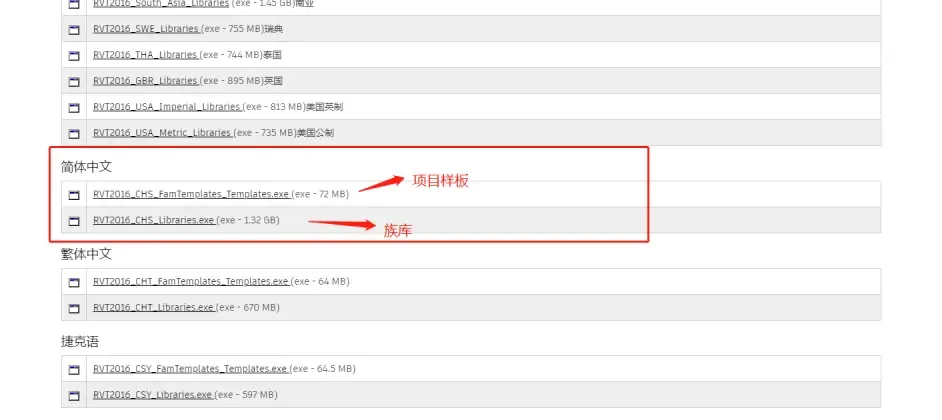
After downloading, simply double-click each file to install them to the default directory.
Once installed, your issue will be resolved. When you reopen Revit, you will find that both the family library and project template files have been successfully restored.
















Must log in before commenting!
Sign Up