
The Revit software series, developed by Autodesk, is currently the most widely used BIM platform. It integrates the features of Autodesk Revit Architecture, Autodesk Revit MEP, and Autodesk Revit Structure, enabling comprehensive building modeling and analysis. Autodesk Revit Architecture allows precise design aligned with the architect’s workflow, producing high-quality architectural plans. Autodesk Revit MEP supports the design of complex mechanical, electrical, and plumbing systems, making it an essential tool for HVAC, electrical, and plumbing engineers. Autodesk Revit Structure offers accurate design and analysis of building structures. Template files and family libraries are crucial components in Revit, forming the foundation for creating detailed building models.
(1) Template File
Template files play a vital role in real-world project workflows by accommodating various business requirements. Creating template files helps save time by avoiding repetitive settings and significantly improving modeling efficiency. Every project in Revit starts with a project template file, which includes view templates, families needed for model construction, and essential project settings such as view scale, visibility options, and project units. Users can customize these templates to suit specific project needs and import them accordingly.
(2) Revit Family Library
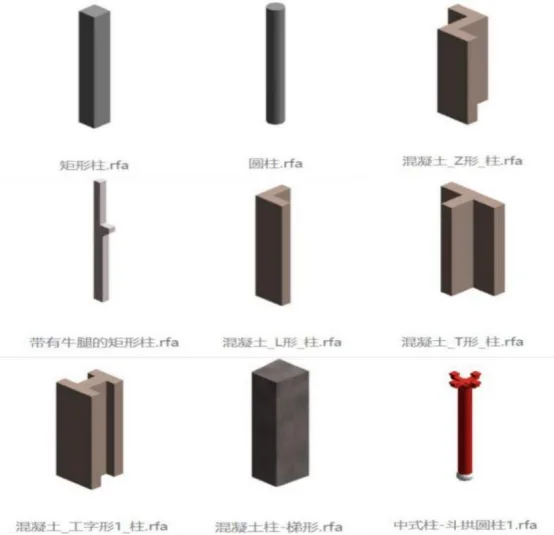
Revit models are composed of numerous family components. Besides offering a default family library, Revit allows users to create parameterized families tailored to their needs and add them to the library for easy reuse across projects. By adjusting parameters, a single family can generate multiple variations, providing diversity in appearance and properties. Therefore, the richness of the family library directly impacts the level of detail and refinement in the project model. The families included in the family library are illustrated in Figure 1.
















Must log in before commenting!
Sign Up