
The quality and accuracy of components play a crucial role in the progress of prefabricated construction. Utilizing BIM technology to transfer project information from the architectural design phase to the component production stage provides effective data that directly supports manufacturing. By standardizing the production of prefabricated components, a comprehensive library can be established, containing various component families needed for engineering projects, such as prefabricated exterior walls, floor slabs, beams, stairs, balcony panels, adjustment boards, and voids.
The design team uploads the 3D model to a cloud-based BIM management platform. When it comes to processing and producing components, the prefabricated component factory uses the real-time 3D model available on the platform to design molds. These molds are tailored to the factory’s equipment capabilities and help guide workers during cutting and processing.
The following image illustrates the specific process of creating a component library using the Revit platform.
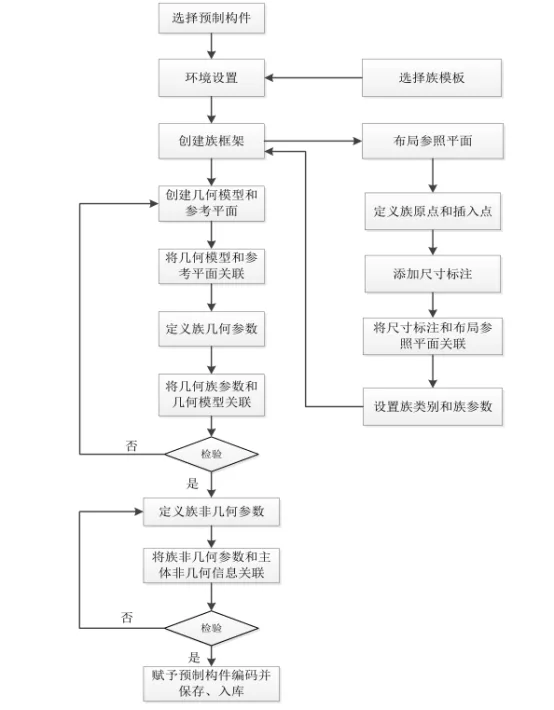
For instance, in Revit, the appropriate wall type is selected from the component library based on the structural composition and thickness. This is then placed within the model. The production factory processes and manufactures the components precisely according to the wall’s dimensions, shape, and reserved hole positions specified in the model. Accurate reservation and embedding of features like natural gas and drainage pipeline openings are critical to prevent problems such as insufficient groove depth or misalignment during installation. Additionally, some walls include a decorative outer layer beyond the structural layer. Component manufacturers require detailed information about the materials used for this decorative surface in the model to ensure accurate production.
During the preparation phase, manufacturers use the component model information to gather necessary materials and molds and plan production schedules in advance, which helps free up storage space for finished products. During production, the design unit inputs detailed component designs into the model. This data is automatically converted into a format compatible with production equipment, enabling immediate commencement of prefabricated component manufacturing.
Providing accurate and comprehensive component information guides production, enhances quality and precision, and reduces rework and project delays caused by defective or unusable parts. In the quality inspection phase, if cracks or other defects are detected, operators can report this information through the cloud BIM management platform, allowing administrators to review and implement corrective measures. A similar process is followed during component inventory management, ensuring that all production data is consistently recorded in the cloud BIM platform.
















Must log in before commenting!
Sign Up