
Problem
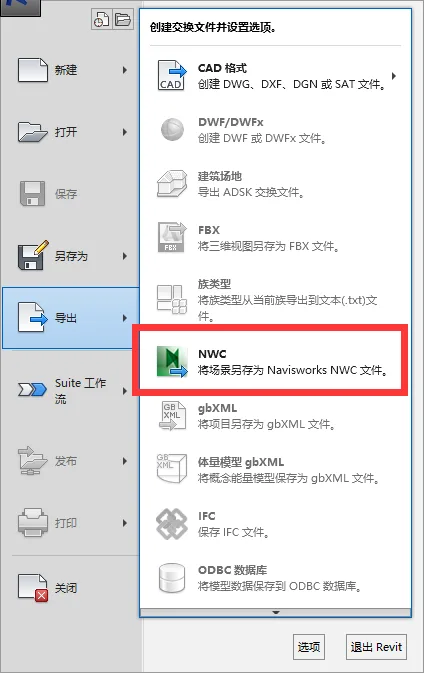
When trying to export a model from Revit to Navisworks, the ‘Export’ option (Save Scene) for NWC files is missing.
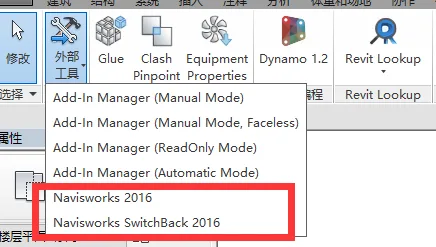
The ‘External Tools’ icon is missing from the ‘Add Ons’ tab in Revit:
Reason
The missing export utility prevents exporting Revit models to Navisworks.
This issue often occurs if Navisworks is installed before Revit, which can result in the export plugin not being selected during installation.
Version mismatches can also cause this problem. The installed Navisworks Manage version must match the Revit version.
Solution
Reinstall the export plugin, which is available for download at the end of this article.
If there is a version mismatch, install the export plugin that corresponds to your software version. The export plugin does not require activation.
To avoid this issue, always install Revit before installing Navisworks.
If the above steps do not resolve the issue:
1. Check whether both Navisworks 20xx Exporters – 64 bit and Navisworks 20xx Exporters – 32 bit are installed on your computer.
2. Uninstall the 32-bit version via the Control Panel.
3. Verify that Revit is selected during the Navisworks exporter installation:
• Open Control Panel > Programs and Features.
• Select Autodesk Navisworks 20xx Export Program – 64 bit, then choose Uninstall/Change.
• When the “Settings” dialog appears, navigate to “Add or Remove Features”.
• Ensure the Revit 20xx (64 bit) plugin checkbox is checked.
• If it is unchecked, select it and click to update the installation.
Export plugin download
















Must log in before commenting!
Sign Up