
Question:
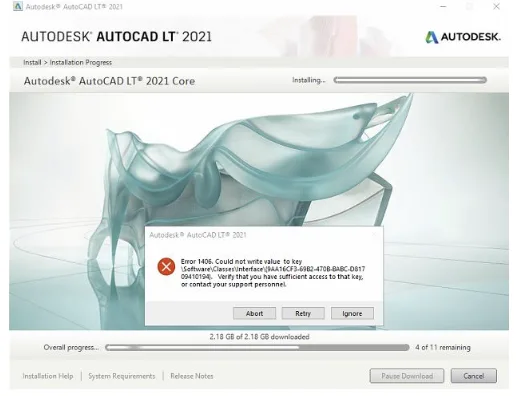
Error 1406 occurred during the installation of Autodesk software.
Error message: 1406. Unable to write value to the specified registry key.
Solution:
Typically, you can safely ignore this error by clicking ‘Ignore’ a few times to continue the installation. However, if the installation still fails, please try the following steps.
Navigate to the exact registry key location. In the example above, go to:
ComputerHKEY_LOCAL_MACHINESOFTWAREClasses
- Right-click on the “Components” key and select “Permissions”.
- Click the “Advanced” button.
- Go to the “Owner” tab.
- Under “Change owner to:”, select the “Administrators” group, then click “Apply”.
- Check the box for “Replace owner on subcontainers and objects”, then click “Apply”.
- Switch to the “Permissions” tab, check “Replace all child object permissions with inheritable permissions from this object”, and click “Apply”.
Note: The exact wording of options may vary slightly depending on your version of Windows.

xuebim
Follow the latest BIM developments in the architecture industry, explore innovative building technologies, and discover cutting-edge industry insights.
← Scan with WeChat















Must log in before commenting!
Sign Up