
Question:
You tried to deploy Autodesk software following the online instructions for creating Autodesk software deployments, but the extraction failed. The DDA.log file located in %localappdata%AutodeskODIS shows the following output:
2020-04-03T15:09:12.695 [DDA: 25240, single] [Installer DEBUG] [Autodesk::DDA::DeploymentHandler::Init] DeploymentHandler::Init
2020-04-03T15:09:12.719 [DDA: 25240, single] [Installer ERROR] [Expand] [Expand::ValidateSchema] Schema validation failed!
2020-04-03T15:09:12.719 [DDA: 25240, single] [Installer ERROR] [Autodesk::DDA::DeploymentHandler::DeploymentHandlerImpl::Init] Unable to load deployment: c:autodeskautodesk_maya_2020_1_ml_windows_64bit_dlmmanifestmaya-gen.xml
2020-04-03T15:09:12.719 [DDA: 25240, single] [Installer ERROR] [Autodesk::DDA::CoreApp::CoreAppImpl::Init] DeploymentHandler Init
2020-04-03T15:09:12.920 [DDA: 25240, single] [Installer INFO] [wmain] installer exit. Exit code: 553
Reason:
The XML file used for extraction is invalid. One common cause is that the UPI2 code was unintentionally modified, making it invalid:

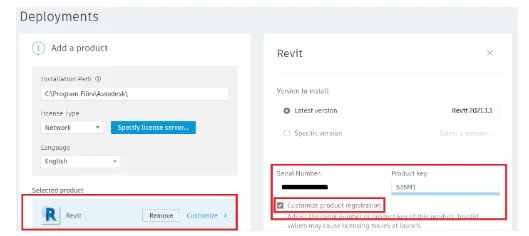
During the creation of the online deployment, the serial number and product key values were left empty.
Additionally, special characters located in the extraction path can cause issues.
Solution:
- Verify your deployment XML file and confirm that only the changes recommended in the manual for creating a Maya 2020 network deployment (and similar Autodesk products) have been made.
- Make sure to provide the serial number and product key when creating the online deployment. For example:
- Ensure the extraction path does not contain spaces or special characters such as
!,@,#,$, etc. Use a simple, clean folder path.
















Must log in before commenting!
Sign Up