
Question:
How can I completely uninstall Autodesk programs on a Mac?
Solution:
AutoCAD or AutoCAD LT
To uninstall AutoCAD or AutoCAD LT, please use the dedicated Remove AutoCAD20xx application provided for the version you have installed.
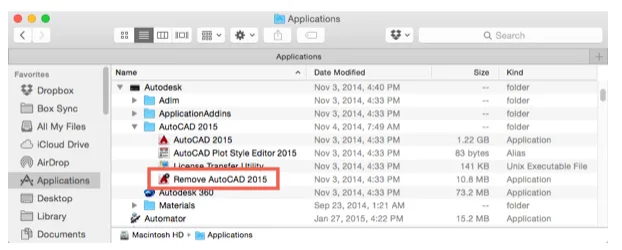
Multiple Products
If you have several Autodesk products installed, the following process will remove all of them.
If you need to follow these steps, first uninstall all Autodesk programs by right-clicking each application and selecting Move to Trash.
Other Autodesk Programs
For uninstalling versions 2020 or later, you must first stop the Autodesk licensing service:
- Open the Terminal application.
- Enter the following command to stop the licensing service:
launchctl unload /Library/LaunchDaemons/com.autodesk.AdskLicensingService.plist
Next, use the following terminal commands to delete any remaining files and folders after uninstalling the product:
Warning: Use the rm -rf command with great caution. It permanently deletes files and cannot be undone.
sudo rm -rf /Users/<Username>/Library/Application Support/Autodesk*(Removes Autodesk background services files)sudo rm -rf /Users/<Username>/Library/Logs/Autodesk*(Deletes Autodesk service log files)sudo rm -rf /Library/LaunchDaemons/com.autodesk.*(Removes Autodesk background programs)sudo rm -rf /Library/Application Support/Autodesk*(Deletes Autodesk application data)sudo rm -rf /Applications/Autodesk(Removes Autodesk program shortcuts)sudo pkgutil --pkgs | grep iautodesk | xargs -n1 pkgutil --forget(Removes residual Autodesk product packages)
Note: If the above command fails, you may need to enable the macOS root user and run the command as root:
- Enable the macOS root user.
- Open Terminal and type
su. - Enter the root password (characters will not be displayed).
- Run the command:
pkgutil --pkgs | grep iautodesk | xargs -n1 pkgutil --forget - Type
exitto leave the root user session.
















Must log in before commenting!
Sign Up