
The tool prompt window opens, but the video does not play as expected.
Issue:
Is it possible to run ToolClips in the tooltip on a system without a media player installed? This issue occurs when trying to watch a short video clip. ToolClips are MP4 video files, which require a media player installed on the operating system to play.
Solution:
Install a media player capable of playing MP4 files, and set it as the default player for MP4 videos on your operating system.
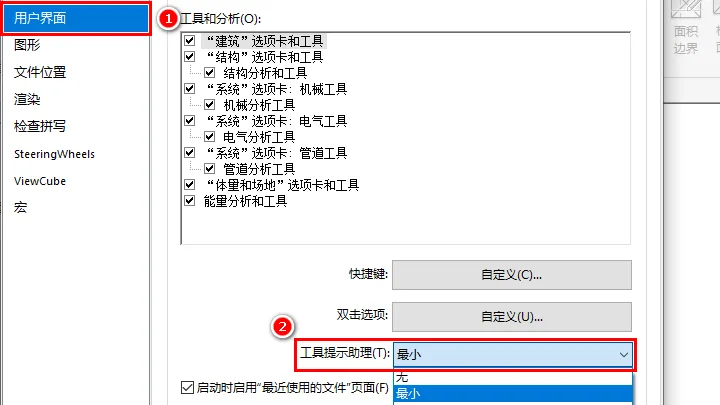
If you want to prevent ToolClips from displaying in the future, you can configure the ‘Tooltip Assistant’ to ‘Minimum’ as follows:
1. Click on the File tab to open options.
2. Under the User Interface tab, set the Tooltip Assistant option to Minimum.
This setting causes the software to show only a brief description of the tool, suppressing additional information such as images and ToolClips. Note that tooltips within the canvas will still display normally.
















Must log in before commenting!
Sign Up