
Each component of the building is parameterized to simulate a realistic scene and displayed within Revit software. This platform supports modeling in civil and installation engineering by integrating the functionalities of Revit Architecture, Revit Structure, and Revit MEP. Each of these three software modules serves a distinct professional modeling purpose: Revit Architecture focuses on architectural design, Revit Structure handles structural modeling, and Revit MEP is dedicated to mechanical, electrical, and plumbing systems. Together, they form a comprehensive BIM model file. The Revit platform acts as a centralized database containing all model entities and parameter information, functioning as an integrated digital repository.
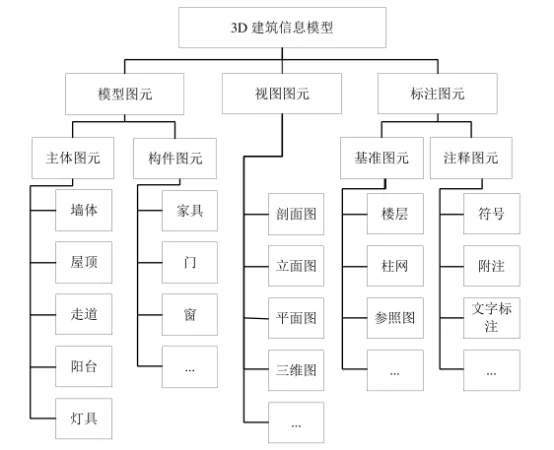
Revit Model Data Structure
The modeling elements in Autodesk Revit software are primarily divided into three categories: model elements, view elements, and annotation elements. Model elements form the foundation of BIM 3D models and are further classified into main elements and component elements based on their hierarchical importance. Main elements include solid structures such as walls, ramps, balconies, and bathrooms, while component elements cover secondary constructions like lights, windows, doors, stoves, and washing machines.
Revit represents the geometric and physical properties of these building components through detailed model element data, serving as the core working objects for all project participants. To facilitate modeling, Revit offers various operating interfaces, including section views, elevation views, plan views, and 3D views—these constitute the software’s main view elements. Annotation elements are divided into numerical and textual types, with benchmark elements such as floors, column grids, and reference drawings forming a key part of the annotation system. Additional annotation elements include symbols, text notes, and other markings.
The BIM 3D model created with Revit acts as an extensive database, storing diverse project data such as geometric dimensions (length, width, height) and physical properties (density, weight, thermal expansion coefficient, conductivity, specific heat capacity). As a large-scale data integration platform, Revit excels in consolidating all project information into a logically structured and reliable data exchange entity. Model elements take a leading role in the information model, directly corresponding to the physical entities within the engineering project.
Entity models are described through two main data types: basic data and extended data. Basic data covers invariant information like geometric dimensions, functional characteristics, and physical properties that do not change over time or due to external conditions. Extended data includes technical specifications and economic information related to the model. Although extended data can be extensive, BIM 3D models typically contain less of it due to its broad scope.
Author: Guo Guofeng, Guilin University of Electronic Science and Technology
For educational and communication purposes only. Copyright belongs to the original author.
















Must log in before commenting!
Sign Up