
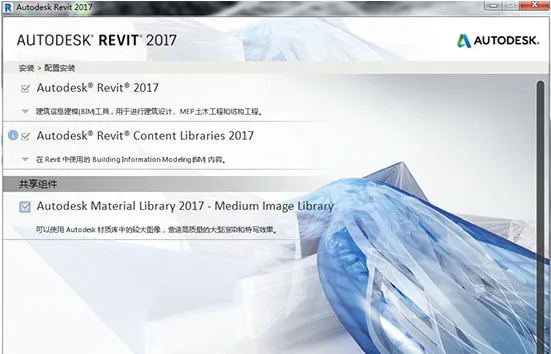
Revit® is architectural design software specifically developed for Building Information Modeling (BIM). It includes features for architectural design, MEP (mechanical, electrical, and plumbing), structural engineering, and construction. The Revit 2017 license is available only as part of the Building Design Suite Premium and Ultimate editions.
Developed by Autodesk, the Revit software series is tailored to support BIM processes. It helps architects design, construct, and maintain buildings with improved quality and enhanced energy efficiency. Revit is one of the most widely used BIM software tools in China’s construction industry.
Revit 2017 has been officially released! Users interested in this version can download it now.
Installation Tutorial:
1. Run the Revit 2017 installation package and select a decompression directory. The directory path should not contain any Chinese characters. The decompression requires approximately 5.77GB of free space.
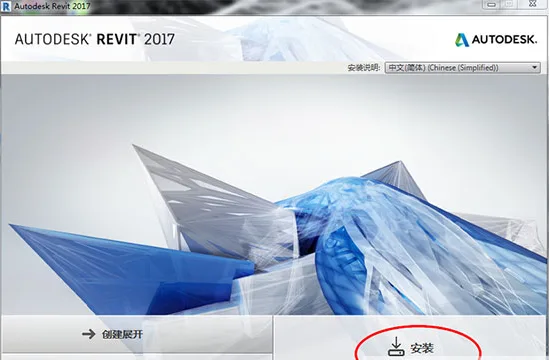
2. Once decompression is complete, the installation interface will launch automatically. The default language is Chinese. Click “Install” to proceed.
3. Agree to the user license agreement by selecting “I agree,” then click “Next.”
4. Choose the desired installation features and specify the installation directory, then click “Install.”
5. Wait for the installation process to finish.
6. Launch Revit 2017 from the desktop shortcut and select “Enter Serial Number.”
7. Click “Activate.”
8. Enter the serial number: 666-66996969 and the product key: 829I1.
9. Open the “Revit 2017” keygen (registry patch) as an administrator and click on “Patch.”
10. Copy the “Application Code” from Revit into the keygen’s first input field, then click “Generate” to create an activation code.
11. Select “I have an activation code from Autodesk,” paste the generated activation code into the application, and click “Next.”
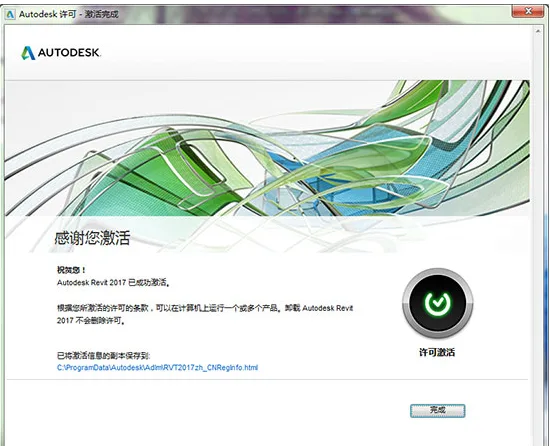
12. Revit 2017 is now fully installed. You can start exploring its features right away!















Is the download missing?
Hello, the download link has been updated.
Which of the three installation packages should I install? There’s no installation tutorial either
All three need to be downloaded, this one is compressed into volumes.
Revit2017 official version download (building structure plumbing, electrical, MEP three in one version) includes complete family library, installation tutorial, BIM training video tutorial “cannot be downloaded
The download link has been updated.
Teacher, the product key 829l1 is not working
Serial number “666-6696969”, key “829I1”
Teacher, after downloading and installing, there is no family library available
The download address for the 2016 offline version of the family library is: __AI_ST_URL_0__
Why didn’t the installation box automatically pop up after decompression?
If the installation box does not automatically pop up, go to C: Autodesk, find the decompressed file, and double-click to install.
After opening BIM, he said how to fix it if I haven’t loaded the xx family
It should be a missing family library. You can download an offline family library and place it in the corresponding location
Installation completed, how can I use MEP?
MEP is included by default
I am disconnected from the internet and can only enter the serial number 066-0666666. After zero, there are only seven 6s, and the eighth 6s cannot be entered. What’s going on?
Change the serial number to 666-66996969
Hello, do you have a 32-bit system??
Does Revit2017 not have a 32-bit version? Please download the 2013 version for 32-bit
Serial number “066-06666666”, entering the key “829I1” shows invalid?
Activate in a disconnected state, activate in a disconnected state, activate in a disconnected state, and say important things three times.
Where is this registration code
The download contains registration, and the description includes installation tutorials.
Hello teacher, I only installed 16 programs and failed to activate them multiple times. What’s going on
If it has already been installed before, some will be skipped and those that have already been installed successfully.
I entered the serial number “066-06666666” and the keys “829I1” and “666-69696969”. The key “829I1” did not activate successfully. What should I do
Network disconnection installation
Excuse me, teacher, does this software not support XP system?
The 2017 version is not supported, please download the 2013 version.
Cutting off the network key is also incorrect
After decompression, it always prompts that the installation needs to restart the system. Even after restarting, a restart system window still pops up. What is the reason for this?
Enter the Windows Task Manager, then end the relevant processes of Autodesk, and then install.
The relevant Autodesk processes were not opened, and during installation, the network, firewall, security guards, and applications were all closed, but the above situation still occurred
Hello, how can I solve the problem I raised last time~~~
Has the registry been cleaned up? Suggest searching for Revit related content in the registry to delete it.
Why is it all in English within the clan? How can we solve it!!!!!! Thank you
It does not affect usage. If you want to use it in Chinese, you can download the Chinese family library and copy it into it. The download address for the 2016 family library is __AI_ST_URL_0__
Hello! After installing Revit2017, the four templates below the project are missing. Using the shortcut key ctrl+N, only ‘none’ is displayed. How to solve this problem!
There was a problem during the installation process, the template file is missing. Just copy it in and it will work
Installation activation successful
May I ask why there are icons and transitions displayed when I open it, but the program doesn’t respond whether I click to enter the serial number or try it out? How can I solve this problem?
Suggest attempting to operate after disconnecting from the internet.
May I ask if it’s not possible to install multiple versions at the same time? I originally had a 2013 version on my computer, and I was able to completely disconnect from the internet during installation
Multiple versions can coexist.
Blogger, I used to install and then uninstall, but now while installing, I find that Revit Content Libraries have already been installed. How do I uninstall them?
Hello, go to the Control Panel – Programs (Uninstall Programs), find the software you want to uninstall, and double-click to uninstall it directly.
What should I do if I cannot access the activation page when clicking on the shortcut after installation is complete?
If you directly enter the software user interface, it means that you have successfully activated it before and can use it directly. If you are applying for an activation code interface, please disconnect from the internet and restart the software to enter the activation page
Hello, the key activation code is not working
Please disconnect from the internet first, then reopen the software and activate it.
How to solve the installation failure prompt? Thank you!
The software installation package location should not contain Chinese, and make sure that the installed version is a version supported by your computer system.
There are a total of 19 products, but the installation always gets stuck at 17, leaving 16 remaining. What’s the reason?
This situation is usually due to network reasons (downloading while connected to the internet), and you can try installing and resolving it while the network is disconnected.
The internet connection works! The installation has been completed, thank you! Thank you. Perfect operation, enjoy~
Can the Windows 10 system be installed
Can be installed, Rebit2017 supports Win10 system.
How to decompress two installation packages
Just run one of them, and the other will run automatically
What is the password for online storage…
The download page is displayed, just copy and paste it.
There’s no serial number
Please use serial number: 666-66996969 Key: 829I1
May I ask what to do if the Revit.exe dialog box pops up after installation and activation, and then the software cannot be opened
Revit cannot be opened. Solution: Check if the computer graphics card supports 3D acceleration. If it does, then delete the license file and reactivate it. Step 1: The license localization authorization program data file is located in C: ProgramData FLEXnet. Find a file similar to adskflex_ ********* _tsf.data and delete it.Step 2 (to be executed only when Step 1 expires): The license certificate file is located in C: ProgramData Autodesk Adlm and the corresponding C: ProgramData Autodesk Adlm ASR files, where each product in the ASR folder has four subfiles.
Is it 32-bit or 64 bit. Please provide some information, thank you
64 bit, this version does not have 32-bit
I haven’t found where the clan is, but the software is still very useful
Not bad, not bad, very good!!!