
BIM Q&A | How to Draw This Floor Plan in AutoCAD 2019?
How can you measure and draw the curved arc shown in the picture?

To determine if the curve is a circular arc, you simply need to measure it.
Use several equal-length strings to measure the height of the bow (the arc’s rise). If these measurements are consistent, the curve is a circular arc.
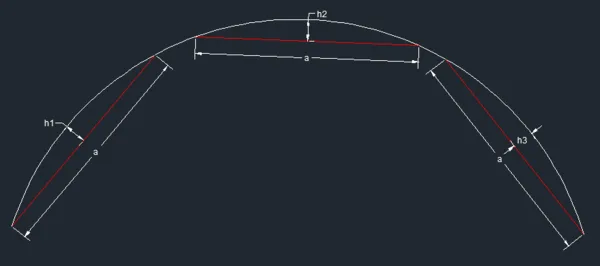
If the heights h1, h2, and h3 are equal, then the curve is confirmed as a circular arc.

xuebim
Follow the latest BIM developments in the architecture industry, explore innovative building technologies, and discover cutting-edge industry insights.
← Scan with WeChat















Must log in before commenting!
Sign Up