
BIM Q&A | Beams Disappear When Deleted and Redrawn in Revit Drawings
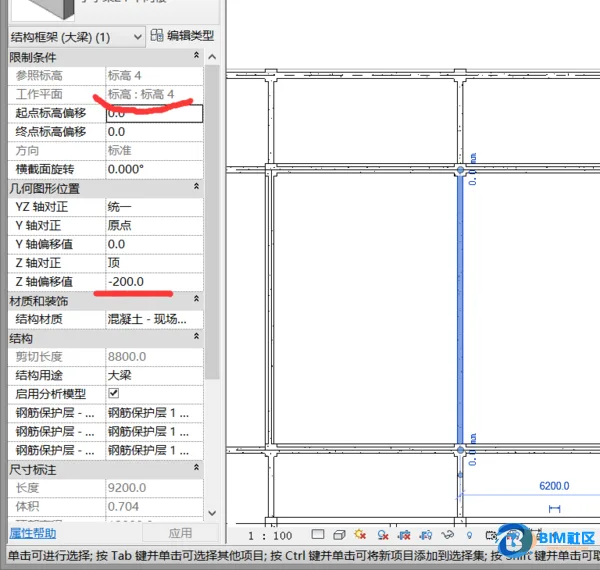
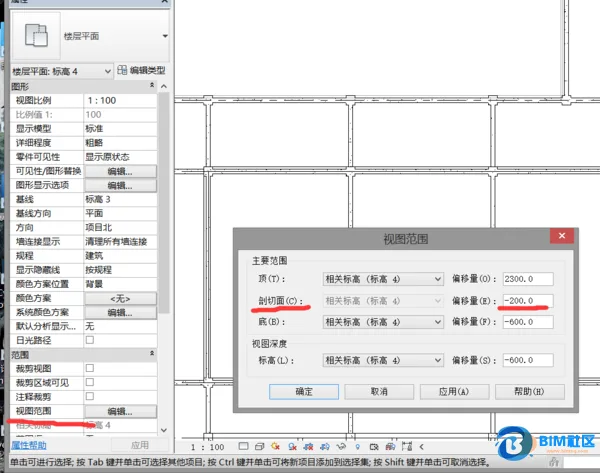
To resolve the issue, select the elevation view and open the View Range settings in the floor plan properties. Adjust the view depth and bottom parameters to a level below the beam so the beam becomes visible. Note that at this stage, the beam is not editable.
Next, modify the section box or section plane to cut through the beam. This will allow you to edit all beams within the plan view effectively.

xuebim
Follow the latest BIM developments in the architecture industry, explore innovative building technologies, and discover cutting-edge industry insights.
← Scan with WeChat















Must log in before commenting!
Sign Up