
BIM Q&A | How to Create Mass in Revit 2017
1. Launch the Revit software. In the upper right corner, you’ll find various modules such as Architecture, Structure, Systems, Insert, Annotate, Analyze, Massing & Site.

2. Click on the Massing & Site module. This will reveal options including In-Place Mass, Component Mass, Curtain Wall, Roof, Wall, Floor, and more.
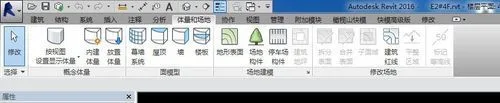
3. Choose the In-Place Mass option to begin constructing your volume.
This tutorial is kindly provided by the BIM professional instructors at Silk Road Education. We hope you find it helpful.

xuebim
Follow the latest BIM developments in the architecture industry, explore innovative building technologies, and discover cutting-edge industry insights.
← Scan with WeChat















Must log in before commenting!
Sign Up