
BIM Q&A | Revit North Elevation Cannot Be Colored
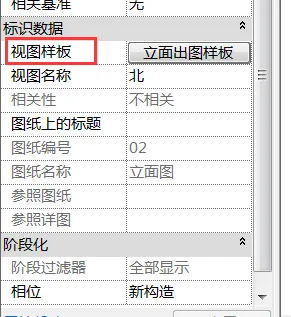
First, verify if the view style in the View Control Bar is set to shading mode. Sometimes, after applying a view template, users cannot adjust this setting directly. In such cases, try setting the view template to None to regain control over the shading.
If the elevation still does not display any color, check the materials assigned to the elements to ensure they support color display in shading mode.


xuebim
Follow the latest BIM developments in the architecture industry, explore innovative building technologies, and discover cutting-edge industry insights.
← Scan with WeChat















Must log in before commenting!
Sign Up