
BIM Q&A | In REVIT, a Question Mark Appears at the End of a Newly Created Tag Symbol Based on an Existing One
As shown in the image below, notice the question mark at the end of the first line. How can you remove it?
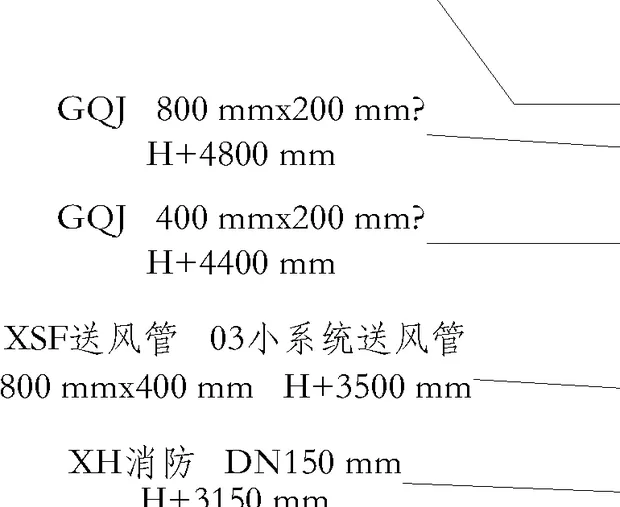
Follow these steps to remove the question mark:
1. The question mark is part of the font. Click to select it, then right-click and choose “Properties” to open the properties panel, or press Ctrl+1 to open it directly.
2. In the properties panel, focus on three key pieces of information: the “Text” at the top, and the “1526” value next to “Layer”. Press ESC once to deselect the text.
3. Type q in the command bar, select qslice, and press Enter. Alternatively, you can access this via Tools > Quick Select.
4. In the Quick Select dialog, filter by the three key criteria you identified: set Object Type to Text, choose the Layer property, and select the value 1526. Then click OK.
5. This will select all text objects on that layer. In the properties dialog, click the dropdown arrow next to Style.
6. Choose the custom text style “Rebar Symbol” that you created earlier. You will notice the question mark disappears. Click outside the selection or press ESC to exit.
7. This method effectively removes the question marks. However, if the question mark persists, it might be caused by a special font that the new text style cannot read, resulting in question marks still displaying. Also, if there are many layers with question marks, this approach may not be very efficient.
















Must log in before commenting!
Sign Up