
BIM Q&A | Lumion 8 Advanced Operating Configuration
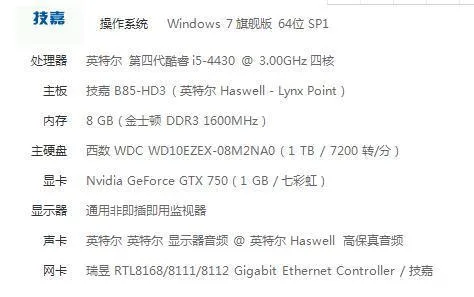 Can I run Lumion 8 if I upgrade my memory to 16GB and use a GTX 1070 Ti with 8GB VRAM? This setup should be capable of handling community planning projects covering tens of thousands of square meters, as well as other smaller design models.
Dear user, your memory and graphics card are sufficient, but your CPU may be a limiting factor.
It is generally recommended to have a CPU with a high clock speed, ideally 4.0 GHz or higher. Lower clock speeds can bottleneck powerful graphics cards like the Nvidia GTX 1080 or Nvidia Titan X (Pascal).
Having more than four CPU cores will not significantly improve performance in this context.
CPUs such as the Intel i7-4790K, i7-6700K, or i7-7700K, all running at 4.0+ GHz, are good choices.
We do not recommend using Xeon CPUs with clock speeds below 3.4 GHz for this purpose.
Please consider these recommendations when configuring your system.
















Must log in before commenting!
Sign Up