
BIM Q&A | Why Does My Computer Freeze When Working on Revit Projects with This Configuration?
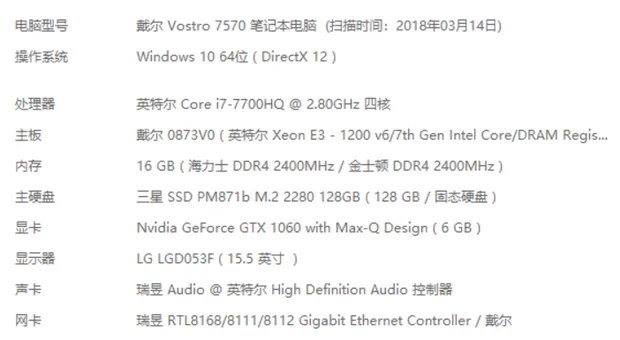
Computer lag during Revit projects is often caused by several factors, including excessive driver loads, numerous startup items, software conflicts, and system issues.
Here are some recommended steps to improve performance:
- Download and install drivers directly from the official manufacturer’s website to avoid incompatibilities caused by third-party updates.
- Go to Control Panel > Programs > Uninstall, and check for unnecessary or duplicate software. If you have multiple antivirus or system optimization programs installed, uninstall all but one.
- Disable unnecessary startup programs to free up resources. Open Start > Run > type
MSConfig, then uncheck unimportant startup items or third-party applications. - Use a clean, official system installation rather than modified “Ghost” versions, as pure systems tend to offer better compatibility and stability.

xuebim
Follow the latest BIM developments in the architecture industry, explore innovative building technologies, and discover cutting-edge industry insights.
← Scan with WeChat















Must log in before commenting!
Sign Up