
BIM Q&A | How to Fix a Revit Download Missing Project File Templates
When I first clicked “Browse,” nothing appeared. I was confused as a beginner and asked for help.
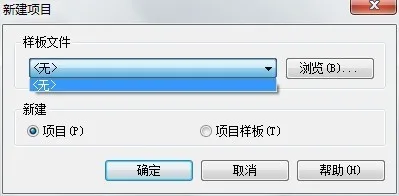
Where can I find the default locations for Revit’s system family libraries and project templates?
When installing Revit, you might encounter issues where family libraries, family templates, or project templates fail to install properly. In these cases, you need to manually place these files in the correct folders. So, where are the default locations?
Family Library: C:ProgramDataAutodeskRVT 2016Libraries
Project Template: C:ProgramDataAutodeskRVT 2016Family TemplatesChinese
Note: The ProgramData folder is hidden by default. You must enable viewing hidden files in your folder options to access it.
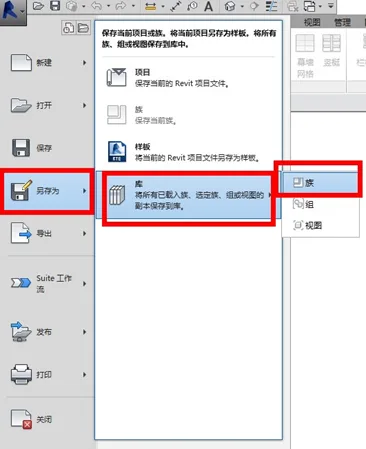
Below is the method for exporting families from a Revit project all at once, as shown in the image:
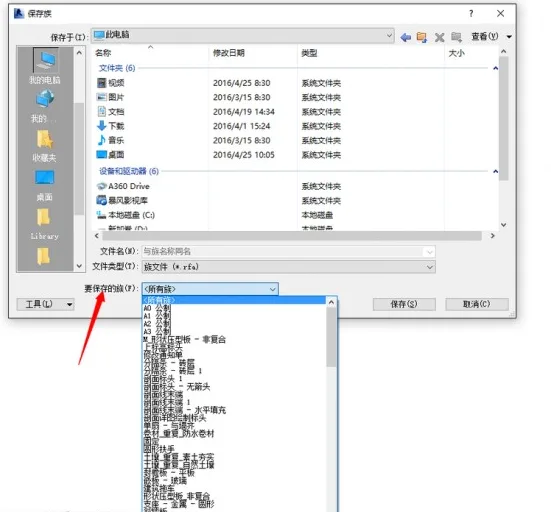
2. In the “Save Family” dialog that appears, choose the family you want to save from the “Family to Save” dropdown at the bottom, as shown below:
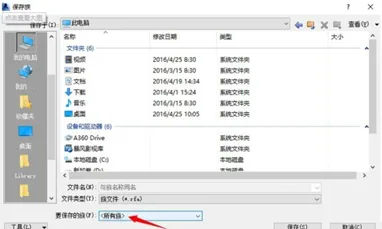
3. Under “Families to Save,” you can select “All Families” to export every family in the project at once, as shown here:
Recommendation: Although this method of saving and loading families works, it can be prone to data loss and is difficult to manage.
At our BIM center, many colleagues prefer to download third-party plugins specifically designed for managing family libraries. Large companies often invest in tools like Family Cube and Family Go, or use free component dock plugins that effectively handle family library management. One-click project loading is common among users, and since these plugins are free, they are widely adopted.
















Must log in before commenting!
Sign Up