BIM World
A Professional BIM Learning Platform


BIM Q&A | How to Prevent Link Binding Errors and Warnings in Revit Modeling

BIM Q&A | Revit Errors When Binding Links: How to Prevent Errors and Warnings During Modeling
When binding links in Revit, a dialog box appears with several binding options, including attached details, elevation, and grid, as shown in Figure 1.BIM Q&A | Revit encounters errors and cannot bind links. How to avoid Revit errors and warnings when modeling?
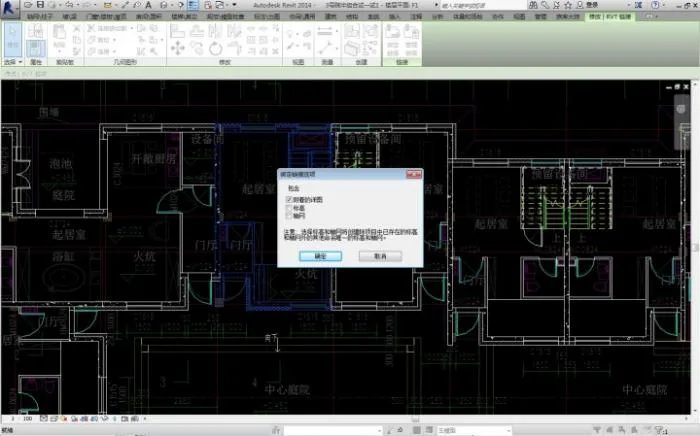
Initially, the attached detailed drawing option was selected. However, after a lengthy loading process, the binding failed, as illustrated in Figure 2.BIM Q&A | Revit encounters errors and cannot bind links. How to avoid Revit errors and warnings when modeling?
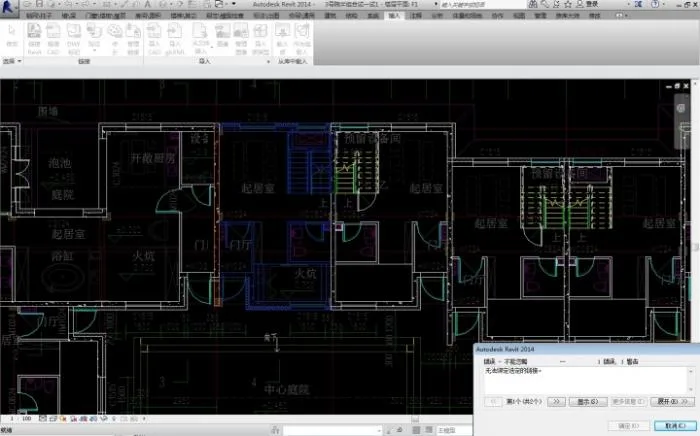
The error message indicated a problem with one wall. Despite thorough checks and modifications, no issues were found with that wall. The message also displayed an incorrect location ID, which was unclear in meaning, as shown below.BIM Q&A | Revit encounters errors and cannot bind links. How to avoid Revit errors and warnings when modeling?
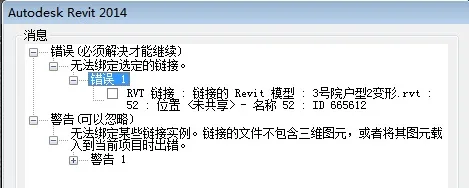
Eventually, the user tried unchecking the detailed drawing option, and the link was successfully bound. What caused this issue? Seeking expert advice! Additionally, how can similar errors be avoided during Revit checks throughout the modeling process?



xuebim
Follow the latest BIM developments in the architecture industry, explore innovative building technologies, and discover cutting-edge industry insights.
← Scan with WeChat
Like(0) 打赏
BIM WORLD » BIM Q&A | How to Prevent Link Binding Errors and Warnings in Revit Modeling

Comment Get first!

Must log in before commenting!


BIM World, A Professional BIM Learning Platform

Stay updated on the latest architecture trends and share new building technologies.

Contact UsAbout Us

觉得文章有用就打赏一下小编吧

非常感谢你的打赏,我们将继续提供更多优质内容,让我们一起创建更加美好的网络世界!

支付宝扫一扫

微信扫一扫

Account Login

By signing in, you agree toUser Agreement

Sign Up












